Maxi
Member
- Messages
- 184
- Reaction score
- 126
AdvancedFlightComputer adds maneuver planning, burn execution and closed-loop guidance to KSA: quick-tools for common orbital maneuvers, flyby targeting that aims a transfer at a chosen periapsis instead of the body center, multi-pass burn splitting for Oberth-efficient departures, RCS-only burn execution, automatic staging, automatic removal of finished burns, powered guidance for ascent, boostback and landing, and support for targeting interstellar comets on hyperbolic orbits.
Features
Maneuver Quick-Tools
New plan types in the stock Transfer Planner dropdown:
Flyby Targeting
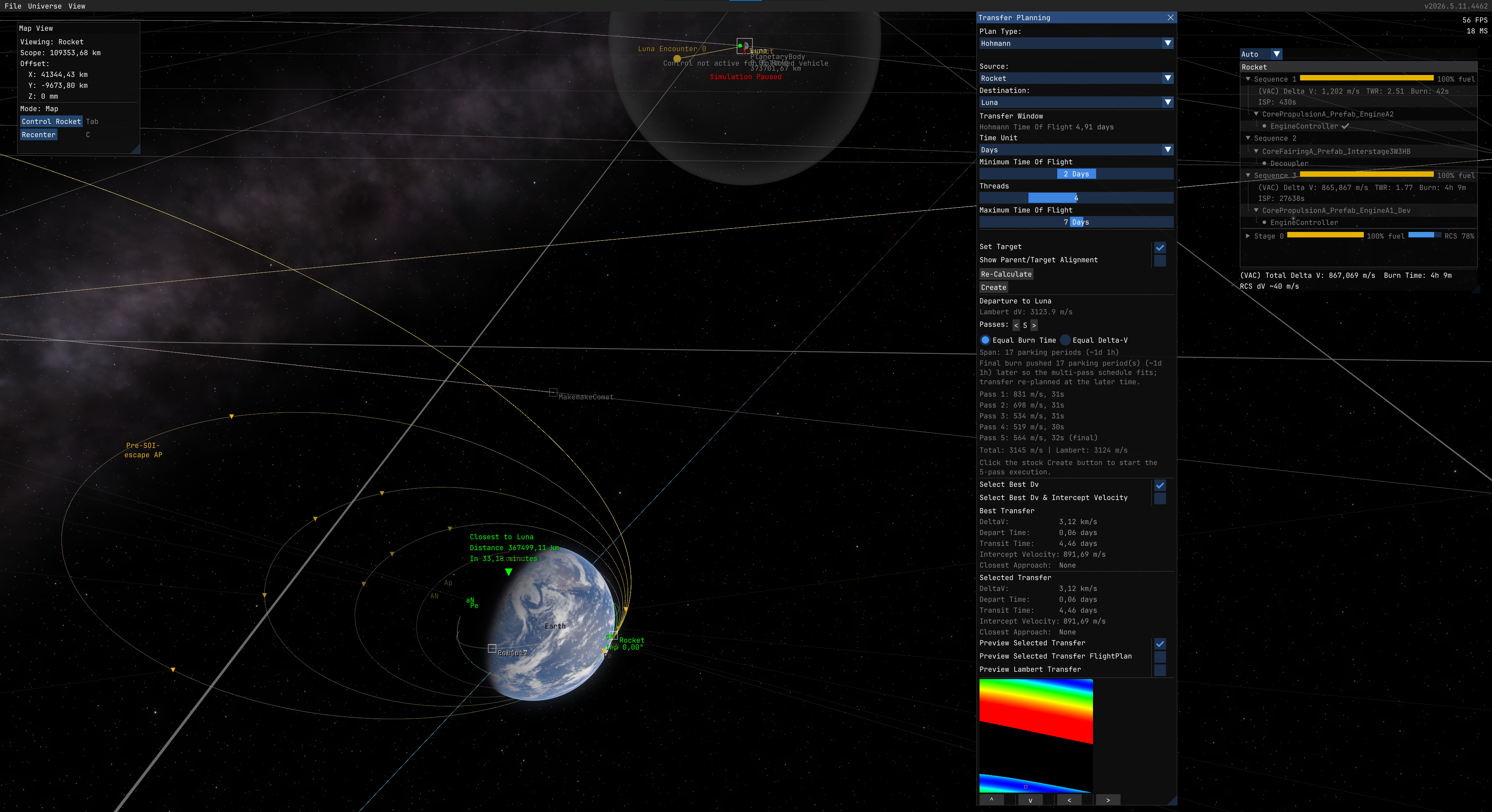
The stock planner aims every transfer at the target body's center, so a well-timed Hohmann arrives as an impact and the flyby has to be set up afterwards as a separate correction. Tick Target flyby periapsis in the Transfer Planning window and the departure burn is aimed at a periapsis you choose instead, so Create fires the flyby directly.
Limitation: the plan is impulsive, the burn is not. On a near-escape departure the periapsis actually flown drifts from the requested one by roughly the finite-burn loss. Trim it with a small correction burn, or split the departure across several passes to cut the loss.
Multi-Pass Burns
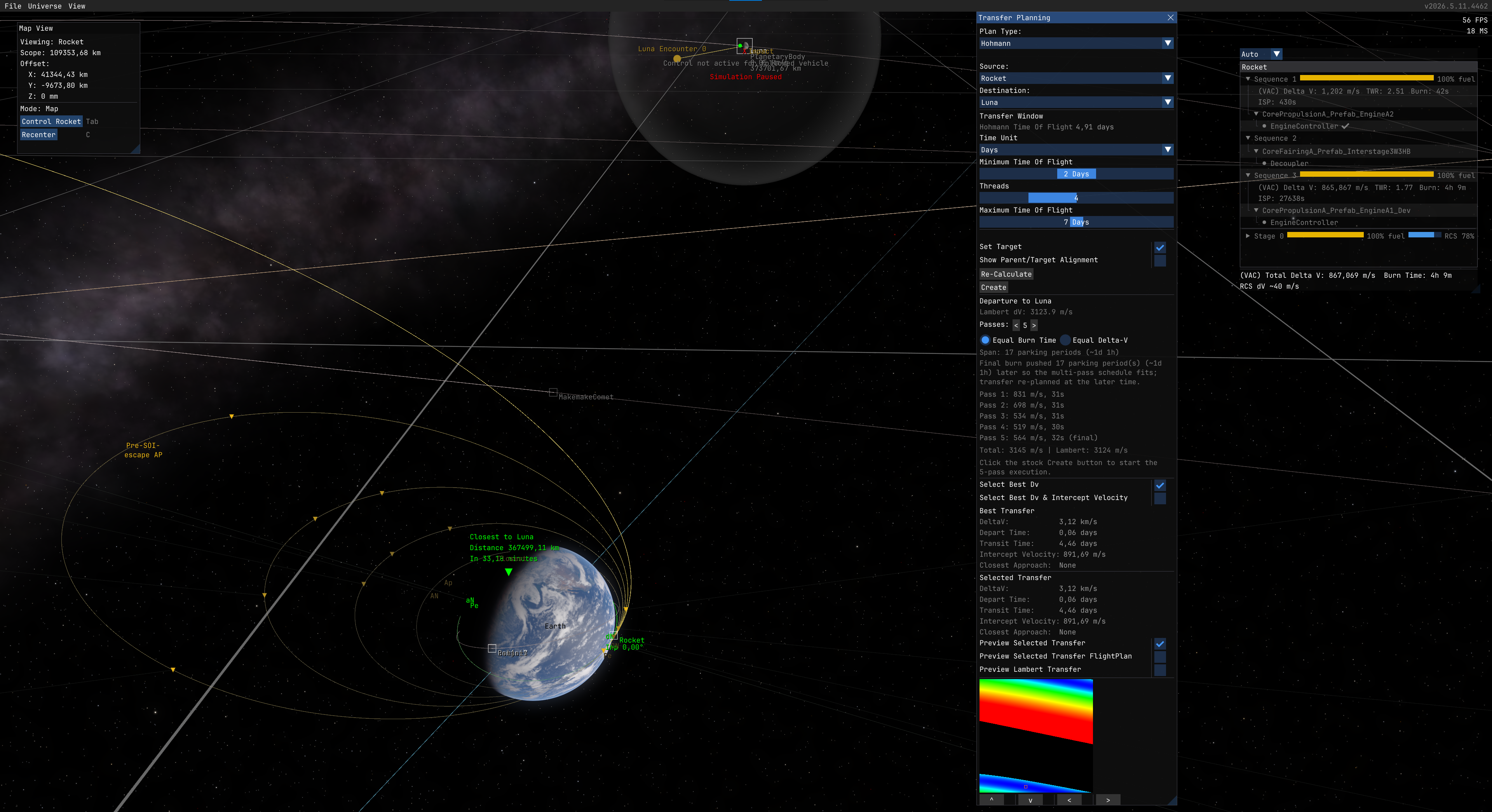
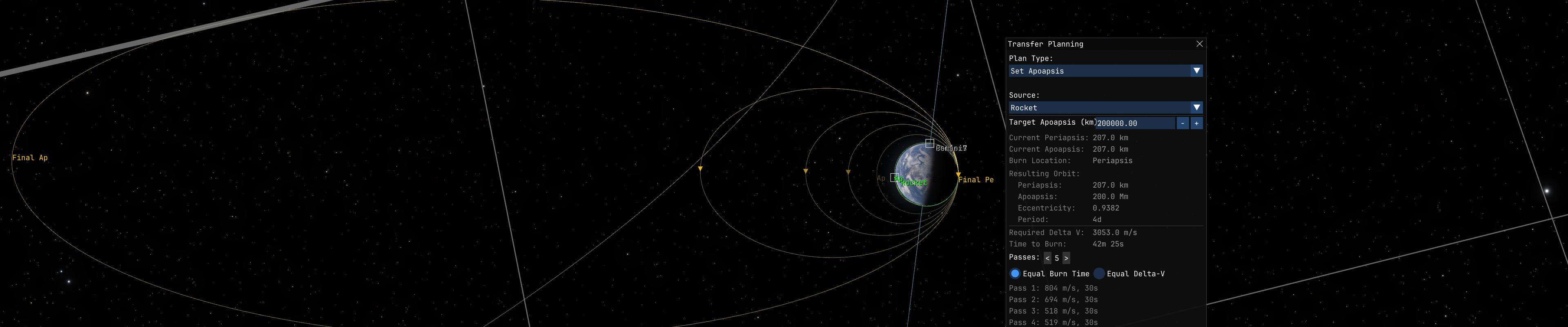
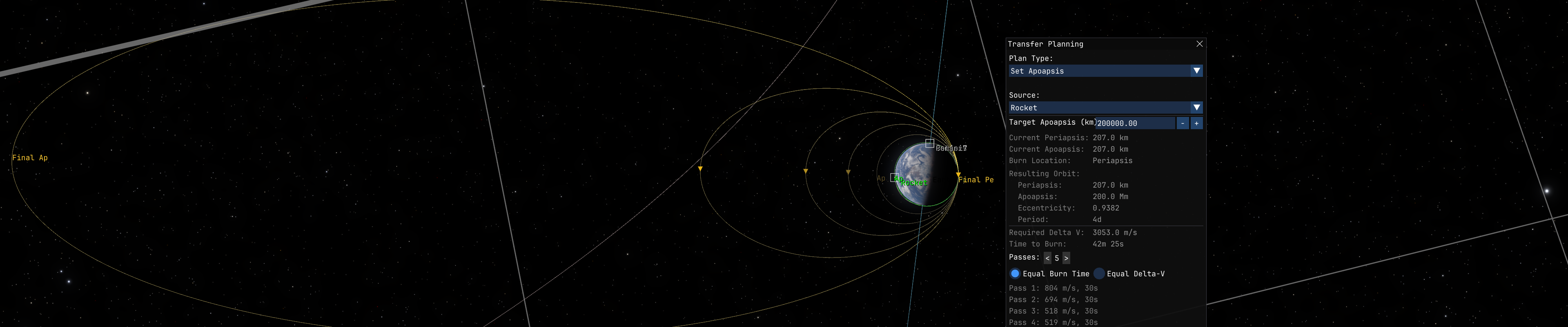
Split any planned burn into multiple passes across successive orbits to reduce finite-burn loss. Instead of one long burn that sweeps a large arc away from periapsis, the engine fires in shorter bursts near periapsis on each orbit, the same technique real lunar kick stages use with several perigee burns before the final injection.
Supports Hohmann departures, apse burns (Set Pe/Ap), inclination changes, and circularize. Includes a 3D orbit preview with per-pass markers, automatic execution via Auto burn mode, and an inline pass list showing remaining dV and burn time. Particularly useful for low-TWR spacecraft (ion engines, small kick stages, nuclear tugs). With automatic staging on and automatic burn removal left on, a multi-pass execution runs hands-free from first ignition to final departure.
RCS Translation Burns
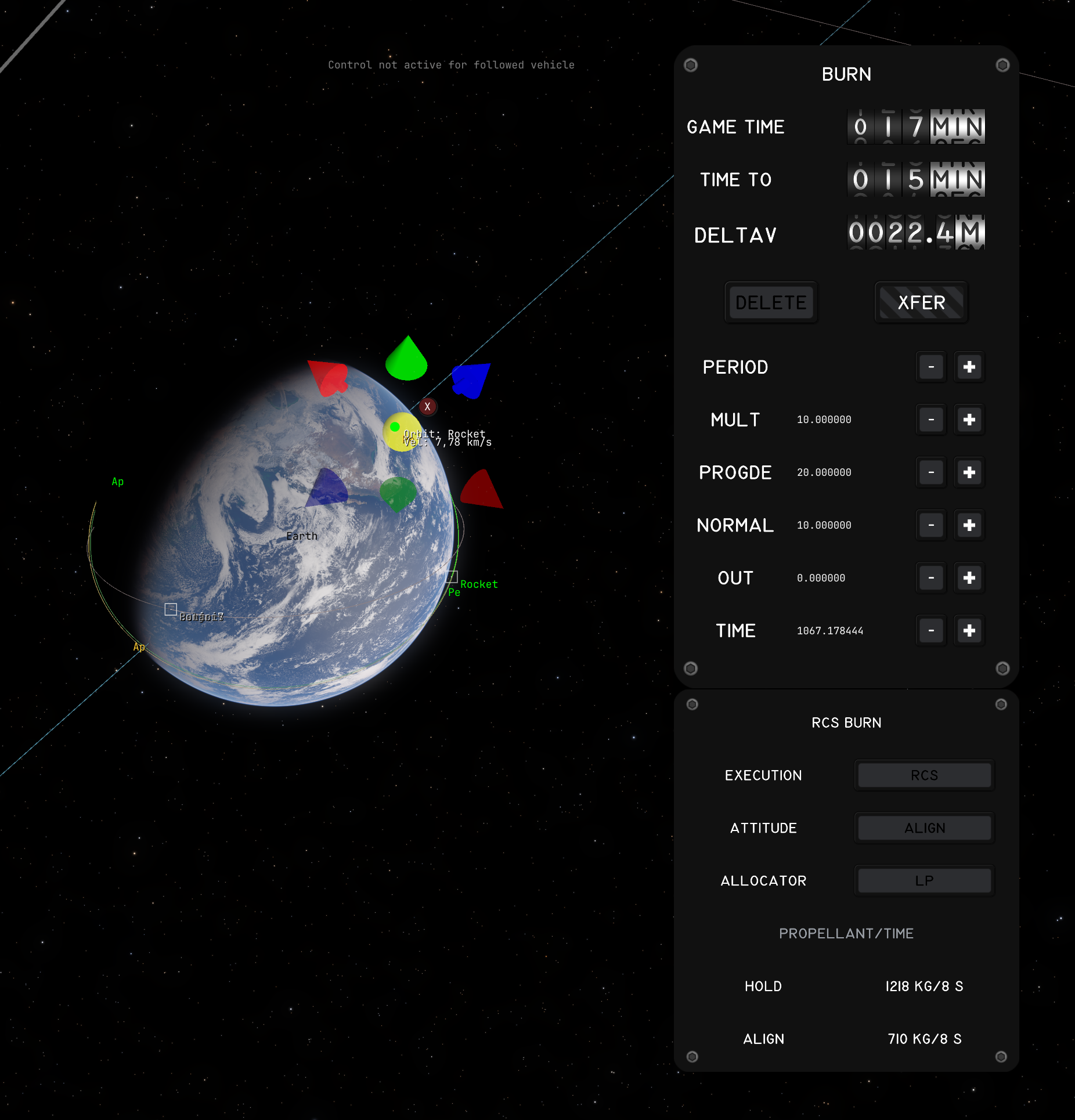
Execute a planned burn on RCS thrusters alone, no main engine. Useful for small corrections, where rotating the whole vehicle for the main engine can cost more than translating, and for vehicles with no active main engine like small probes.
The stock Auto burn button stays the trigger: a burn runs on the engine when an active fueled one exists, otherwise on RCS. Per-burn options sit below the burn editor: Execution, Attitude and Allocator. Two attitude strategies: Hold keeps the current attitude and fires the axis mix that points at the burn vector, Align first rotates the strongest thruster axis onto it, and Auto picks the cheaper one including the slew. Execution is closed-loop against the game's own delta-V accounting. Burns stay in the stock save format, and RCS arming survives save/load including mid-burn. An optional LP allocator solves the fuel-optimal jet-select problem over the individual thrusters and stays opt-in.
Automatic Staging
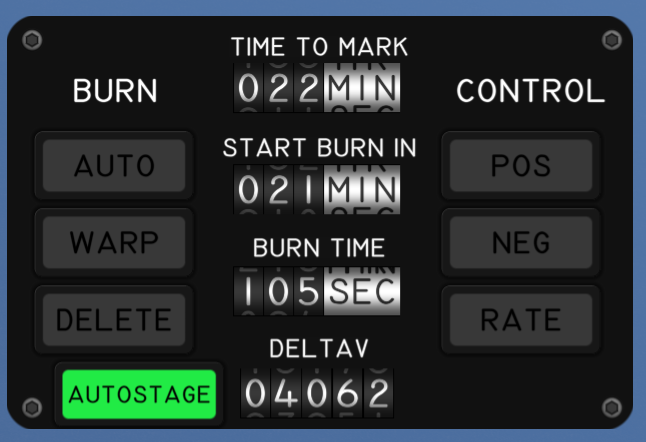
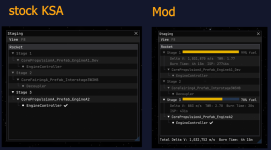
Activates the next sequence whenever the active engines run out of propellant, and drops burnt-out boosters while the rest of the stage keeps firing. Works during auto-burns (continues the burn instead of aborting) and manual burns.
Automatic Burn Removal
A completed auto-burn is removed from the plan as soon as the flight computer flips out of Auto, confirmed through the same delta-V reversal the stock flight computer uses, so a burn that flamed out before its target stays in the plan and can be resumed after staging. RCS burns are removed on their completion. Manual burns are never touched. Switch on the Mods settings page, on by default.
Powered Guidance
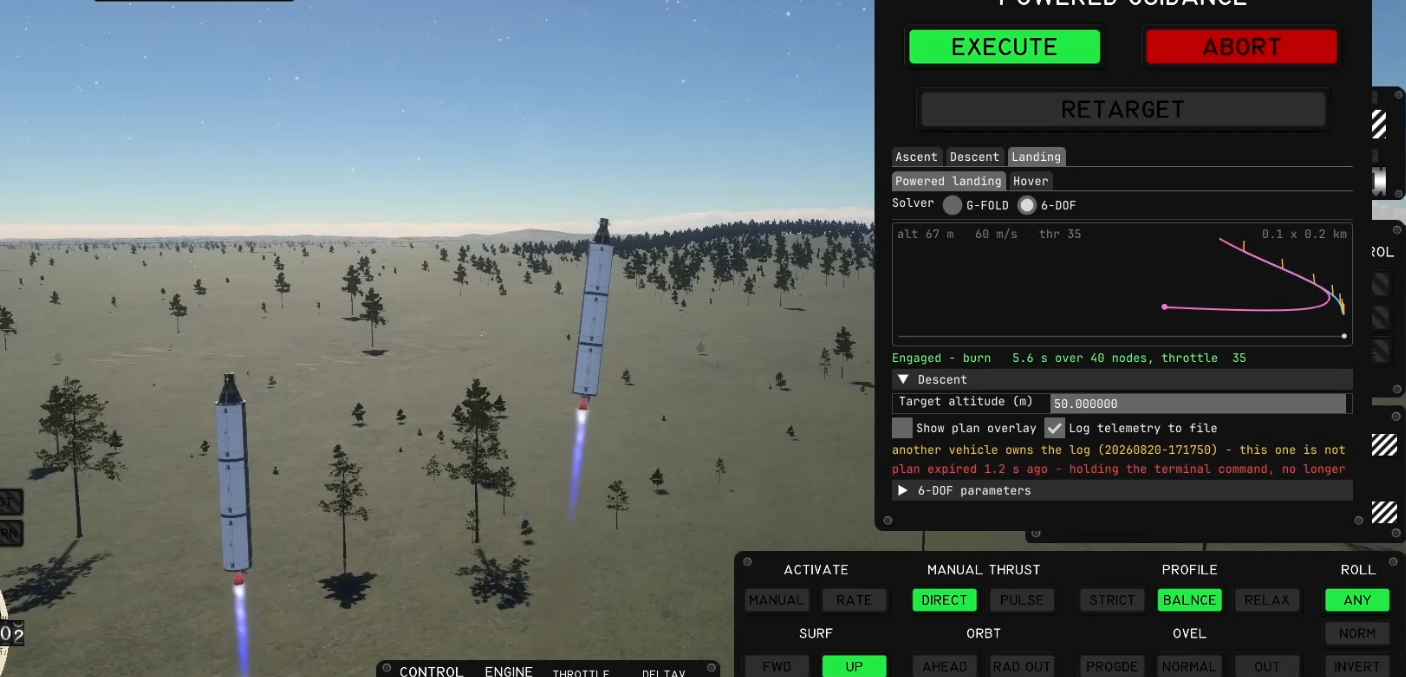
Closed-loop guidance that flies the vehicle for you. Open the AFC Guidance menu in the top bar, switch Enabled on and click Show panel. EXECUTE, ABORT and RETARGET act on the selected tab.
Hyperbolic Targets
The stock Transfer Planner filters out bodies with eccentricity >= 1. This mod lets it target interstellar comets (Oumuamua, 2I/Borisov, 3I/ATLAS) by patching the planner's time-of-flight and alignment math to handle unbound orbits.
Installation
Credits: the powered guidance is the work of Oliver Cairns (cairn5), co-author of the project. PEGAS by Noiredd is the reference for UPFG. Clarabel and SCS are the conic solvers behind G-FOLD and the 6-DOF guidance.
License: MIT
Source: GitHub
Download: Releases | SpaceDock
Dependencies: StarMap (required), KittenExtensions (only for Hyperbolic Targets and the AUTOSTAGE button)
My other mods: DeltaVMap | MeasureTools
Features
Maneuver Quick-Tools
New plan types in the stock Transfer Planner dropdown:
- Set Periapsis / Set Apoapsis - single burn at the opposite apse to raise or lower one apse to a target altitude.
- Match Inclination - plane-change burn at AN or DN to align with a target orbit's plane.
- Set Inclination - plane-change burn at AN or DN to set an absolute inclination angle. Reference plane selectable: Ecliptic or Equatorial.
Flyby Targeting
The stock planner aims every transfer at the target body's center, so a well-timed Hohmann arrives as an impact and the flyby has to be set up afterwards as a separate correction. Tick Target flyby periapsis in the Transfer Planning window and the departure burn is aimed at a periapsis you choose instead, so Create fires the flyby directly.
- Periapsis is entered against a selectable reference: Surface, Center or Atmosphere. The Atmosphere option only appears for bodies that have one, and a request below the safe floor is refused.
- Flyby side picks which side of the body you pass, named in the target's own orbital frame: Inner, Outer, North or South. A side whose axis lies along the approach direction cannot be reached and is greyed out.
- Works for moon flybys and for interplanetary targets, either as a single burn or split across multi-pass passes.
- The section reports the approach speed, the impact parameter, the departure delta-V next to the impact-aimed one, and the periapsis the propagated trajectory actually reaches.
Limitation: the plan is impulsive, the burn is not. On a near-escape departure the periapsis actually flown drifts from the requested one by roughly the finite-burn loss. Trim it with a small correction burn, or split the departure across several passes to cut the loss.
Multi-Pass Burns
Split any planned burn into multiple passes across successive orbits to reduce finite-burn loss. Instead of one long burn that sweeps a large arc away from periapsis, the engine fires in shorter bursts near periapsis on each orbit, the same technique real lunar kick stages use with several perigee burns before the final injection.
Supports Hohmann departures, apse burns (Set Pe/Ap), inclination changes, and circularize. Includes a 3D orbit preview with per-pass markers, automatic execution via Auto burn mode, and an inline pass list showing remaining dV and burn time. Particularly useful for low-TWR spacecraft (ion engines, small kick stages, nuclear tugs). With automatic staging on and automatic burn removal left on, a multi-pass execution runs hands-free from first ignition to final departure.
RCS Translation Burns
Execute a planned burn on RCS thrusters alone, no main engine. Useful for small corrections, where rotating the whole vehicle for the main engine can cost more than translating, and for vehicles with no active main engine like small probes.
The stock Auto burn button stays the trigger: a burn runs on the engine when an active fueled one exists, otherwise on RCS. Per-burn options sit below the burn editor: Execution, Attitude and Allocator. Two attitude strategies: Hold keeps the current attitude and fires the axis mix that points at the burn vector, Align first rotates the strongest thruster axis onto it, and Auto picks the cheaper one including the slew. Execution is closed-loop against the game's own delta-V accounting. Burns stay in the stock save format, and RCS arming survives save/load including mid-burn. An optional LP allocator solves the fuel-optimal jet-select problem over the individual thrusters and stays opt-in.
Automatic Staging
Activates the next sequence whenever the active engines run out of propellant, and drops burnt-out boosters while the rest of the stage keeps firing. Works during auto-burns (continues the burn instead of aborting) and manual burns.
- AUTOSTAGE toggle button on the engine gauge panel; the switch belongs to the vehicle. Also on the Mods settings page.
- Control-module guard, cascade staging and auto-burn continuation, so planned burns do not abort at a staging.
- Spent stage drop sheds burnt-out boosters as soon as they quit, and refuses when the separated parts still feed a retained engine.
- Configurable staging delays for decouplers and engines per part variant, with on-screen countdowns.
Automatic Burn Removal
A completed auto-burn is removed from the plan as soon as the flight computer flips out of Auto, confirmed through the same delta-V reversal the stock flight computer uses, so a burn that flamed out before its target stays in the plan and can be resumed after staging. RCS burns are removed on their completion. Manual burns are never touched. Switch on the Mods settings page, on by default.
Powered Guidance
Closed-loop guidance that flies the vehicle for you. Open the AFC Guidance menu in the top bar, switch Enabled on and click Show panel. EXECUTE, ABORT and RETARGET act on the selected tab.
- Ascent flies UPFG, the Space Shuttle's ascent guidance, to a target periapsis, apoapsis, inclination and LAN, optionally holding the argument of periapsis, with an optional launch window, g-limit and booster reserve. Launching to a target vehicle flies a chase orbit below it.
- Boostback flies a separated booster back toward its landing site with a settling burn, a flip, the boostback burn and an entry attitude, against an impact prediction through the atmosphere.
- Deorbit and land flies the whole chain from a low orbit: the deorbit burn, a fuel-optimal powered descent with G-FOLD or the 6-DOF solver, and a terminal hover to touchdown. Land from here starts at the descent.
Hyperbolic Targets
The stock Transfer Planner filters out bodies with eccentricity >= 1. This mod lets it target interstellar comets (Oumuamua, 2I/Borisov, 3I/ATLAS) by patching the planner's time-of-flight and alignment math to handle unbound orbits.
Installation
- Install StarMap (required) and KittenExtensions (only for Hyperbolic Targets and the AUTOSTAGE button).
- Download from GitHub Releases or SpaceDock, or install it with Borea.
- Extract into
Documents\My Games\Kitten Space Agency\mods\AdvancedFlightComputer\. - The game auto-discovers new mods on next launch.
Credits: the powered guidance is the work of Oliver Cairns (cairn5), co-author of the project. PEGAS by Noiredd is the reference for UPFG. Clarabel and SCS are the conic solvers behind G-FOLD and the 6-DOF guidance.
License: MIT
Source: GitHub
Download: Releases | SpaceDock
Dependencies: StarMap (required), KittenExtensions (only for Hyperbolic Targets and the AUTOSTAGE button)
My other mods: DeltaVMap | MeasureTools
Last edited: