Neutrino Client on Bazzite Linux

Flushfoot

New Member
Messages
6
Reaction score
1
Good evening (here... good morning in NZ?) Ahwoo!

I just got around to installing the Neutrino Client on my Linux machine; instructions you provided installed/ran Neutrino very well, thanks!

However, I was saddened to discover that using Neutrino to install/launch KSA did not 'automagically' handle any of the intricacies of running KSA on an immutable OS. (I do not know how it is done, but another Early Access game seems able to have their game running 'natively and independently' [not in Steam] on Linux, even on Bazzite... Hytale, in case that points anyone in the 'right direction')

I have only tried this the once so far, and have not yet tried to see if I could put Neutrino into a Distrobox (I think that was the guidance before to run KSA on SteamOS/immutables?) so that Neutrino can handle the updating "behind the scenes" that's kept me from trying to repeat those steps to get the game running.

Good first step though!

Thanks,
Ryan
 

Attachments
  • Screenshot_20261027_222206.jpeg
    Screenshot_20261027_222206.jpeg
    91.8 KB · Views: 0
Upvote 0
Slight amendment to my first comment; I am not 100% certain Neutrino was “installed” on Bazzite with the instructions (not listed nor searchable in my ‘Start Menu’, no Desktop icon, etc.) but it certainly opened for me.
 
Hi Ryan, good afternoon from NZ.

Thanks for trying the Neutrino beta of the Ahwoo client on Bazzite and for writing this up.

Could you tell me what happens when you press Play on KSA? Try running KSA from a terminal in the install folder (./KSA) and paste what it prints.

Another Bazzite player saw KSA fail to find the Vulkan library. If you see an error mentioning Vulkan, this command ran from the KSA install folder should fix it:

ln -s /usr/lib64/libvulkan.so.1 libvulkan.so

On your second point, yes, the Ahwoo client won't show up in your app menu right now. The Linux install doesn't create a menu entry yet, and we'll add one.
 
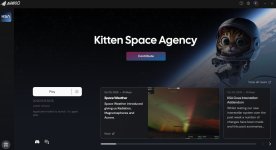
The screenshot I included in the first post should show what happened ‘at the end’ of trying to Play from Neutrino (briefly showed “Application is running” before giving that ‘Failed’ status/message)

PC is shut down for the night (11:30 pm Tuesday here 😅) but I’ll try to report back ‘tomorrow’ after work. 🫡
 
I have not (yet) figured out where in my (still unintuitive to me) Linux file-structure Neutrino stuck the KSA game, but I did spot Logs in Documents (/Documents/My Games/Kitten Space Agency/logs/) and that does suggest trouble with Vulkan, so I'll try the proposed fix.

[Brutal.Monitor] recovered 2 log lines from KittenSpaceAgency.261028-181710.13767.log.ring
18:17:16.776 ERROR Unhandled exception System.TypeInitializationException: The type initializer for 'Brutal.VulkanApi.Vulkan' threw an exception.
---> System.DllNotFoundException: Unable to load shared library 'vulkan' or one of its dependencies. In order to help diagnose loading problems, consider using a tool like strace. If you're using glibc, consider setting the LD_DEBUG environment variable:
/var/home/ryanw/Games/Ahwoo/Kitten Space Agency/vulkan.so: cannot open shared object file: No such file or directory
/var/home/ryanw/Games/Ahwoo/Kitten Space Agency/libvulkan.so: cannot open shared object file: No such file or directory
/var/home/ryanw/Games/Ahwoo/Kitten Space Agency/vulkan: cannot open shared object file: No such file or directory
/var/home/ryanw/Games/Ahwoo/Kitten Space Agency/libvulkan: cannot open shared object file: No such file or directory

at System.Runtime.InteropServices.NativeLibrary.LoadLibraryByName(String libraryName, Assembly assembly, Nullable`1 searchPath, Boolean throwOnError)
at Brutal.VulkanApi.Vulkan..cctor()
--- End of inner exception stack trace ---
at Brutal.VulkanApi.Vulkan.get_GetInstanceProcAddr()
at KSA.Program..ctor(IReadOnlyList`1 inArgs)
at KSA.Program.Main(String[] inArgs).
 
Update:
1793226160920.png

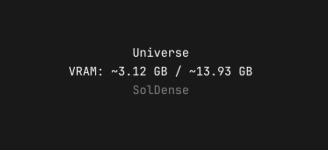
I might have "bitten off more than my GPU can chew" in trying to run Interstellar + Solar System as it crashed shortly after ☝️, but it did at least get that far :)
 
Maybe not strictly related to VRAM then... I downgraded textures and such and chose Earth + Moon only, and still crashed out "while loading":

[Brutal.Monitor] recovered 108 log lines from KittenSpaceAgency.261028-182112.15683.log.ring
18:25:12.622 INFO loaded settings from /home/ryanw/Documents/My Games/Kitten Space Agency/settings.toml
18:25:13.169 DEBUG Found dedicated compute queue family at index 2
18:25:13.169 DEBUG Found dedicated transfer queue family at index 1
18:25:13.172 DEBUG Multi view supported: True
18:25:13.173 INFO Present wait supported: True
18:25:13.173 DEBUG Ray query acceleration structure support:True
18:25:13.430 INFO Swapchain created with 3 images at 2560x1396 (surface current 2560x1396, min 2560x1396, max 2560x1396, window 2560x1396, framebuffer 2560x1396, present FifoKHR)
<...>

Various (hopefully) relevant log files have been put into this .zip (as the native .log files aren't accepted for forum-upload)
 

Attachments

Back
Top