
MorningStarO
New Member
- Messages
- 2
- Reaction score
- 2
Game Version
v2026.10.13.5602Operating System
Windows 10What Happened
In the Map View, the atmospheric effect of a celestial body does not appear to be rendered correct.The following Map View elements are rendered on top of the body's atmospheric effect:
- Celestial body grid
- Body name label
- Orbit lines
- Sun
As a result, the grid, labels, and orbit lines appear to be drawn in front of the atmosphere instead of being visually occluded/blended by it. This makes the Map View look visually incorrect.
What Was Expected
The atmospheric effect should be rendered with the appropriate depth/layering relative to Map View overlays?Reproduction Steps
- Open Map View.
- Focus the camera on Titan (or another body with an atmosphere).
- Zoom in to see the issue.
Reproduction Rate
AlwaysAdditional Info
- Video/Screenshots: Titan
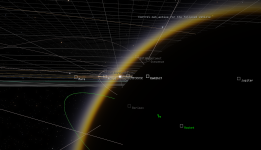
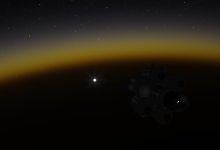
- In this image, the Sun can be seen through Titan's atmosphere, while the stars are correctly obscured ↓
Last edited:
Upvote
0

