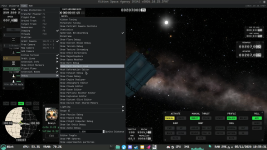
Solved menu highlighting doesnt work in windowed

WerIstLuka

New Member
Messages
8
Reaction score
4

Game Version​

2026.10.19.5638

Operating System​

Linux Mint Cinnamon 22.3 X11

What Happened​

the wrong menu item gets highlighted when hovering over a sub menu if you play in windowed

What Was Expected​

The menu item that my mouse is over should be highlighted

Reproduction Steps​

  1. open a menu from the headerbar while the game is in windowed
  2. hover over an option that has submenus (indicated by arrow)
  3. hover over an item in that submenu

Reproduction Rate​

always
 
Upvote 0
This suggestion has been implemented. Votes are no longer accepted.
Are you running with any command line options? Forcing Wayland or X11?
 
I'm launching the game from ahwoo using the default settings. I'm not forcing a specific backend.
So far I've only tried the game on X11 but I'll try it on wayland and will reply in like 10 minutes with what happens

I counted the pixels and it seems like the game highlights 32px above my cursor, which is weird because i dont think anything on my computer has a height of 32px. My panel is 40px, headerbar is 27px, cursor is 20px

I attached a screenshot to visualize
1793872756187.png
 
Thanks, that 32 px measurement is really useful. Could you try launching with -fixed-viewport added to the command line and see if the highlight lines up then? I suspect long submenus are being split into their own window, and the window manager moves it slightly.
 
Ok, that nails the problem to exactly what I thought. Fix should be in the next build.
 
Back
Top