
MorningStarO
New Member
- Messages
- 1
- Reaction score
- 2
Game Version
v2026.10.10.5554Operating System
Windows 10What Happened
After saving the game and then loading the save during flight, the staging/Sequence Δv display becomes incorrect.Before saving:
- Green = the current Sequence
- Yellow = the next Sequence
- The current Sequence's Δv is displayed correctly
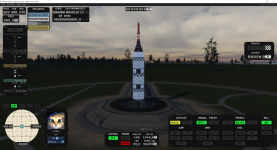
- The green Δv value becomes the value that previously belonged to the next Sequence
- The yellow value also shifts forward by one Sequence
- The Δv for the actual current Sequence is no longer displayed correctly
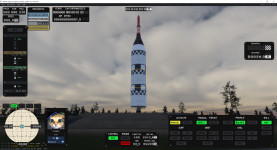
What Was Expected
After loading a save, the staging/Sequence display should be identical to the state before saving:- Green should represent the current Sequence
- Yellow should represent the next Sequence
- Each Sequence should display its own correct Δv
Reproduction Steps
- Build a vehicle with multiple Stages/Sequences.
- Make sure the staging window displays different Δv values for consecutive Sequences.
- Launch the vehicle.
- Observe the green (current) and yellow (next) Δv values.
- Save the game during flight.
- Load the save.
- Check the staging/Sequence Δv display again.
- The displayed Δv values are shifted by one Sequence and the current Sequence's Δv is missing/incorrect.
Reproduction Rate
AlwaysAdditional Info
- This appears to be related specifically to loading a flight save. The staging/Sequence configuration itself does not appear to have intentionally changed, but the displayed Δv values are associated with the wrong Sequence after loading.
Upvote
2


