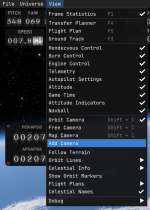
IIRC there is functionality to detach the map view onto a second monitor
How do I go about doing this? I am aware you can detach UI elements, but I cannot figure out how to detach the entire map scene
Apologies if this feature is not available yet
this is how to do it, you can drag it right out of the game after you spawned it in. however i get a strange bug where the vessel graphically disappears after adding the second camera for map view
this is how to do it, you can drag it right out of the game after you spawned it in. however i get a strange bug where the vessel graphically disappears after adding the second camera for map view
I am experiencing that same bug, along with a glitch where dragging any element onto another monitor instantly crashes the game.
Hopefully they provide a fix soon enough
I wonder if this feature work well with monitors that have a different refresh rate, different resolution, and even a different dynamic range (HDR/SDR)
Considering it's two distinct windows, at least it shouldn't break dxgi flip mode.