
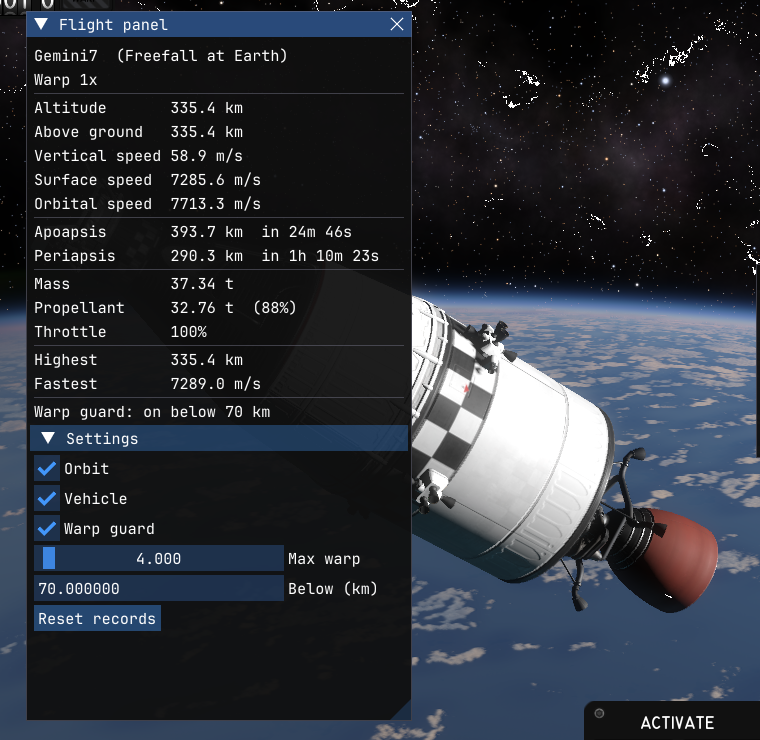
Flight Panel adds a window with live flight data and a warp guard that keeps time warp in check at low altitude.
Features
- Flight data: altitude, height above ground, vertical, surface and orbital speed, apoapsis and periapsis with countdowns, mass, propellant, throttle and time warp, plus the highest and fastest your vehicle has been.
- Warp guard: below an altitude you set (70 km by default), time warp can't go past a speed you set (4x by default), and auto-warp won't start.
- Settings in the panel: which sections to show and the warp guard limits. They're saved across games.
- F7 shows and hides the panel, and F6 turns the warp guard on and off. Both are in the game's Mods menu too.
Oxidizer 0.4.0 or later, either as the StarMap mod (
Oxidizer.StarMap) or standalone. Works on Windows, Linux and macOS (Apple Silicon, with the macOS port).Install
It's on the content index (https://ksamods.gg/mods/flight_panel), so a mod manager like Borea installs it along with Oxidizer. By hand:
- Install Oxidizer: see its install steps.
- Download
flight_panel-1.0.0.zipand unzip it intoDocuments/My Games/Kitten Space Agency/mods/, so there's amods/flight_panel/folder. - Start the game and enable the mod when it asks.
Download: https://github.com/SafeShows/oxidizer-flight-panel/releases/tag/v1.0.0
For modders
Flight Panel is also a worked example of an Oxidizer mod written in Rust. Each source file shows one part of the API: the window, hotkeys and Mods menu; reading the game; patching game methods (skipping one and changing another's return value); and saving settings. The README explains which file does what. Copy anything you like into your own mods.
Source code
https://github.com/SafeShows/oxidizer-flight-panel
License
MIT No Attribution (MIT-0). Use, change and redistribute it freely, no credit required.
Attribution
Built with Oxidizer and its oxidizer_api crate (MIT). Settings are read and written with the toml crate (MIT/Apache-2.0).
Last edited:


