
Game Version
[2026.10.10.5554]Operating System
Ubuntu 26.04.1 LTSHardware
- GPU / Driver Version: PNY RTX 5080, 16GB VRAM, 595.99- CPU: AMD Ryzen™ 9 5900XT × 32
- RAM: 128.0 GiB DDR4
- Screen: TV as a monitor (4K if relevant)
Install Location
/home/user/Downloads/KSAWhat's Happening?
Fullscreen only covers one quarter of the screen, changing the screen settings doesn't change the coverage. Buttons on launch screen correspond to the mouse position of the actual screen.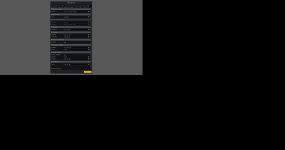
Furthermore (probably a different issue) when launching the game (Using the setting in the above figure). The game crashes while compiling shaders, utilizing a very large ammount of VRAM. (12.7 / 13.03) GB thereby not accessing the full amount.
Program then wont terminate when closing window.
Reproduction Rate
every launchAlready Tried
tried reinstallingLogs
22:00:10 INFO loaded Situation Template 'Gemini7StartingSituation'22:00:10 INFO loaded Situation Template 'RocketStartingSituation'
22:00:10 INFO loaded Situation Template 'HunterStartingSituation'
22:00:10 INFO loaded Situation Template 'BanjoStartingSituation'
22:00:10 INFO loaded Situation Template 'PolarisStartingSituation'
22:00:11 INFO loaded Situation Template 'Gemini7StartingSituation'
22:00:11 INFO loaded Situation Template 'RocketStartingSituation'
22:00:11 INFO loaded Situation Template 'HunterStartingSituation'
22:00:11 INFO loaded Situation Template 'BanjoStartingSituation'
22:00:11 INFO loaded Situation Template 'PolarisStartingSituation'
22:00:11 DEBUG loaded system 'SolDense'
22:00:11 DEBUG loaded planet mesh collection 'Default'
22:00:11 DEBUG loaded planet mesh collection 'EarthScale'
22:00:11 DEBUG loaded planet mesh collection 'OceanEarth'
22:00:11 DEBUG loaded planet mesh collection 'Asteroid'
22:00:11 DEBUG loaded planet mesh collection 'MarsScale'
22:00:11 DEBUG loaded planet heightmap collection 'Default'
22:00:14 INFO loading star binary 'briars_binary_dimmer_better_99k_stars.bin'
22:00:14 INFO loading star binary 'briars_binary_dimmer_better_99k_stars.bin'
22:00:14 DEBUG loading 99038 star binaries from 'Content/Core/briars_binary_dimmer_better_99k_stars.bin'
22:00:14 INFO instantiated 'SolDense' system
22:00:19 INFO following celestial 'Earth'
22:00:19 INFO set simulation speed to x1
22:00:19 INFO set map camera to azimuth 2.88, elevation 0.47, distancePower 3635076.00
22:00:19 INFO set camera mode to 'Map'
22:00:19 INFO set map camera to azimuth 2.88, elevation 0.47, distancePower 3635076.00
22:00:19 INFO set camera mode to 'Map'
22:00:19 INFO set orbit camera to azimuth -4.83, elevation -0.41, distancePower 2.85
22:00:19 INFO set camera mode to 'Orbit'
22:00:22 INFO Planet renderer procedural modifier pipelines build in: 489ms
22:00:22 INFO Ecotype Tree: built 0 collider shapes and 48 compounds across 3 objects and 16 scales
22:00:22 INFO Ecotype SmallTree: built 0 collider shapes and 48 compounds across 3 objects and 16 scales
22:00:22 INFO Ecotype Shrub: built 0 collider shapes and 48 compounds across 3 objects and 16 scales
22:00:22 INFO Ecotype Rocks: built 0 collider shapes and 112 compounds across 7 objects and 16 scales
22:00:22 INFO Ecotype LargerRocks: built 0 collider shapes and 112 compounds across 7 objects and 16 scales
22:00:22 INFO Ecotype SmallerRocks: built 0 collider shapes and 112 compounds across 7 objects and 16 scales
22:00:22 INFO Ecotype Rocks: built 0 collider shapes and 112 compounds across 7 objects and 16 scales
22:00:22 INFO Ecotype LargerRocks: built 0 collider shapes and 112 compounds across 7 objects and 16 scales
22:00:22 INFO Ecotype SmallerRocks: built 0 collider shapes and 112 compounds across 7 objects and 16 scales
22:00:22 INFO Building ground clutter compute pipelines...
22:00:24 INFO Ground clutter compute pipelines built in 1133 ms
22:00:24 INFO Ecotype: Grass VRAM Usage: 9 Mb.
22:00:24 INFO Ecotype: Tree VRAM Usage: 159 Mb.
22:00:24 INFO Ecotype: SmallTree VRAM Usage: 17 Mb.
22:00:24 INFO Ecotype: Shrub VRAM Usage: 50 Mb.
22:00:24 INFO Ecotype: Rocks VRAM Usage: 22 Mb.
22:00:25 INFO Ecotype: LargerRocks VRAM Usage: 22 Mb.
22:00:25 INFO Ecotype: SmallerRocks VRAM Usage: 12 Mb.
22:00:25 INFO Ecotype: Rocks VRAM Usage: 22 Mb.
22:00:25 INFO Ecotype: LargerRocks VRAM Usage: 22 Mb.
22:00:25 INFO Ecotype: SmallerRocks VRAM Usage: 12 Mb.
22:00:25 INFO Ground clutter ecotype render data built in 1701 ms
22:00:26 INFO Current ring maximum meshes instances: 234772, impostor instances: 1156096, VRAM usage: 33 MB.
22:00:26 ERROR Unhandled exception System.Exception: Vma Failed to create image 'Sunbloom Occlusion Viewport 0.Color' (8192x4320x1, R16G16B16A16SFloat, mips 1, samples _1Bit): ErrorOutOfDeviceMemory
at KSA.KsaVmaAllocator.AllocateImage(String& name, VkImageCreateInfo& imageCreateInfo, CreateInfo& allocateCreateInfo)
at KSA.KsaVmaAllocator.Brutal.VulkanApi.Abstractions.IImageAllocator.AllocateImage(String& name, VkImageCreateInfo& imageCreateInfo, CreateInfo& allocateCreateInfo)
at Brutal.VulkanApi.Abstractions.ImageExExtensions.CreateImage(IImageAllocator allocator, CreateInfo createInfo)
at RenderCore.SimpleVkTexture..ctor(String name, IImageAllocator allocator, Int32 width, Int32 height, Int32 depth, VkFormat format, Int32 mipLevels, Int32 arrayLayers, Boolean cubeMap, VkImageUsageFlags flags, Nullable`1 range, VkSampleCountFlags samples)
at KSA.Rendering.RenderImage.CreateTexture(Int32 inWidth, Int32 inHeight)
at KSA.Rendering.RenderImage..ctor(RenderImageCreateInfo& inCreateInfo)
at KSA.Rendering.RenderTarget.CreateColorImage(IVulkanContext inContext, String inName, VkExtent2D inExtent, VkFormat inFormat, Int32 inMipLevels)
at KSA.Rendering.RenderTarget..ctor(IVulkanContext inContext, String inName, VkExtent2D inExtent, VkFormat inColorFormat, VkFormat inDepthFormat, Int32 inMipLevels, VkSampleCountFlags inSamples, Boolean inPreserveMultisampleAttachments)
at KSA.SunbloomRenderer.Build()
at KSA.SunbloomRenderer..ctor(Renderer renderer, VkSampler pointSampler, VkSampler linearSampler, Int32 frameCount, AtmosphereRenderer atmosphereRenderer)
at KSA.Program..ctor(IReadOnlyList`1 inArgs)
at KSA.Program.Main(String[] inArgs).
22:01:26 WARN Last chance dump: timed out.
Unhandled exception. System.Exception: Vma Failed to create image 'Sunbloom Occlusion Viewport 0.Color' (8192x4320x1, R16G16B16A16SFloat, mips 1, samples _1Bit): ErrorOutOfDeviceMemory
at KSA.KsaVmaAllocator.AllocateImage(String& name, VkImageCreateInfo& imageCreateInfo, CreateInfo& allocateCreateInfo)
at KSA.KsaVmaAllocator.Brutal.VulkanApi.Abstractions.IImageAllocator.AllocateImage(String& name, VkImageCreateInfo& imageCreateInfo, CreateInfo& allocateCreateInfo)
at Brutal.VulkanApi.Abstractions.ImageExExtensions.CreateImage(IImageAllocator allocator, CreateInfo createInfo)
at RenderCore.SimpleVkTexture..ctor(String name, IImageAllocator allocator, Int32 width, Int32 height, Int32 depth, VkFormat format, Int32 mipLevels, Int32 arrayLayers, Boolean cubeMap, VkImageUsageFlags flags, Nullable`1 range, VkSampleCountFlags samples)
at KSA.Rendering.RenderImage.CreateTexture(Int32 inWidth, Int32 inHeight)
at KSA.Rendering.RenderImage..ctor(RenderImageCreateInfo& inCreateInfo)
at KSA.Rendering.RenderTarget.CreateColorImage(IVulkanContext inContext, String inName, VkExtent2D inExtent, VkFormat inFormat, Int32 inMipLevels)
at KSA.Rendering.RenderTarget..ctor(IVulkanContext inContext, String inName, VkExtent2D inExtent, VkFormat inColorFormat, VkFormat inDepthFormat, Int32 inMipLevels, VkSampleCountFlags inSamples, Boolean inPreserveMultisampleAttachments)
at KSA.SunbloomRenderer.Build()
at KSA.SunbloomRenderer..ctor(Renderer renderer, VkSampler pointSampler, VkSampler linearSampler, Int32 frameCount, AtmosphereRenderer atmosphereRenderer)
at KSA.Program..ctor(IReadOnlyList`1 inArgs)
at KSA.Program.Main(String[] inArgs)
Aborted (core dumped) ./KSA


