
! "❮♔𝕵𝕺𝕹𝖄Ⅳ𝓣♔❯𝖌𝖗𝖎𝖓𝖉" !
New Member
- Nov 1, 2025
- 2
- 1

Will there be support for apple silicon?

Support for anything other than Windows will come down to cost/benefit analysis. Maintaining and supporting multiple builds is a much bigger effort than most people realize, and supporting public builds for like 1%-2% of the gaming public (MacOS/Linux) would require a *huge* active, contributing user base.
Yeah macOS 26 is the last version for the Top end intel Macs and sometime in 2027-2028 the Intel to M-serris translator layer will be removedI can only imagine this would be the case. There's not really any Intel-based Macs worth supporting anymore (macOS won't even be updated for Intel models anymore) and the performance delta would be outrageous.
We do know that a handful of devs work with macOS regularly so it's not out of the question, just a long ways down the road.
Personally I would love to see how the game can run on my M4 Pro mini.
is there a free alt to CrossOver or is that the only option for now?As nice as native MacOS support would be, I think it's fully sufficient to target a smooth experience via Crossover. I think they even offer professional support for game studios to get their Windows game running via Crossover.
As a game dev, I would target that and get those people on board early on. This is probably the leanest solution for Mac support.
Whisky "works" for me if I disable AA, terrain, and ocean.is there a free alt to CrossOver or is that the only option for now?

Hello everyone! I followed Kiwi Shark's guide and got it working pretty easily. It does seem to be capped at 30FPS through, even with 120Hz selected and Vsync off. Thanks for the guide!
I could see Apple getting behind something like this, would make a nice WWDC demo showing off the latest M5/6 Max/Ultra hardware. Imagine having a bunch of 5K displays, one running a separately rendered view out each of the spacecraft window running concurrently plus another with an external view of the spacecraft. The recent and soon to be released Macs have some serious render per watt and render per dollar capability that Apple is selling to AI servers farms but make sense as a game machine if only more companies would build native for macOS.All true. It's a whole other pipeline for developing, troubleshooting, & QA and it adds up. Each platform could well imply multiple additional employees each.
I think at least in regards to macOS there are lots of opportunities in the educational space that would help justify the effort considering that's part of the vision for the game's legacy. Lots of US universities have Apple authorized campus stores and certified service centers on campus. You could Air Drop the game across a whole classroom from one local copy in minutes.
Similar to RW's internal connection with Nvidia for technical support it's not unlikely that they could (try to) build a similar relationship with Apple. Apple conducts a lot of education outreach and developer workshops for writing compatible software.
If Apple and Hideo Kojima got Death Stranding to run on the iPhone, there's hope for KSA to run on a MacBook Pro. Eventually. It makes sense that its Windows only for now, especially this early. But hey, the more options the better.
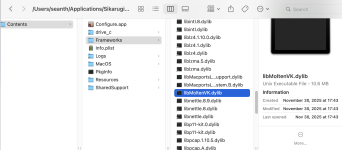
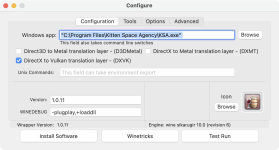
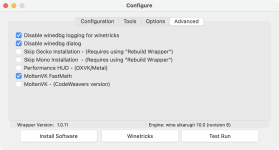
Is this method still working. I'm pretty familiar with Sikarugir and followed the instructions, but the instructions for installing the new MoltenVK dylib doesn't match my path structure. There is no Contents/MacOS/Frameworks for me. It's Contents/Frameworks.
But setting that aside, when I put the libMoltenVK.dylib in Contents/Framework and launch it, I get the settings screen and then a graceful crash after loading. Looking at the log I'm seeing a lot of:
[mvk-error] SPIR-V to MSL conversion error: DrawIndex is not supported in MSL.
[mvk-error] VK_ERROR_INITIALIZATION_FAILED: Vertex shader function could not be compiled into pipeline. See previous logged error.
View attachment 1704 View attachment 1705View attachment 1706
Am I doing something stupid? Maybe I grabbed the wrong moltenVK dylib?
Looks like MoltenVK 1.4.2 is what I grabbedIt's possible, although I haven't gotten to test it myself lately.
The install guide on the wiki was recently updated by someone that got it working. Maybe something in there can help.
For reference, could you share which specific MoltenVK you're trying to use?


