

General Meatsauce
Member
- Messages
- 23
- Reaction score
- 28
RF Spectrum Mod adds a functional approximation of the RF Spectrum and utilities to Kitten Space Agency.
KSA VER: v2025.12.31.3103
DOWNLOAD: https://github.com/meatsauce007/IonocatRfMod/blob/main/PLUGIN/IonocatRfMod.zip
SOURCE: https://github.com/meatsauce007/IonocatRfMod
LIC: MIT https://github.com/meatsauce007/IonocatRfMod/blob/main/License.txt
MUSIC: All music & sounds are original by General Meatsauce
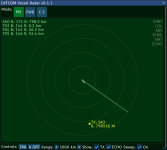
A transmitter is an emitter of RF frequency with some audio or data signal. This is often another vessel or ground transmitter, marked as TX: {Identity}
An echo is a simulated radar return. This is also called a "skin echo" since it simulates a radar pulse echoing off the skin of a vessel. Echos do not currently return identity, adding some mystery to what you are seeing on the scope.
PPI - Plan Position Indicator
Meatsauce
Major features include:
- Tunable Receiver (14mhz to 10ghz)
- Real Free Space Path Loss calculations
- Broadcast Radio Stations (find them between 88mhz to 108mhz)
- City-Based Morse Code Identifiers (around 145.700 mhz)
- Vessel Radar and Tracking
- Jovian Radio Emissions (18 to 22mhz)
- Deep Space Radio Astronomy Objects (limited as of 0.1.1) (1420mhz)
KSA VER: v2025.12.31.3103
DOWNLOAD: https://github.com/meatsauce007/IonocatRfMod/blob/main/PLUGIN/IonocatRfMod.zip
SOURCE: https://github.com/meatsauce007/IonocatRfMod
LIC: MIT https://github.com/meatsauce007/IonocatRfMod/blob/main/License.txt
MUSIC: All music & sounds are original by General Meatsauce
Installation
- Download the mod from the link above
- Extract and place the /IonocatRfMod/ folder into the Kitten Space Agency /content/ directory
- Add the mod to your manifest.toml file:
[[mods]]
id="IonocatRfMod"
enabled = true
Receiver Panel
RCVR PANEL
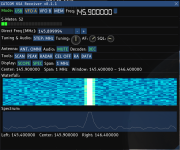
The Receiver panel is your main window for controlling the radio and mod features. From top to bottom:- Mode will set the receiver mode. Broadcast stations are in FM mode only. Beacons can be heard in CW or USB mode.
- There are two VFOs, A and B. Pressing MEM will set the current frequency to the active VFO (amber)
- The _ next to the frequency readout will minimize the window. If you lose the window F9 will restore it.
- The S-Meter gives you an indication of signal strength.
- Below that is your direct frequency input. Use numbers only for direct input.
- You can tune the frequency with the tuning Knob and also set the volume. SQL is not implemented yet.
- STEP will change the tuning step (improvements coming)
- Antenna mode is not implemented but will be when I graduate to parts.
- Press MUTE to enable audio (it will turn green). Red Mute means audio is muted.
- Decoder is not implemented (will be used for data mode when finished)
- SCAN: Moves through the scan range to find signals. (not implemented)
- PEAK: Finds the strongest signal (automatic now, not implemented)
- RADAR: Opens the radar panel
- CEL OFF: Enabled the celestial grid (not implemented)
- RA: Expands the Radio Astronomy pointer and tracking (not fully implemented)
- DATA: Opens the DATA window (not implemented)
- SCOPE: Enables/Disables the Waterfall or Bandscope
- SPEC: Enables/Disables the Spectrum Scope
- SPAN: Controls the passband visibility of the two scopes. (100khz to 50mhz)
- Visual representation of band activity for the selected span
RADAR PANEL
The radar panel will display transmitters and radar 'echoes'A transmitter is an emitter of RF frequency with some audio or data signal. This is often another vessel or ground transmitter, marked as TX: {Identity}
An echo is a simulated radar return. This is also called a "skin echo" since it simulates a radar pulse echoing off the skin of a vessel. Echos do not currently return identity, adding some mystery to what you are seeing on the scope.
PPI - Plan Position Indicator
- The PPI represents the radar antenna as the center of the display. Up is always forward on the display.
- The PPI will show a track list, as well as transmitters in range.
- Press TRK to move between all radar tracks.
- 'A OFF/A ON' will mute/unmute radar sounds
- Range keys will change the radar range from <1km to 3000km and is line-of-sight dependant
- Show TX / ECHO will hide/show the two classification of radar tracks
- SWEEP will hide/show the radar sweep indicator
- The FWD mode will scan a 3D cone area in front of the vessel.
- The CS mode will give you a Azimuth/Elevation indication of returns.
See the readme in git for additional details.
Known Issues:
- Mute button must be cycled to set changes in Volume (AF)
- Squelch SQL: not implemented
- RA Targeting: not fully implemented (sky sphere is rotated incorrectly)
- Celestial Grid: not implemented
- Antenna Mode: not implemented
- Scan / Peak: not implemented
Future Plans
- Additional radar symbols
- Optimization
- Bi-Directional Data Modes
- Add lightning crash sound
- Clean up the code
- Complete refactor / rebuilt
- Second Pass Bearing & S-Meter Falloff
- Method to add BEACON TX to other vessels
- Radio and Antenna Parts for vessels
- UI panels improvements
- Thanks to RacerX and KSA Discord modding channel for ideas and help.
- Enjoy and let me know what you think!
- Yes, this isn't very optimized yet but doesn't seem to have too much affect on performance. Report bugs and ideas to this thread.
Meatsauce


