
Dejvid
New Member
- Nov 25, 2025
- 3
- 11
Avionics
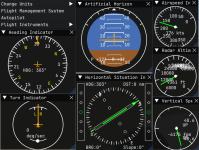
Avionics is a mod that adds airplane flight instruments. The current features are:
Updated for KSA version: v2025.12.25.3047
SpaceDock: https://spacedock.info/mod/4057/Avionics
Source code: https://github.com/DavidK0/Avionics
Latest release: https://github.com/DavidK0/Avionics/releases/latest
Mod version: v1.7.0
License: MIT
How to install
1. Install StarMap
. i. Download and unzip the latest release of StarMap
. ii. Run the .exe and follow the instructions
2. Install ModMenu
. i. Download and unzip the latest release of ModMenu
. ii. Put the contents in Kitten Space Agency\Content\
3. Download and unzip the latest release of Avionics from Github or from SpaceDock
4. Place the contents in Kitten Space Agency\Content\. Your content folder should look something like this:
How to use in game
1. Open the Avionics pages with the 'Avionics' button in the mod menu.
2. Enter the ICAO code of an airport in the FMS, select a runway, and execute the plan
3. View the directions of your flight plan HSI.
4. Enable autopilot in the 'Autopilot' window. You must disable the manual mode on the in game autopilot.
Demonstration
Avionics is a mod that adds airplane flight instruments. The current features are:
- All the basic flight instruments of a steam gauge cockpit
- An FMS that stores the positions of thousands of airports across the world
- An autopilot with altitude hold, heading hold, and airport navigation
Updated for KSA version: v2025.12.25.3047
SpaceDock: https://spacedock.info/mod/4057/Avionics
Source code: https://github.com/DavidK0/Avionics
Latest release: https://github.com/DavidK0/Avionics/releases/latest
Mod version: v1.7.0
License: MIT
How to install
1. Install StarMap
. i. Download and unzip the latest release of StarMap
. ii. Run the .exe and follow the instructions
2. Install ModMenu
. i. Download and unzip the latest release of ModMenu
. ii. Put the contents in Kitten Space Agency\Content\
3. Download and unzip the latest release of Avionics from Github or from SpaceDock
4. Place the contents in Kitten Space Agency\Content\. Your content folder should look something like this:
5. Edit the Manifest.toml in My Games\Kitten Space Agency\ to include Avionics and ModMenu. Your final Manifest.toml should look something like this:├── Core
├── Avionics
│ ├── Avionics.deps.json
│ ├── Avionics.dll
│ ├── airports.json
│ └── mod.toml
├── ModMenu
│ ├── LICENSE.txt
│ ├── mod.toml
│ └── ModMenu.dll
6. Run KSA through StarMap[[mods]]
id = "Core"
enabled = true
[[mods]]
id = "Avionics"
enabled = true
[[mods]]
id = "ModMenu"
enabled = true
How to use in game
1. Open the Avionics pages with the 'Avionics' button in the mod menu.
2. Enter the ICAO code of an airport in the FMS, select a runway, and execute the plan
3. View the directions of your flight plan HSI.
4. Enable autopilot in the 'Autopilot' window. You must disable the manual mode on the in game autopilot.
Demonstration
Last edited: