AlmightyM3
New Member
- Oct 17, 2025
- 2
- 1
Game Version
2026.4.18.4206Operating System
Windows 11 ProSystem Info
Processor: AMD Ryzen 7 5800XRAM: 32 GB
GPU: NVIDIA GeForce RTX 3060 Ti, 8 GB VRAM
What Happened
None of the engines on the default spacecraft in testing mode have visible engine plumes, although they still have the startup effects, sound effects, and heating effects. The rocket also seems to go through bumps in the terrain but not flat terrain.What Was Expected
Visible engine plumes and interactions with terrain features is expected as that is what occurred in previous versions, such as 2026.2.5.3428.Reproduction Steps
- Start KSA in testing mode. (I have not tried other modes so I do not know if it also occurs there.)
- Try starting any engine on the default craft, no plumes will be visible.
- Upon deorbiting, the rocket does not interact with hills and bumps in the terrain.
Reproduction Rate
Always.Additional Info
See attached photo for an example, I also have a video but seem to be unable to upload it.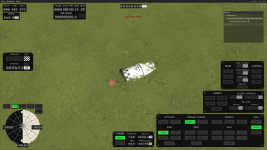

Upvote
0