
Maxi
Member
- Oct 17, 2025
- 144
- 92
Game Version
2026.4.16.4170Operating System
Windows 10What Happened
When the Transfer Planning window is open after a transfer has been calculated, Dear ImGui shows the "3 visible items with conflicting ID!" error dialog.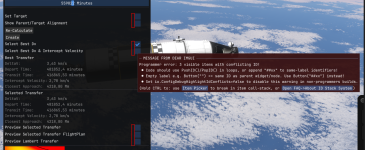
What Was Expected
No ID conflict / error message.Reproduction Steps
- Launch the game with no mods.
- Start any flight situation.
- Open the Transfer Planner.
- Select a Source and Destination, click "Calculate".
- Dear ImGui error dialog appears if you hover to the object left of the checkboxes.
Reproduction Rate
Always.Additional Info
- Severity: Appears to be purely cosmetic, no functional impact on transfer planning behavior.
Upvote
2