Infinite_Spaces.
Member
- Nov 4, 2025
- 43
- 80
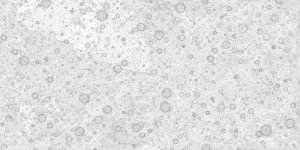
Something i had always wanted to try out, but never really got the chance until i retired was to use World Machine's amazing fractal erosion to help make a planet, as opposed to just a terrain. For a first semi serious project since learning Blender i decided to try to do exactly this as a test, i created some craters and erroded them pretty heavily in World Machine, the following are some of the maps that i output.
Note how none of these are seemless.
Base color: (Unused)
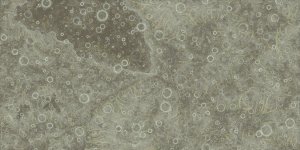
AO:
Normal:
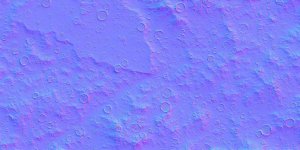
The originals were all 16384 x 8192px PNG and included further maps for information like Talus, and Flow. While those were for finer control over the finished look, i didnt actually use them for this test.
Result: (Un-textured, displacement only, with a yellow light for the sun).
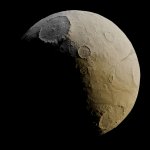
The visible erosion, while likely not realistic in a physical sense, certainly makes the terrain more visually striking and detailed looking, with detail that seems to make sense, and that has a natural looking flow to it.
Sadly though, overall the test was a total failure, as i wasnt able to solve outputing proper seemless tiles for the generated maps with World Machine, and so the above render is hiding some horrid seems that arent facing the camera at this angle.
I could offcourse edit the maps by hand one by one to make them seemless, but this leads me to an even older problem that i have never been able to solve, which is how to make the exact same edits to multiple maps at the same time. Idealy one would have them all as layers in a single file, with any changes made to any of the layers propogating to the others, but i have yet to find a solution to this, and am still kinda working on it.
Figured i would post this here incase anyone else ever came across this problem, as i would very much love to know how to overcome this!
Note how none of these are seemless.
Base color: (Unused)
AO:
Normal:
The originals were all 16384 x 8192px PNG and included further maps for information like Talus, and Flow. While those were for finer control over the finished look, i didnt actually use them for this test.
Result: (Un-textured, displacement only, with a yellow light for the sun).
The visible erosion, while likely not realistic in a physical sense, certainly makes the terrain more visually striking and detailed looking, with detail that seems to make sense, and that has a natural looking flow to it.
Sadly though, overall the test was a total failure, as i wasnt able to solve outputing proper seemless tiles for the generated maps with World Machine, and so the above render is hiding some horrid seems that arent facing the camera at this angle.
I could offcourse edit the maps by hand one by one to make them seemless, but this leads me to an even older problem that i have never been able to solve, which is how to make the exact same edits to multiple maps at the same time. Idealy one would have them all as layers in a single file, with any changes made to any of the layers propogating to the others, but i have yet to find a solution to this, and am still kinda working on it.
Figured i would post this here incase anyone else ever came across this problem, as i would very much love to know how to overcome this!
Last edited: