Disabling texture Streaming causes Excessive Vram to be used and crashes the game on launch

Toble_

New Member
Nov 15, 2025
4
0

Game Version

2026.8.3.5117

Operating System

[Windows 11]

What Happened​

Game Crashes on launch when disabling texture streaming

What Was Expected​

Game should launch

Reproduction Steps​

  1. Disable Texture streaming in the very first menu
  2. Start KSA

Reproduction Rate​

Always

Additional Info​


Operating system: Microsoft Windows 11 Home Single Language, Version 10.0.26200
DirectX runtime version: DirectX 12
Driver: Game Ready Driver - 610.74 - Tue Jul 7, 2026
CPU: AMD Ryzen 7 5800H with Radeon Graphics
RAM: 16.0 GB

Graphics card
GPU: NVIDIA GeForce RTX 3060 Laptop GPU
Direct3D feature level: 12_1
Total available graphics memory: 13238 MB
Shared system memory: 7094 MB
Dedicated video memory: 6144 MB GDDR6
Video BIOS version: 94.06.21.00.23
 
Upvote 0

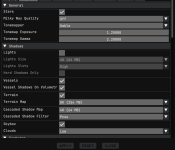
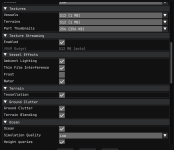
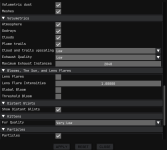
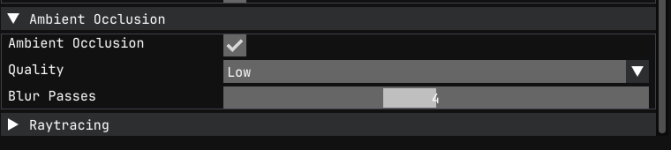
Could you share what graphics settings you're trying to run the game with and how much VRAM it seems to use with texture streaming enabled?

The point of texture streaming is to reduce the game's on-demand VRAM usage. If turning it off leads to a crash, then that may just be the threshold your GPU is capable of at the settings you're using.
 
Screenshot 2026-08-01 202458.png
 

Attachments

  • Screenshot 2026-08-01 202508.png
    Screenshot 2026-08-01 202508.png
    55.4 KB · Views: 0
  • Screenshot 2026-08-01 202518.png
    Screenshot 2026-08-01 202518.png
    59.7 KB · Views: 0
  • Screenshot 2026-08-01 202526.png
    Screenshot 2026-08-01 202526.png
    13.2 KB · Views: 0