• ⚠️ Mod Release Rules now apply to this board.

    All mods must include a license, source code (for executable mods), and proper attribution.

    Read the full rules here before posting.

Part Modding: Error: SubPartTemplate is null for ''

Spaceman3d

Member
Nov 14, 2025
115
72
When I try to laod my Part Mod, KSA crashes and I get the following Error:

Preparing Part Thumbnails...
System.NullReferenceException: SubPartTemplate is null for ''
at KSA.ModLibrary.Get[T](String id)
at KSA.SubPartReference.GetTemplate()
at KSA.SubPart..ctor(SubPartReference inReference, Part inParent)
at KSA.Part..ctor(PartTemplate inTemplate, Vehicle inVehicle, String inName)
at KSA.Rendering.ThumbnailEditor.PreparePartThumbnails(Loading inLoader, Viewport inRenderedViewport)
at KSA.Program.PreparePartThumbnails(Loading loader)
at KSA.Program..ctor(IReadOnlyList`1 inArgs)
at KSA.Program.Main(String[] inArgs) .ctor (in C:\prototype-planet\KSA\Program.cs:300)

 
I haven't done any part modding, I've just been looking through the code. Does the XML for you part contain the Id attribute for the subpart? From ../Content/Core/PartAssets.xml line 845 (I went deeper for something maybe more representative?):
XML:
    <SubPart Id="ApolloCSMDetailsSubPart">
        <SubPartModel Id="ApolloCSMDetailsSubPartModel">
            <Mesh Id="ApolloCSMDetails"/>
            <Material Id="Apollo2Mat"/>
        </SubPartModel>

        <Engine Id="AJ10-137">
            <Location X="-6.5" Y="0.0" Z="0.0" />
            <ExhaustDirection X="-1" Y="0" Z="0" />
            <!-- Realistic values -->
            <!-- <Thrust KN="43.7" /> -->
            <!-- <SpecificImpulse Seconds="319" /> -->
            <!-- <MinimumThrottle Value="1" /> -->
            <Thrust KN="650" />
            <SpecificImpulse Seconds="100000" />
            <MinimumThrottle Value="0.05" />
            <VolumetricExhaust Id="ApolloCSM" />
            <SoundEvent Action="On" SoundId="DefaultEngineSoundBehavior"/>
        </Engine>
    </SubPart>

And the decompiled code for ModLibary:
C#:
        if (typeFromHandle == typeof(SubPartTemplate) || typeFromHandle.IsSubclassOf(typeof(SubPartTemplate)))
        {
            if (!(AllSubParts.Find(KeyHash.Make(id)) is T result9) || 1 == 0)
            {
                throw new NullReferenceException(typeFromHandle.Name + " is null for '" + id + "'");
            }

            return result9;
        }

This may be the cause.
 
I have the id attribute but is still brings up the same Error

XML:
<Assets>

  <MeshFile Id="MCRN TachiMeshFile" Path="Meshes/MCRN_Tachi.glb" Category="Vessel" />
 
  <PbrMaterial Id="TachiMat">
        <Diffuse Path="Textures/Tachi_DIffuse.png" Category="Vessel"/>
        <Normal Path="Textures/Tachi_Normal.png" Category="Vessel"/>
        <RoughMetalAo Path="Textures/Tachi_ORM.png" Category="Vessel"/>
    </PbrMaterial>

  <Part Id="MCRN-Tachi">
    <SubPart Id="MCRN Tachi">
        <SubPartModel Id="MCRN_TachiModel">
            <Mesh Id="MCRN TachiMeshFile"/>
            <Material Id="TachiMat"/>
        </SubPartModel>     
    </SubPart>
    
  </Part>

</Assets>
 
Hi, so here's the change that caused this, and the fix:

Revision 2859
  • Separated references to SubParts from their definitions. This helps prevent duplicate definitions and allows us to give each SubPart instance its own ID separate from the template ID.
  • Moved all inline-defined SubParts out into their own definitions.
Previously you could define a SubPart Id inside a Part, but now you must instead define it byself and then use SubPart InstanceOf inside the part like below, hope that helps.

XML:
    <SubPart Id="Axis_SubPart">
        <SubPartModel Id="Axis_SubPartModel">
            <Mesh Id="Axis_Mesh"/>
            <Material Id="RGB_Test_Mat"/>
        </SubPartModel>
    </SubPart>

    <Part Id="Axis_Part">
        <SubPart InstanceOf="Axis_SubPart"/>
        <Connector>
            <Transform>
                <Position X="0.0"/>
            </Transform>
        </Connector>
    </Part>
 
So I copyed your code above and replaced all file paths with my model file paths and now get this Error:

System.NullReferenceException: Object reference not set to an instance of an object.
at KSA.SubPartModel..ctor(SubPartModelReference inModelReference)
at KSA.SubPartModel.Get(SubPartModelReference inModelReference)
at KSA.SubPart..ctor(String inName, SubPartTemplate inTemplate, Part inParent, Nullable`1 inTransform, Nullable`1 inGimbal)
at KSA.SubPart..ctor(SubPartReference inReference, Part inParent)
at KSA.Part..ctor(PartTemplate inTemplate, Vehicle inVehicle, String inName)
at KSA.Rendering.ThumbnailEditor.PreparePartThumbnails(Loading inLoader, Viewport inRenderedViewport)
at KSA.Program.PreparePartThumbnails(Loading loader)
at KSA.Program..ctor(IReadOnlyList`1 inArgs)
at KSA.Program.Main(String[] inArgs) .ctor (in C:\prototype-planet\KSA\Program.cs:300)

Code:
XML:
<Assets>
    <MeshFile Id="MCRN-Tachi_Mesh" Path="Meshes/MCRN_Tachi.glb" Category="Vessel"/>
    
    <PbrMaterial Id="MCRN-Tachi_Mat">
        <Diffuse Path="Textures/Tachi_DIffuse.png" Category="Vessel"/>
        <Normal Path="Textures/Tachi_Normal.png" Category="Vessel"/>
        <RoughMetalAo Path="Textures/Tachi_ORM.png" Category="Vessel"/>
    </PbrMaterial>

    <SubPart Id="MCRN-Tachi_SubPart">
        <SubPartModel Id="MCRN-Tachi_SubPartModel">
            <Mesh Id="MCRN-Tachi_Mesh"/>
            <Material Id="MCRN-Tachi_Mat"/>
        </SubPartModel>
    </SubPart>

    <Part Id="MCRN-Tachi_Part">
        <SubPart InstanceOf="MCRN-Tachi_SubPart"/>
        <Connector>
            <Transform>
                <Position X="0.0"/>
            </Transform>
        </Connector>
    </Part>
</Assets>
 
Yeah sorry not sure what your issue is. That should be correct. KSA is very sensitive to naming, is this your only SubPart in the entire mod?
 
Last edited:
I guess my Software Engineering problem-solving skills need yet more work. I tried following your latest stack trace in v2025.11.11.2924 and I'm at a loss. Your XML looks fine - you give it everything it's asking for.

Could it maybe a typo in your Diffuse path? :
<Diffuse Path="Textures/Tachi_DIffuse.png" Category="Vessel"/>
vs
<Diffuse Path="Textures/Tachi_Diffuse.png" Category="Vessel"/>
 
Welp same Errot still. I checked the typo was also in the texture file name,as I copied the texture file name. wold not have made a diffrence bur tried annyway
only subpart
 
Last edited:
Here is the file. meshes and textures included. Its just a part without anny RCS or engines. Also I havent created a Vehicle. My idea is to use the Editor to place it into the world and the use the "Create new Vehicle button" to make it a seperate vehicle
 
Last edited:
Your problem is <RoughMetalAo> they switched to the more standard ORM format, which is now <AoRoughMetal>, I know, I know :D

Also, you have some duplicate IDs in your mod that will conflict with Core, including the following, you'll want to remove/rename these.

ApolloRCS
ApolloCSM
EngineA
MmuRcsVac

Hope that helps!
 
updated the ORM texture and removed the "exhaustAssets.xml" file. still crashes same error. Attached Updated the Mod file
 

Attachments

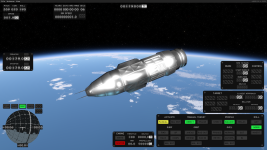
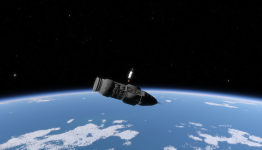
IT'S WORKING!!!!!!!!! Thanks for the Help. great Comunity here!
 

Attachments

  • Screenshot 2025-11-27 143610.png
    Screenshot 2025-11-27 143610.png
    3.4 MB · Views: 0
  • Like
Reactions: UriahGnu