
Game Version
v2026.6.7.4631Operating System
Windows 10What Happened
If and only if I choose in the launcher dialog the 2K/16MB option for parts textures, then KSA crashes after logging about anVK_ERROR_DEVICE_LOST error.The effect is 100% reliable/reproducible so far.
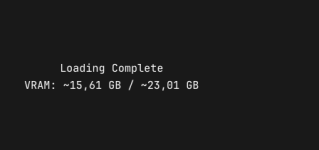
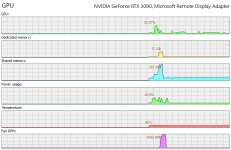
According to KSA itself, to the TaskManager and to my ProcessExplorer clone, there's still plenty of VRAM available.
Examples:
- Always crash: 2K-parts-textures, with "Earth only", all settings to MINimum --> about 6 / 24 GB VRAM in use, before crash.
- Always okay: 1K-parts-textures, but with "Solar system", all settings to MAXimum --> about 16 / 24 GB VRAM in use.
What Was Expected
Choosing the 2K-parts-textures shouldn't lead to crashes.Reproduction Steps
- Start KSA
- Choose "2K / 16MB" parts textures in the launcher dialog
- Try to proceed to the actual game
- Watch the game loading/initializing until "Loading complete" appears,
and just disappearing about half a second later
Reproduction Rate
Always. 100% reliable.Additional Info
- System
- 64 GB RAM
- Nvidia RTX 3090 with 24 GB VRAM
- Neither CPU nor GPU are overclocked/undervolted
- From the KSA log file after a crash:
-
Code:
07:54:33.594  INFO Application Initialization Complete
07:54:33.603  INFO Controlling 'Rocket'
07:54:33.671 DEBUG master server version: 'v2026.6.7.4631'
07:54:33.671  INFO you are running the latest version
07:54:35.414 ERROR Unhandled exception Brutal.VulkanApi.VkResultError: Vulkan call to vkWaitForFences failed with error: VK_ERROR_DEVICE_LOST
   at Core.Renderer.TryAcquireNextFrame()
   at KSA.Program.OnPreRender(Double dtPlayer)
   at KSA.Program.OnFrame(Double currentPlayerTime, Double dtPlayer)
   at KSA.App.Run()
   at KSA.Program.Main(String[] inArgs).
-
- From the Window Event Viewer about the KSA crashes:
- Faulting application name: Brutal.Monitor.Subprocess.exe, [...] Exception code: 0xe0434352
- Video/Screenshots:
- Screenshot atttached of last sign of life of KSA before crashing ("Loading complete")
- Screenshot attached of my ProcessExplorer clone showing VRAM usage (up to ~16 / 24 GB)
Attachments

Upvote
2



