Solved Ahwoo install failed

DeadInferno

New Member
Messages
4
Reaction score
5
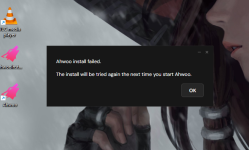
After installation, when I try to launch the launcher, it fails to start and eventually displays the following error: "Ahwoo install failed".

System information:
  • OS: Windows 11
  • Browser: Google Chrome
Steps:
  1. Try to launch the "Ahwoo" launcher using the desktop shortcut.
  2. Nothing happens immediately; the launcher doesn't start.
  3. After 30–50 seconds, the "Ahwoo install failed" error message appears.
 

Attachments
  • Снимок экрана 2026-11-10 080646.png
    Снимок экрана 2026-11-10 080646.png
    173.6 KB · Views: 0
Upvote 0
This suggestion has been implemented. Votes are no longer accepted.
Hey @DeadInferno and welcome to the forums!

Sorry to hear that you're having issues with the client.

So we can offer some advice, can you please open up C:\Users\YOUR_NAME\AppData\Local\Ahwoo\Client\Logs and zip all the logs and reply with that here?

Could you please also let us know what country you're in and whether you're using a VPN here?
 
Sure, here it is.

My home country is the Russian Federation. Initially, I wasn't using a VPN, but after the installation failed, I tried again with a VPN enabled. Unfortunately, that didn't solve the issue.

As for the forums, I tried accessing them both with and without a VPN.
 

Attachments

I also noticed that I couldn't access the "ahwoo.com" domain or any of its subdomains. The pages seemed to load incompletely and just showed a blank white screen. However, if I enabled my DPI bypass tool, the domain loaded successfully and I was able to use the forums. So it seemed like some kind of routing issue.

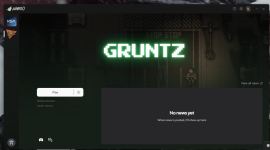
As it turned out, after I forced my DPI bypass tool to filter packets sent to the "ahwoo.com" domain, I was actually able to launch the launcher, download and start the game (Gruntz)! Both the forums and the main website are now working without any issues as well.

So I'm pretty confident the issue was related to routing — perhaps something was going wrong when the initial packets were sent? I'm not entirely sure, but the launcher is now starting without any problems.
 

Attachments

  • Снимок экрана 2026-11-10 194515.png
    Снимок экрана 2026-11-10 194515.png
    397.5 KB · Views: 0
Here's what I did to fix the issue from my location in Russia:
  1. Launched my DPI bypass tool (zapret-discord-youtube).
  2. Added the "ahwoo.com" domain to the packet filtering list.
  3. Enabled packet filtering.
I figured I'd leave this here in case it helps someone else with the same issue.
 
Yeah I believe your ISP is restricting access to Cloudflare IP addresses, which the whole Ahwoo platform is behind at the moment. Great you got it working!
 
Back
Top