

Sencho
New Member
- Messages
- 3
- Reaction score
- 3
 RU
RUПриветствую всех, если при запуске игры у вас появится звук, но не появится окно с игрой, это для вас.
(Способ который мне реально помог чуть ниже)
Шаг 1. Установка или обновление .NET 10 Runtime
Игра жестко регулируется на .NET 10. В дистрибутивах на базе Arch стандартные пакеты могут анализировать или отсутствовать, поэтому лучше ставить бинарные версии из AUR.
1. Откройте терминал и установите актуальный .NET 10 (если у вас используется yay):
yay -S dotnet-runtime-bin dotnet-sdk-bin
2. Если пакетный менеджер запросит замену существующего старого пакета (например, dotnet-sdk), подтвердите замену, нажав кнопку y.
Шаг 2. Переход к корневой папке игры
Лаунчер скачивает файлы игры в закрытые или пользовательские каталоги. Нам нужно добраться до исполняемого файла (Gruntz) напрямую.
1. По умолчанию игра находится по пути:
домашняя папка/games/Ahwoo/Gruntz/

2. Убедитесь, что у файла есть права на исполнение:chmod +x Gruntz (я это не делал,xd)
Шаг 3. Запуск игры с обходом глобализации.NET
Главный прикол получения успеха при запуске, как я понял, кроется в передаче Специального флага DOTNET_SYSTEM_GLOBALIZATION_INVARIANT=1, который отключает проблемы возникновения системных ICU-библиотек локализации, мешающие открытию графического окна.
Запустите игру с терминала в корневой папке Gruntz: DOTNET_SYSTEM_GLOBALIZATION_INVARIANT=1 ./Gruntz -windowed
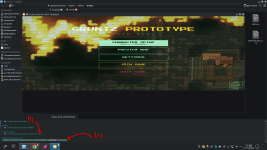
Альтернативный шаг: Принудительный перевод игры в оконный режим
Важное примечание: «Из коробки» игра обычно запускается нормально. Проблема с отсутствием окна (когда идет только звук) почти всегда появляется после того, как вы вы один раз включили Fullscrean (полный экран) в настройках и решили перезапустить игру...
да-да-да, не удивляйтесь этим «...», ведь по итогу мне помог этот способ, а я думал, что способ выше решил мои проблемы, xd.
P.S надеюсь что способ выше все ровно не будет лишним, вдруг кому поможет.
Для решения проблемы вам всего навсего нужно зайти в настройки игры, которые лежал по пути: Документы/My Games/Gruntz/settings.toml
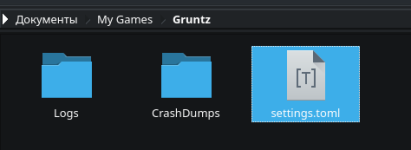
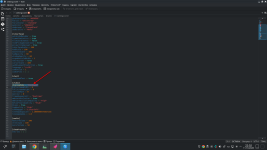
Внутри этого текстового документа листаем в самый низ до пункта [video] и видим displayMode = "Fullscrean" меняем его значение на
"Windowed" или "Borderless" сохраняем изменения и радуемся=)
 ENG
ENGHi everyone! If your game process is running, you can hear the background audio, but the main game window refuses to pop up, this fix is for you. (The method that actually helped me is a bit further down)
Step 1: Install or Update .NET 10 Runtime
The game heavily relies on .NET 10. On Arch-based distros, official repository packages might conflict or miss specific components, so installing the -bin versions from AUR is recommended.
1. Open your terminal and install .NET 10 via yay:
yay -S dotnet-runtime-bin dotnet-sdk-bin
2. If your package manager asks to replace/remove conflicting old packages (like standard dotnet-sdk), press y to confirm.
Step 2: Navigate to the Game Folder
The launcher stores game files in user/hidden directories. You need to access the main binary directly. We need to get to the executable file (Gruntz) directly.
1. By default, the game is located at:
home folder/games/Ahwoo/Gruntz/

2. Make sure the file has execution permissions:chmod +x Gruntz (I didn't do this, xd)
Step 3. Launching the game with bypassing .NET globalization
The main point of achieving success upon launch, as I understand it, lies in passing the Special flag DOTNET_SYSTEM_GLOBALIZATION_INVARIANT=1,which disables the problems of occurrence of system ICU localization libraries that prevent the opening of the graphic window.
Launch the game from the terminal in the Gruntz root folder DOTNET_SYSTEM_GLOBALIZATION_INVARIANT=1 ./Gruntz -windowed
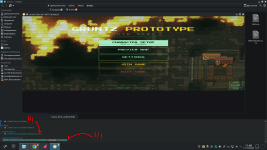
Alternative Step: Force the Game into Windowed Mode
Important note: Out of the box, the game usually launches just fine. The problem with a missing game window (when only the audio plays) almost always appears after you once turned on Fullscreen in the settings and decided to restart the game...
Yes-yes-yes, don't be surprised by these "...", because in the end it was this method that helped me, while I thought that the method above had already solved my problems, xd.
P.S. I hope the method above won't be useless anyway, just in case it helps someone.
To solve the problem, you just need to go into the game settings, which are located at: Documents/My Games/Gruntz/settings.toml.
Inside this text document, scroll down to the very bottom to the [video] section, where you will see displayMode = "Fullscreen". Change its value to "Windowed" or "Borderless", save the changes, and enjoy=)
Last edited:
