
CompactHUD is a Kitten Space Agency mod that condenses the information from all the UI windows into 2 small ones. This mod doesn't modify/change the existing UI only adds the two windows. Due to the nature of the game and the mod features the existing windows will lose functionality when the mod is enabled but can be disabled during the game. This mod conflicts with mods that control your vehicle but, disabling the mod in the tab on the menu bar should let them work.
License: MIT
Download https://github.com/Restricted117/KSA-CompactHUD/releases#release-v0.1.0
Source code: https://github.com/Restricted117/KSA-CompactHUD
Dependencies
CompactHUD supports manual installation through StarMap or by using the mod loader Borea.
Borea
1. Install [Borea](https://github.com/KSAModding/Borea)
2. Search for KSA-CompactHUD and install.
3. Launch from Borea to use the mod.
StarMap
1. Follow the install instructions and install [StarMap](https://github.com/StarMapLoader/StarMap).
2. Download and extract the latest release CompactHUD from the releases.
3. Place the CompactHUD folder into Documents/My Games/Kitten Space Agency/mods (recommended, persists across game updates) or <KSA Installation>/Content/<ModName>
make sure the mod is CompactHUD/<mod files> and not CompactHUD/CompactHUD/<mod files>
4. Open Documents/My Games/Kitten Space Agency/manifest.toml and add this to it and save:
Gallery
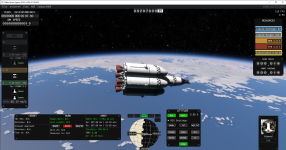
Horizontal Layout
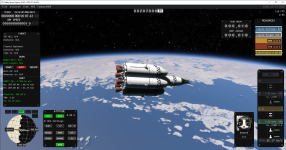
Vertical Layout
License: MIT
Download https://github.com/Restricted117/KSA-CompactHUD/releases#release-v0.1.0
Source code: https://github.com/Restricted117/KSA-CompactHUD
Dependencies
- Required: StarMap https://github.com/StarMapLoader/StarMap
- Optional: ModMenu https://github.com/MrJeranimo/ModMenu
- Navball sets the frame of the vehicle flight computer. This means that if you're set to prograde and the navball is set to the surface frame it points prograde in that frame. Switching to orbit frame points to prograde in that frame and etc.
- Now allows you to point in the positive velocity direction in your target frame. The base game only allows for pointing in the negative direction of your target.
- Time to apoapsis/periapsis is shown in info window.
- Max G-load warning. The G force readout turns yellow at 50% of your vehicles structural limit and turns red at 70%.
- The info panel supports vertical/horizontal layouts.
- The window layout is saved automatically when exiting the game and is loaded once on startup.
- Works with ModMenu or without it.
CompactHUD supports manual installation through StarMap or by using the mod loader Borea.
Borea
1. Install [Borea](https://github.com/KSAModding/Borea)
2. Search for KSA-CompactHUD and install.
3. Launch from Borea to use the mod.
StarMap
1. Follow the install instructions and install [StarMap](https://github.com/StarMapLoader/StarMap).
2. Download and extract the latest release CompactHUD from the releases.
3. Place the CompactHUD folder into Documents/My Games/Kitten Space Agency/mods (recommended, persists across game updates) or <KSA Installation>/Content/<ModName>
make sure the mod is CompactHUD/<mod files> and not CompactHUD/CompactHUD/<mod files>
4. Open Documents/My Games/Kitten Space Agency/manifest.toml and add this to it and save:
5.Launch KSA using StarMap to use the mod.[[mods]]
id = "CompactHUD"
enabled = true
Gallery
Horizontal Layout
Vertical Layout
Last edited:


