

SterlingOrbital
New Member
- Messages
- 1
- Reaction score
- 1
Sterling Orbital: Sparrow Launch System
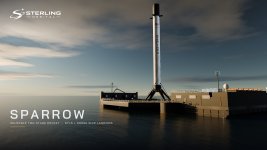
The Sparrow is a reusable two-stage rocket for Kitten Space Agency, with its own engines, a drone ship, and flight software that flies the whole mission for you: ascent, staging, then a propulsive landing of the first stage, either back at the pad (RTLS) or on the drone ship at sea.
DOWNLOAD
Not affiliated with or endorsed by Space Exploration Technologies Corp.
Source code: https://github.com/SterlingOrbital/SterlingOrbital (flight software in source/SterlingFlight)
Bug reports and feedback welcome here or at https://github.com/SterlingOrbital/SterlingOrbital/issues
The Sparrow is a reusable two-stage rocket for Kitten Space Agency, with its own engines, a drone ship, and flight software that flies the whole mission for you: ascent, staging, then a propulsive landing of the first stage, either back at the pad (RTLS) or on the drone ship at sea.
DOWNLOAD
- Download: https://github.com/SterlingOrbital/SterlingOrbital/releases/tag/v1.0.0 (SterlingOrbital_v1.0.0.zip)
- Code (SterlingFlight.dll and its source): MIT
- Parts, models, textures, liveries: CC BY 4.0
- Bai Jamjuree font: SIL Open Font License 1.1
- SPDX: MIT AND CC-BY-4.0. Full license text in the LICENSE file in the download and in the repository.
- Parts: first stage (clean and sooted liveries), interstage with built-in attitude thrusters, second stage, payload adapter, fairing halves, grid fins, landing legs, the octaweb with nine Anvil 1D engines, and the Anvil Vac upper-stage engine.
- The autonomous drone ship "It Was Never Goodbye", which heads out to sea for drone ship landings.
- Flight software: mission control panel, live launch webcast, booster guidance with boostback, entry and landing burns, grid fin steering, landing leg suspension, engine sets (9 / 3 / 1), and soot that builds up on the booster during the entry and landing burns.
- Build the Sparrow in the editor (octaweb, first stage, 4 legs, 4 grid fins, interstage, second stage with the Anvil Vac, payload adapter, payload, fairings).
- Put it on the pad at KSC (LC-39A).
- Open Sterling Orbital > Sparrow Mission Control in the top menu bar (or press Ctrl+Shift+F), pick RTLS or DRONESHIP, set the orbit, press LAUNCH, and watch.
- After the landing, press RECOVER VEHICLE to recover the booster and the drone ship.
- A broadcast-style overlay for your launch: mission name (taken from the vehicle name), T- / T+ clock, a timeline of mission events (MECO, entry burn, landing burn, landing, fairing, SECO) that scrolls with mission time, and speed and altitude telemetry for stage 1 and stage 2.
- On by default. Turn it on or off with the "Webcast at launch" ON / OFF switch in the Mission Control panel before you press LAUNCH.
- When you press LAUNCH, the game's own UI fades out and the webcast takes over the screen. The flight software keeps flying either way.
- To leave the webcast and get the game UI back, press F2 or Ctrl+Shift+W. Press Ctrl+Shift+W again to bring the webcast back at any time.
- Kitten Space Agency build 2026.11.25.5949 or newer (may work on earlier builds but not tested)
- StarMap mod loader 0.5.4 or newer (needed for the flight software): StarMap forum thread / StarMap on GitHub
- Windows
- Download SterlingOrbital_v1.0.0.zip from the release page above.
- Copy the SterlingOrbital folder into Documents\My Games\Kitten Space Agency\mods\
- Enable it in manifest.toml.
- Start the game through StarMap.
- The guidance system is not perfect, but excitement is guaranteed.
- Automated flights launch from KSC only for now.
- First-stage soot isn't kept when you reload a save (use the sooted variant for a flown look).
- 3D model: "Falcon 9 - SpaceX" by Stanley Creative, CC BY 4.0, version as published on Sketchfab, https://sketchfab.com/3d-models/394f7cf52d124bbd9db69f24d1ff2f08. Modified: the Sparrow stages, interstage, fairing, grid fins and octaweb are derived from it (split into game parts, re-meshed, re-textured and re-branded). Not endorsed by the author.
- Font: Bai Jamjuree (Medium, SemiBold) by Cadson Demak, SIL Open Font License 1.1, version 1.000, https://fonts.google.com/specimen/Bai+Jamjuree
Not affiliated with or endorsed by Space Exploration Technologies Corp.
Source code: https://github.com/SterlingOrbital/SterlingOrbital (flight software in source/SterlingFlight)
Bug reports and feedback welcome here or at https://github.com/SterlingOrbital/SterlingOrbital/issues


