

Elevatorcait
New Member
- Messages
- 8
- Reaction score
- 9
Webcast Telemetry Overlay
Mod name: Webcast Telemetry Overlay (`KSATelemetryOverlay`)
Current Version: 1.2.0 (Last updated 11/02/2026)
License: MIT
Download: Borea (recommended), or Spacedock / Github Releases
Source code: https://github.com/elevatorctln/KSA-Public-Telemetry
---
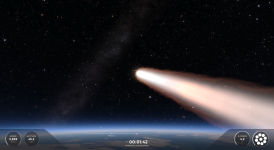
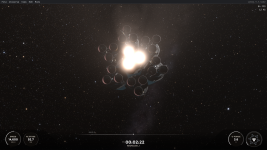
This is a work-in-progress mod that creates a SpaceX-style launch broadcast telemetry overlay in-game. The overlay is populated with live data from the active vehicle and the mod includes an engine diagram generated automatically using the actual position of the engines on your stage relative to each other.
See it in action:
The mod features:
- A bottom telemetry bar: speed and altitude on the left, T+ clock and mission timeline in the center, g-force and the engine diagram on the right. All of these positions are configurable. Styled to look like the SpaceX webcast overlay, slick animations and all.
- An engine diagram built from the real nozzle positions on your active stage, with a propellant arc gauge around it. It intelligently displays the engines on the current stage, and filters out thngs like verniers and RCS nozzles. Engines are displayed to scale with each other based on exit diameter.
- Event notifications for certain in-flight events. Currently: Liftoff, Max-q, MECO, Stage Sep, SES-1, SECO, Landing burn, landing, and generic engine ignition/cutoff. I am not totally happy with how this works for now, it's not fully reliable but it does work most of the time. Improvements coming eventually, but it can be disabled in settings.
- Flight Recorder - Detailed below.
- A mission timeline bar showing detected events behind the marker and any planned maneuvers ahead of it.
- Freeze-on-signal-loss: if the vehicle stops being controllable, the overlay freezes at the last received values. When a vehicle passes 95% tolerance on any load limit, the telemetry pre-emptively freezes until either the vehicle breaks apart or the tolerance falls back below 95%. This prevents garbage telemetry being used from the same frame as a vehicle failure.
- Optionally and by default hides the flight UI while the overlay is up, and restores it afterwards. The HUD is shown again while the game's own layout-saving window is open, so a HUD layout saved with the overlay running does not have everything switched off.
- Every element is available as its own movable imgui window that behaves like any other.
- Fairly in-depth configuration available in the settings menu.
Flight Recorder:
The Flight Recorder is a replay feature that records the direct game render without the game HUD layer or any imgui elements at all. The game HUD can be used during the recorded flight, and will still not be visible in the replay. By default, this feature includes the telemetry overlay. After recording is complete, the finalization step composites the telemetry overlay onto the video. Because all of the telemetry has already been recorded by this point, the overlay clock is synced to liftoff and all mission events are placed ahead of time where they happened. This step can be disabled in the mod settings. Recording can be started/stopped by keybind (F9 by default), or by a button in the mod settings.
This features relies on ffmpeg being present on the user's machine and either listed in the PATH or manually pointed to from the settings.
IMPORTANT: In order to use the flight recorder properly, the "pixel culling" setting in KSA's graphics options must be disabled. When enabled, the game behind the UI elements is not rendered at all so they will appear as black squares in the replay.
Installation
I recommend installing via Borea. Alternatively you can download from Github or from Spacedock.
Dependencies
ModMenu is optional but recommended, it provides the settings dropdown menu. If modmap is not installed, the settings menu can be accessed through a keybind that brings up a dedicated window, by default numpad backslash
Settings
Toggle the overlay on and off using the numpad period key by default. This can be configured in the config file or the settings menu.
Settings are saved to `Documents/My Games/Kitten Space Agency/KSATelemetryOverlay/config.json`, which is safe to edit by hand if your heart so desires.
Third-party content included in this download
Montserrat (`montserrat/Montserrat-Regular.ttf`, `montserrat/Montserrat-Bold.ttf`)
- Author: Julieta Ulanovsky, with Reserved Font Names 'Montserrat'
- License: SIL Open Font License 1.1 — full text included as `montserrat/OFL.txt`
- Version used: 2.001
- Original work: https://github.com/JulietaUla/Montserrat
The fonts are bundled unmodified and unrenamed. MIT (this mod's code) and the OFL apply
to separate files in the package and don't conflict.
Licensing
This mod is MIT. The full text is in `LICENSE.TXT`
Mod name: Webcast Telemetry Overlay (`KSATelemetryOverlay`)
Current Version: 1.2.0 (Last updated 11/02/2026)
License: MIT
Download: Borea (recommended), or Spacedock / Github Releases
Source code: https://github.com/elevatorctln/KSA-Public-Telemetry
---
This is a work-in-progress mod that creates a SpaceX-style launch broadcast telemetry overlay in-game. The overlay is populated with live data from the active vehicle and the mod includes an engine diagram generated automatically using the actual position of the engines on your stage relative to each other.
See it in action:
- A bottom telemetry bar: speed and altitude on the left, T+ clock and mission timeline in the center, g-force and the engine diagram on the right. All of these positions are configurable. Styled to look like the SpaceX webcast overlay, slick animations and all.
- An engine diagram built from the real nozzle positions on your active stage, with a propellant arc gauge around it. It intelligently displays the engines on the current stage, and filters out thngs like verniers and RCS nozzles. Engines are displayed to scale with each other based on exit diameter.
- Event notifications for certain in-flight events. Currently: Liftoff, Max-q, MECO, Stage Sep, SES-1, SECO, Landing burn, landing, and generic engine ignition/cutoff. I am not totally happy with how this works for now, it's not fully reliable but it does work most of the time. Improvements coming eventually, but it can be disabled in settings.
- Flight Recorder - Detailed below.
- A mission timeline bar showing detected events behind the marker and any planned maneuvers ahead of it.
- Freeze-on-signal-loss: if the vehicle stops being controllable, the overlay freezes at the last received values. When a vehicle passes 95% tolerance on any load limit, the telemetry pre-emptively freezes until either the vehicle breaks apart or the tolerance falls back below 95%. This prevents garbage telemetry being used from the same frame as a vehicle failure.
- Optionally and by default hides the flight UI while the overlay is up, and restores it afterwards. The HUD is shown again while the game's own layout-saving window is open, so a HUD layout saved with the overlay running does not have everything switched off.
- Every element is available as its own movable imgui window that behaves like any other.
- Fairly in-depth configuration available in the settings menu.
Flight Recorder:
The Flight Recorder is a replay feature that records the direct game render without the game HUD layer or any imgui elements at all. The game HUD can be used during the recorded flight, and will still not be visible in the replay. By default, this feature includes the telemetry overlay. After recording is complete, the finalization step composites the telemetry overlay onto the video. Because all of the telemetry has already been recorded by this point, the overlay clock is synced to liftoff and all mission events are placed ahead of time where they happened. This step can be disabled in the mod settings. Recording can be started/stopped by keybind (F9 by default), or by a button in the mod settings.
This features relies on ffmpeg being present on the user's machine and either listed in the PATH or manually pointed to from the settings.
IMPORTANT: In order to use the flight recorder properly, the "pixel culling" setting in KSA's graphics options must be disabled. When enabled, the game behind the UI elements is not rendered at all so they will appear as black squares in the replay.
Installation
I recommend installing via Borea. Alternatively you can download from Github or from Spacedock.
Dependencies
| Mod | Required? | Link |
| StarMap | Required |
GitHub - StarMapLoader/StarMap: KSA Mod LoaderKSA Mod Loader. Contribute to StarMapLoader/StarMap development by creating an account on GitHub.
 github.com |
| ModMenu | Optional |
GitHub - MrJeranimo/ModMenu: A simple KSA mod that adds a "Mods" tab to the Menu Bar at the top of the game.A simple KSA mod that adds a "Mods" tab to the Menu Bar at the top of the game. - MrJeranimo/ModMenu
github.com
|
Settings
Toggle the overlay on and off using the numpad period key by default. This can be configured in the config file or the settings menu.
Settings are saved to `Documents/My Games/Kitten Space Agency/KSATelemetryOverlay/config.json`, which is safe to edit by hand if your heart so desires.
Third-party content included in this download
Montserrat (`montserrat/Montserrat-Regular.ttf`, `montserrat/Montserrat-Bold.ttf`)
- Author: Julieta Ulanovsky, with Reserved Font Names 'Montserrat'
- License: SIL Open Font License 1.1 — full text included as `montserrat/OFL.txt`
- Version used: 2.001
- Original work: https://github.com/JulietaUla/Montserrat
The fonts are bundled unmodified and unrenamed. MIT (this mod's code) and the OFL apply
to separate files in the package and don't conflict.
Licensing
This mod is MIT. The full text is in `LICENSE.TXT`
Last edited:


