• ⚠️ Mod Release Rules now apply to this board.

    All mods must include a license, source code (for executable mods), and proper attribution.

    Read the full rules here before posting.

Borea - the community content manager for KSA

Maxi

Member
Messages
197
Reaction score
146
Borea is the community content manager for Kitten Space Agency.
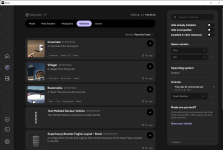
1790178761153.png

License: MIT
Download: https://github.com/KSAModding/Borea/releases/latest
Source code and issues: https://github.com/KSAModding/Borea
Dependencies: none, Borea installs StarMap when a mod needs it
Systems: Windows, Linux and macOS (Apple silicon)

What Borea does
Borea finds your game, installs mods and mod packs with their dependencies into separate instances, so one modded setup never breaks another, and keeps them up to date.
It starts the game through StarMap with the right instance, tells you which mod caused a crash, and looks after your saves, vehicles and backups along the way.

Install
Download the App archive for your system from the release page. On Windows and Linux, unpack the Borea folder somewhere it can stay. On macOS, drag Borea.app into Applications. After that, "Update now" on the Home banner installs every later release.

For mod authors
"List or change your mod" in the App writes your listing, checks it while you type, helps you fill in the dependencies of your mod, and opens the pull request for you. New releases on GitHub or SpaceDock are picked up on their own. Set a game_max when you know a game build breaks your mod, and players on a newer build cannot install it by mistake.

Good to know
  • Builds are not code signed yet, so Windows and macOS might need one extra step on the first start. The release page says what to click.
  • If something looks wrong, it probably is, and we want to hear about it.
  • Borea is a community project by the KSA Modding team, not made by RocketWerkz.
Discord: https://discord.gg/nt4fK4QuTz
Content index: https://github.com/KSAModding/content-index
Website: https://ksamodding.github.io/Borea/
 
Last edited:
Borea v0.3.0 is out 🎉 : https://github.com/KSAModding/Borea/releases/tag/v0.3.0

If you already use Borea, it will offer to update itself from the banner on Home.

For players:

  • Borea keeps only one copy of each mod release and links it into every instance, so a mod you already have is not downloaded twice and does not take up extra space.
  • When the game crashes, Borea tells you which mod caused it and opens the crash log.
  • UI/UX improvmenets such as: Favorites, a filter for mods from your other instances, smooth scrolling, and game settings presets for new instances.
For mod authors:
  • We reccomend to keep the files your mod writes outside its own folder. Borea now shares mod folders between instances so that the user does not have to download and store the mod again and again per instance. However if Borea detects that you do not follow that advice and a mod that writes into its own folder, it automatically gets a separate copy per instance so both approaches should work without issues.
  • You can now create mod pack listings from the listing editor in Borea
Experimental: Borea can start the Windows build of KSA on a Mac through a Wine wrapper such as Sikarugir.
 
Borea v0.5.0 is out: https://github.com/KSAModding/Borea/releases/tag/v0.5.0

If you already use Borea, it offers to update itself from the banner on Home. On a Mac, download Borea.app once by hand and drag it into Applications, because Borea is now a real macOS app. Later updates install themselves again.

For players:
  • Borea finds KSA when you installed it with the new Ahwoo client, on Windows and Linux.
  • A mod or pack whose stated game_max is older than your game is now Incompatible, so a game update no longer installs content that its author marked as broken.
  • Discover sorts by "Recently listed", shows what you installed at a glance, and filters by author when you click an author name.
  • The Mods tab of a pack is a table, and you can use a newer release of a member from there.
  • Smooth scrolling and softer animations.
  • On macOS, Borea has its own name and icon in the Dock and opens borea:// links.
For mod authors:
  • The listing editor shows the dependencies of your mod.toml and helps you add bounds.
  • A fork or a SpaceDock mod can prove that you own it.
  • tag_prefix lets one repository hold other releases next to the mod releases.
Help us Translate Borea on Hosted Weblate, in the browser: https://hosted.weblate.org/engage/borea/
 
Borea v0.5.2 is out (since yesterday) 🎉 https://github.com/KSAModding/Borea/releases/tag/v0.5.2

Borea is now available in Simplified Chinese! The whole UI, all ~1,500 texts, was translated by kuxiaowo (https://github.com/kuxiaowo), who also did a Chinese README for the repo and the new translator list in Settings > About.

Besides that, a few fixes. Just click "Update now" on the Home banner.

If you speak another language and want to help: https://github.com/KSAModding/Borea/blob/main/docs/localization.md
 
Borea v0.6.0 is out: https://github.com/KSAModding/Borea/releases/tag/v0.6.0

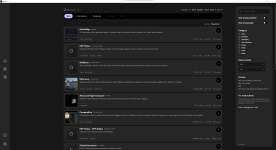
1793644539375.png

If you already use Borea, it offers to update itself from the banner on Home. Your instances, mods and settings stay as they are.

For players:
  • Vehicles and saves are in Discover now. You install them like mods, with all the mods they need, and you can look at a vehicle in 3D before you install it.
  • Share your own vehicles and saves on ksamods.gg, right from Borea. A few minutes later every Borea player finds them in Discover.
  • An instance can keep the KSA build it was made for, so a game update no longer breaks your modded setup.
  • Each instance can use its own StarMap version, and a missing one installs with one click.
  • "Update all" shows what it will change before it starts.
For mod authors:
A big thank you to @SafeShows for building the sharing with us on ksamods.gg, and to @zhengxin pang for the Chinese translation!
 
Wow, such creative and whimsical vehicles! ;)
 
Back
Top