game not opening

OXHY

New Member
Jun 21, 2026
3
0

Game Version

2026.1.123.4567​


Operating System

Windows11

What Happened​

The game opened in the taskbar for a few seconds and there was a blue circle spinning next to the cursor a few seconds later the game closed

What Was Expected​

I was expecting the game to open normally

Reproduction Steps​

What is 'Reproduction Steps'?

Reproduction Rate​

What is 'Reproduction Rate'?

Additional Info​

  • Other Notes:
 
This thread has been moved to Technical Support.
 
1. what hardware do you have? If you dont know it you can check using the windows search bar -> search "Settings" -> go to "System" -> go to "About"

2. Check for logs in C:\Users\YourName\Documents\My Games\Kitten Space Agency\Logs\ Does the directory exist? If yes: what are the contents of the log file?

3. most important: check Windows Event Viewer (Win+R > eventvwr > Windows Logs > Application > "Find" (on the right side panel of the window if you are using windows 10) -> KSA") for entries with source ".NET Runtime" or "Application Error" around the time you tried to launch
 
  • Like
Reactions: Kiwi Shark
1. what hardware do you have? If you dont know it you can check using the windows search bar -> search "Settings" -> go to "System" -> go to "About"

2. Check for logs in C:\Users\YourName\Documents\My Games\Kitten Space Agency\Logs\ Does the directory exist? If yes: what are the contents of the log file?

3. most important: check Windows Event Viewer (Win+R > eventvwr > Windows Logs > Application > "Find" (on the right side panel of the window if you are using windows 10) -> KSA") for entries with source ".NET Runtime" or "Application Error" around the time you tried to launch
1.did you want to know the specs? They are intel i7 11th gen, Nvidia GeForce RTX 4060, 16gb RAM
2.Yes. KittenSpaceAgency and Archives>Brutal.260621.0, Brutal.260621.1, Brutal.260621.2, Brutal.260621.3, Brutal.260621.4
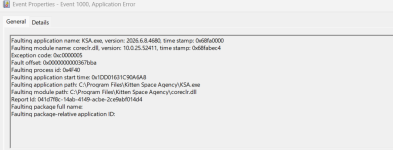
3. There is an event surrounding KSA.exe with "Source : Application Error"
 
1.did you want to know the specs? They are intel i7 11th gen, Nvidia GeForce RTX 4060, 16gb RAM
2.Yes. KittenSpaceAgency and Archives>Brutal.260621.0, Brutal.260621.1, Brutal.260621.2, Brutal.260621.3, Brutal.260621.4
3. There is an event surrounding KSA.exe with "Source : Application Error"
ok good, the specs of your PC are enough to run KSA :)

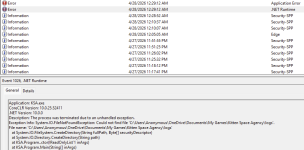
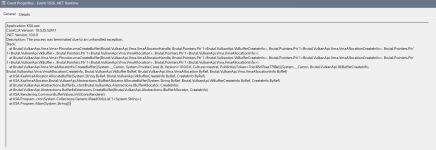
What are the contents of the (event) logs? There should also be an .Net Runtime error somewhere nearby like this:

1782060911373.png

Please send the logs of both
 
ok good, the specs of your PC are enough to run KSA :)

What are the contents of the (event) logs? There should also be an .Net Runtime error somewhere nearby like this:

View attachment 1670

Please send the logs of both
 

Attachments

  • Screenshot 2026-06-21 230638.png
    Screenshot 2026-06-21 230638.png
    345.5 KB · Views: 0
  • Screenshot 2026-06-21 230248.png
    Screenshot 2026-06-21 230248.png
    104 KB · Views: 0
Thank you for the logs. I honestly believe that we did not have such an error before.

The game crashes in CommonBufferValues.Init, which runs at the very start of startup right after the renderer is created, before the loading screen or the graphics setup popup even appear and the main graphic loading work is done, so "too much VRAM" not be the issue. The first thing it does there is allocate a tiny GPU buffer, and that allocation is what fails (vmaCreateBuffer).

I would to the following since it is the only thing that comes to mind:

1. Clean-install your NVIDIA driver
Download the latest Game Ready driver from https://www.nvidia.com/drivers , and during install choose "Custom" -> tick "Perform a clean installation". If you want to be thorough, use DDU (Display Driver Uninstaller) in Safe Mode first, then install fresh.