
Great news, you no longer need to reach out to Support if you want to change the email address associated with your Ahwoo account!
This is the first of a few new self-service features we've been working on. Stay tuned for future updates!
This is the first of a few new self-service features we've been working on. Stay tuned for future updates!
How to change your email address:
- Log into your Ahwoo Account.
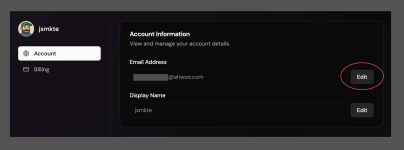
- Navigate to your Account Settings.
- Click the Edit button next to the email field.
- A new tab will open with a field to enter a new email address. Enter a new email address and click Change Email Address.
- Open the inbox of your new email address and look for the email titled Confirm your new Ahwoo account email. Open this and click Confirm new email address.
- A new tab will open confirming your email address has been changed.




