I have the same problem with AMD on Linux and I investigated a bit.
Operating System: EndeavourOS
KDE Plasma Version: 6.7.2
KDE Frameworks Version: 6.27.0
Qt Version: 6.11.1
Kernel Version: 7.0.14-arch1-1 (64-bit)
Graphics Platform: Wayland
Processors: 16 × AMD Ryzen 7 7800X3D 8-Core Processor
Memory: 32 GiB of RAM (30,5 GiB usable)
Graphics Processor 1: AMD Radeon RX 6800
Graphics Processor 2: AMD Ryzen 7 7800X3D 8-Core Processor
Manufacturer: Micro-Star International Co., Ltd.
Product Name: MS-7D75
System Version: 1.0
The terrain shader is under "linux-x64/Content/Core/Shaders/Planet/Planet.frag", so I modified it an shaved it down to first value that has artifacts.
That happens to be the displacements.
I discussed a lot with AI and I think (DON'T TAKE THIS AS FACT THOUGH) the problem is the following:
The displacements are the first point where textures chosen based on a non uniform id are sampled. In that case `globalTextures[material.displacementId]`.
I don't know much about shaders and GPUs but as far as I understand, the GPUs samples multiple pixels at once in a wavefront and assumes that the control flow is the same for all pixels in the wavefront.
However when that assumption breaks, artifacts appear.
In this case, one pixel must sample texture A at a certain point and another pixel in the same wavefront should sample texture B.
I attached a zip with the modified "Planet.frag" I experimented with.
There are two sections:
C-like:
    // BEGIN SECTION
    // This section has artifacts
    displacement = SampleBiplanarTextureGrad(
            globalTextures[material.displacementId],
            // This also does not work.
            // (When enabling, you have to put "#extension GL_EXT_nonuniform_qualifier : require" at the top below the version.)
            // nonuniformEXT(material.displacementId),
            linearRepeatSampler,
            biplanarInfo,
            sampleBiplanarMajor,
            sampleBiplanarMedian,
            texturePos.xyz,
            uvOffset1,
            uvOffset2,
            material.textureTiling * tilingFactor.x,
            material.textureTiling * tilingFactor.y,
            texBlend
    ).r;
    // END SECTION
The first is akin to the current code that produces artifacts.
C-like:
    // BEGIN SECTION
    // This section has no artifacts
    // 110 to 130 is the approximate range of the used displacement textures for me.
    // But that probably varies from start to start, with location and with different settings.
    int textureIdx = material.displacementId;

    #pragma unroll
    for (int i = 110; i < 130; i++)
    {
        if (i == textureIdx)
        {
            displacement = SampleBiplanarTextureGrad(
                    globalTextures[textureIdx],
                    linearRepeatSampler,
                    biplanarInfo,
                    sampleBiplanarMajor,
                    sampleBiplanarMedian,
                    texturePos.xyz,
                    uvOffset1,
                    uvOffset2,
                    material.textureTiling * tilingFactor.x,
                    material.textureTiling * tilingFactor.y,
                    texBlend
            ).r;
        }
    }
    // END SECTION
The second has a loop over some texture ids that happen to contain the ones needed. But it only samples if the index in the loop is the needed one.
Even though I came up with this loop "fix" by myself (and not the AI), I don't quite understand why it works.
My guess is that this ensures that for different pixels in the same wavefront, the same texture is always sampled at a given point in the control flow. If different textures need to be sampled, it happens at different points.
Obviously, this "fix" does not scale, since we would have to loop over all texture ids to make it always work.
The AI also suggested to me probably a thousand times to use `nonuniformEXT(material.displacementId)` instead of just `material.displacementId` and to add `#extension GL_EXT_nonuniform_qualifier : require` at the top.
That doesn't work though. Not sure why. Maybe this needs to be enabled somewhere in the CPU code too?
The same texture id access also causes artifacts with the other textures, like diffuse, normal and aoRoughMetal I think.
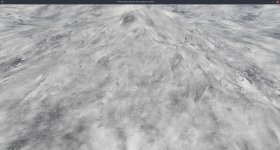
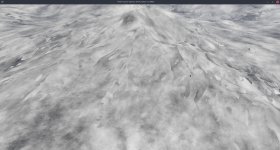
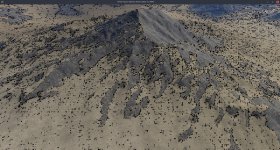
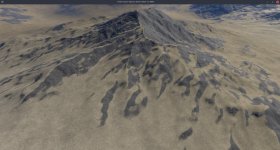
I have attached screenshots of the displacement without the fix, with the fix and the vanilla view.
Does this help
@Linx ? If you want to send shader files with attempted fixes, I can paste them in and give'em a spin.