Black-Talon
New Member
- Apr 16, 2026
- 1
- 0
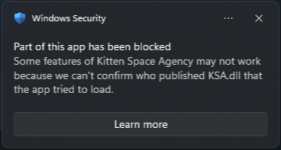
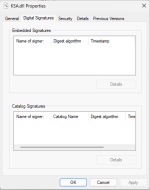
This is a microsoft.com Media Media Creation Tool install of Windows 11 within the last few months, seems to be caused by Smart App Control (windows defaulted to On)? Not sure why KSA.dll is tripping it, also surprised it's struggling to find it's signature, but I don't see it in windows properties either. I've tried All Users and User install and after uninstalling reinstalled to another folder location (C:\Games\Kitten Space Agency) but I get the same result. Thoughts? I wouldn't expect an issue with default windows settings like this. Figured you'd want to know and have it covered here on the forums since other similar "does not open at all" threads don't seem to cover this one.
Application: KSA.exe
CoreCLR Version: 10.0.25.52411
.NET Version: 10.0.0
Description: The process was terminated due to an unhandled exception.
Exception Info: System.IO.FileLoadException: Could not load file or assembly 'C:\Program Files\Kitten Space Agency\KSA.dll'. An Application Control policy has blocked this file. (0x800711C7)
File name: 'C:\Program Files\Kitten Space Agency\KSA.dll'
CoreCLR Version: 10.0.25.52411
.NET Version: 10.0.0
Description: The process was terminated due to an unhandled exception.
Exception Info: System.IO.FileLoadException: Could not load file or assembly 'C:\Program Files\Kitten Space Agency\KSA.dll'. An Application Control policy has blocked this file. (0x800711C7)
File name: 'C:\Program Files\Kitten Space Agency\KSA.dll'
OS Name Microsoft Windows 11 Pro for Workstations
Version 10.0.26200 Build 26200
Other OS Description Not Available
OS Manufacturer Microsoft Corporation
System Name DESKTOP-95NNMRM
System Manufacturer Gigabyte Technology Co., Ltd.
System Model X870E AORUS ELITE X3D
System Type x64-based PC
System SKU Default string
Processor AMD Ryzen 9 9950X3D 16-Core Processor, 4300 Mhz, 16 Core(s), 32 Logical Processor(s)
BIOS Version/Date American Megatrends International, LLC. F5, 12/12/2025
SMBIOS Version 3.7
Embedded Controller Version 255.255
BIOS Mode UEFI
BaseBoard Manufacturer Gigabyte Technology Co., Ltd.
BaseBoard Product X870E AORUS ELITE X3D
BaseBoard Version Default string
Platform Role Desktop
Secure Boot State On
PCR7 Configuration Elevation Required to View
Windows Directory C:\WINDOWS
System Directory C:\WINDOWS\system32
Boot Device \Device\HarddiskVolume1
Locale United States
Hardware Abstraction Layer Version = "10.0.26100.1"
User Name DESKTOP-95NNMRM\User
Time Zone Mountain Daylight Time
Installed Physical Memory (RAM) 64.0 GB
Total Physical Memory 61.5 GB
Available Physical Memory 41.0 GB
Total Virtual Memory 65.4 GB
Available Virtual Memory 40.5 GB
Page File Space 3.88 GB
Page File C:\pagefile.sys
Kernel DMA Protection On
Virtualization-based security Running
Virtualization-based security Required Security Properties Base Virtualization Support
Virtualization-based security Available Security Properties Base Virtualization Support, Secure Boot, DMA Protection, UEFI Code Readonly, SMM Security Mitigations 1.0, Mode Based Execution Control
Virtualization-based security Services Configured Hypervisor enforced Code Integrity
Virtualization-based security Services Running Hypervisor enforced Code Integrity
App Control for Business policy Enforced
App Control for Business user mode policy Enforced
Automatic Device Encryption Support Elevation Required to View
A hypervisor has been detected. Features required for Hyper-V will not be displayed.
Version 10.0.26200 Build 26200
Other OS Description Not Available
OS Manufacturer Microsoft Corporation
System Name DESKTOP-95NNMRM
System Manufacturer Gigabyte Technology Co., Ltd.
System Model X870E AORUS ELITE X3D
System Type x64-based PC
System SKU Default string
Processor AMD Ryzen 9 9950X3D 16-Core Processor, 4300 Mhz, 16 Core(s), 32 Logical Processor(s)
BIOS Version/Date American Megatrends International, LLC. F5, 12/12/2025
SMBIOS Version 3.7
Embedded Controller Version 255.255
BIOS Mode UEFI
BaseBoard Manufacturer Gigabyte Technology Co., Ltd.
BaseBoard Product X870E AORUS ELITE X3D
BaseBoard Version Default string
Platform Role Desktop
Secure Boot State On
PCR7 Configuration Elevation Required to View
Windows Directory C:\WINDOWS
System Directory C:\WINDOWS\system32
Boot Device \Device\HarddiskVolume1
Locale United States
Hardware Abstraction Layer Version = "10.0.26100.1"
User Name DESKTOP-95NNMRM\User
Time Zone Mountain Daylight Time
Installed Physical Memory (RAM) 64.0 GB
Total Physical Memory 61.5 GB
Available Physical Memory 41.0 GB
Total Virtual Memory 65.4 GB
Available Virtual Memory 40.5 GB
Page File Space 3.88 GB
Page File C:\pagefile.sys
Kernel DMA Protection On
Virtualization-based security Running
Virtualization-based security Required Security Properties Base Virtualization Support
Virtualization-based security Available Security Properties Base Virtualization Support, Secure Boot, DMA Protection, UEFI Code Readonly, SMM Security Mitigations 1.0, Mode Based Execution Control
Virtualization-based security Services Configured Hypervisor enforced Code Integrity
Virtualization-based security Services Running Hypervisor enforced Code Integrity
App Control for Business policy Enforced
App Control for Business user mode policy Enforced
Automatic Device Encryption Support Elevation Required to View
A hypervisor has been detected. Features required for Hyper-V will not be displayed.