
NEODIMIO
New Member
- Nov 17, 2025
- 8
- 1
Hello, I would like to report an issue that occurs when entering the construction/editor mode while the game is running in windowed mode.
This happens on a completely clean, unmodded installation, and I have reproduced it multiple times on v2025.11.5.2829.
What I expected to happen
The editor interface should appear inside the game window, it should allow dragging and placing parts normally, and any part highlight effects should reset after exiting the editor.
What actually happens
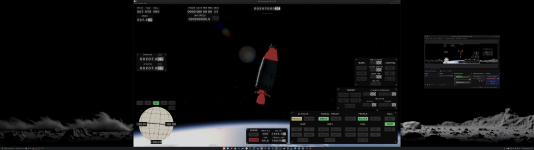
When entering the construction/editor mode in windowed mode, the part selection panel detaches from the game and appears as a separate external system window.
Additionally, dragging parts inside the editor does not work at all; the pieces cannot be moved, selected, or placed.
There is also a persistent highlight issue: any part that the mouse hovers over while in the editor remains highlighted even after exiting the construction mode.
Steps to reproduce
Additional information
Operating system: Arch Linux
Desktop environment: KDE Plasma (Wayland)
Proton versions tested: several recent official Proton builds and multiple Proton-GE versions
Launchers tested: Steam, Heroic Games Launcher, Lutris
Mods: None
CPU: AMD Ryzen 9 9950X
GPU: AMD Radeon RX 9070 XT (16 GB VRAM)
RAM: 64 GB DDR5 (quad channel)
Monitor: 32:9 (7680x2160) at 240 Hz
Storage: Samsung NVMe 980 Pro 2 TB
Power supply: 1000 W
"Video"

This happens on a completely clean, unmodded installation, and I have reproduced it multiple times on v2025.11.5.2829.
What I expected to happen
The editor interface should appear inside the game window, it should allow dragging and placing parts normally, and any part highlight effects should reset after exiting the editor.
What actually happens
When entering the construction/editor mode in windowed mode, the part selection panel detaches from the game and appears as a separate external system window.
Additionally, dragging parts inside the editor does not work at all; the pieces cannot be moved, selected, or placed.
There is also a persistent highlight issue: any part that the mouse hovers over while in the editor remains highlighted even after exiting the construction mode.
Steps to reproduce
- Start the game.
- Switch to windowed mode.
- Enter the construction/editor mode.
- The part panel appears as an external window, and dragging parts does not work.
- Hover over any part in the editor.
- Exit the editor.
- The hovered parts remain highlighted outside the editor.
Additional information
Operating system: Arch Linux
Desktop environment: KDE Plasma (Wayland)
Proton versions tested: several recent official Proton builds and multiple Proton-GE versions
Launchers tested: Steam, Heroic Games Launcher, Lutris
Mods: None
CPU: AMD Ryzen 9 9950X
GPU: AMD Radeon RX 9070 XT (16 GB VRAM)
RAM: 64 GB DDR5 (quad channel)
Monitor: 32:9 (7680x2160) at 240 Hz
Storage: Samsung NVMe 980 Pro 2 TB
Power supply: 1000 W
"Video"
Upvote
0