- Oct 10, 2025
- 477
- 422
Game Version
2026.6.3.4568Operating System
Windows 11What Happened
Tooltips for buttons on the flight UI can be activated and display over top of other windows in front of the widgets.What Was Expected
Other windows/menus/UI over top of the flight UI would block the tooltips.Reproduction Steps
- Open a menu window such as the settings.
- Place the new window over the Autopilot Settings widget.
- Focus on the settings menu and hover the mouse over an Autopilot button with a tooltip.
- Notice the tooltip appear despite being obscured.
Reproduction Rate
Always.Additional Info
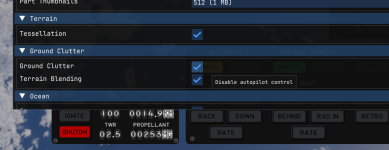
That's not what ground clutter is!

Upvote
0