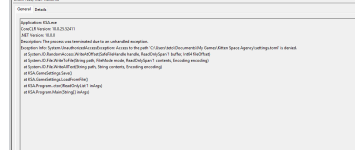
Hi, Thanks for including the Event Viewer entry!

One interesting thing is that running as admin didn't help. That points away from ordinary file permissions and towards Controlled Folder Access, which blocks per app regardless of elevation.
I would try these fixes in Order
Fix 1: Windows Controlled Folder Access (most likely)
Windows Security > Virus & threat protection > Ransomware protection > Manage ransomware protection.
If "Controlled folder access" is On
- click "Allow an app through Controlled folder access" > "Add an allowed app" > "Browse all apps" > C:\Program Files\Kitten Space Agency\KSA.exe
Fix 2: Read-only attribute on the file
Go to C:\Users\teto\Documents\My Games\Kitten Space Agency\, right-click settings.toml > Properties > untick "Read-only" > OK.
Fix 3: Third-party antivirus
If you run anything besides Windows Defender (Bitdefender, Kaspersky, Avast, Norton, ...), most of them have their own "protected folders" / "folder shield" feature that covers Documents. Add KSA.exe as an exclusion there, or pause the AV to test.