
Game Version
v2026.2.2.3396Operating System
Windows 10What Happened
I am installing setup_ksa_v2026.2.2.3396.exe (previous installed was v2026.1.3.3194) , and without surprise I have to update dotnet. However, clicking on the links do nothing. Moreover, there doesn't seem to be a way to copy any of the links, either by selecting the text, or by right-clicking on them. Sure, I COULD just copy manually the links, but they are quite long and error-prone. While it may be difficult to find why clicking doesn't work, allowing to easily copy the links to the clipboard should be more straight-forward and a quick fix to all unexpected problems.What Was Expected
Either clicking on the links do something, or at least I can copy them easily to the clipboard.Reproduction Rate
Always, when dotnet needs to be upgraded.
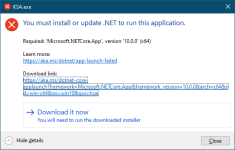
Edit: For information, I found my way through Microsoft's maze ( this time
 ) and successfully installed the required version of dotnet.
Last edited:
Upvote
0


