Linux Discussion

Well, I didn't have to repair permissions for Brutal.Monitor.Subprocess. KSA had no permissions set after download, but I fixed that. But now, after changing nothing since I last posted, the game has started, at least to the Configuration menu. No idea what changed...

But now it seems stuck at "Spherical Billboarding."

And then after about two minutes there, it's gone.

Tried again with most of the settings reduced a couple steps -- this computer is something of a potato for gaming purposes, after all... And with that, now it hangs at Planet Render reporting us of about half the VRAM budget. In htop it shows using 100% of one CPU thread and it hasn't CTD yet, so I'm waiting for it.

And now it's moved on one step, and crashed again.

Is my Surface Pro too potato, or does KSA not get along with Wayland?
 
Last edited:
Okay, going to have to wait until I get my desktop machine fixed. Currently new MB, CPU, RAM, and power supply, but won't start up to POST.

But as you say, even with
Code:
-fixed-viewport
it crashes as soon as it finishes loading.
 
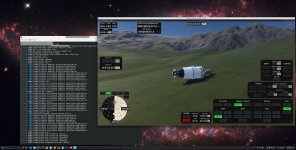
Woohoo, KSA on Linux, the dream is real! To all who made this work, I love you, will be donating!

Works great for me on my rig:
AMD Ryzen 9 5950X
NVIDIA GeForce RTX 4070
64GB RAM
Debian 13
Wayland 1.23.1-3
Plasma 6.3.6
Kernel 6.12.57
NVIDIA (proprietary) driver 580.119.02


All I had to do was:
$ chmod +x KSA Brutal.Monitor.Subproces
$ ./KSA
 

Attachments

  • KSA_Linux.jpg
    KSA_Linux.jpg
    1.5 MB · Views: 0
Last edited:
I got it running first try on my "workstation" laptop that I picked up. A thinkpad P72 with a Intel(R) Xeon(R) E-2176M and a Quadro P4200 (it's basically a slightly trimmed down GTX 1080 w/ 8GB VRAM). I have a windows gaming PC I will play this on mostly, but it was nice to get it fired up, especially becuase it's a bit of a weird setup with NVIDIA Optiums, there is no automatic GPU switching, everything is rendered by default on the integrated Intel graphics unless you are doing GPU compute or explicitly call the GPU. I'm using prime-run for that here is a little bash script I used to make sure both the processes were actually running on the GPU:


Bash:
#!/usr/bin/env bash
# Variables are isolated to this script execution only

__NV_PRIME_RENDER_OFFLOAD=1 \
__GLX_VENDOR_LIBRARY_NAME=nvidia \
VK_ICD_FILENAMES=/usr/share/vulkan/icd.d/nvidia_icd.json \
SDL_VIDEODRIVER=wayland \
./KSA

Intel Xeon E-2176M
NVIDIA Quadro P4200
32GB RAM
Archlinux
Wayland 1.25.0-1
Plasma 6.6.5
Kernel 7.0.10
NVIDIA (proprietary) driver 580.159.04 (This is the newest verison that works with Pascal series GPUs)