
Dejvid
New Member
- Nov 25, 2025
- 4
- 13
NavHud
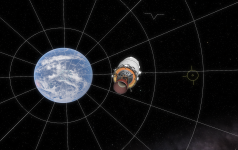
NavHud is a mod that adds a heads-up display that shows the attitude indicator/apollo 8-ball on the area around your vehicle.
Updated for KSA version: v2026.5.11.4462
SpaceDock: https://spacedock.info/mod/4283/NavHud
Source code: https://github.com/DavidK0/NavHud
Latest release: https://github.com/DavidK0/NavHud/releases/latest
Mod version: v1.0.0
License: MIT
How to install
1. Install StarMap
. i. Download and unzip the latest release of StarMap
. ii. Run the .exe and follow the instructions
2. Install ModMenu
. i. Download and unzip the latest release of ModMenu
. ii. Put the contents in Kitten Space Agency\Mod\
3. Download and unzip the latest release of Avionics from Github or from SpaceDock
4. Place the contents in Kitten Space Agency\Mod\. Your content folder should look something like this:
How to use in game
1. The HUD will be on by default.
2. Turn it off or change settings by using the ModMenu menu
NavHud is a mod that adds a heads-up display that shows the attitude indicator/apollo 8-ball on the area around your vehicle.
Updated for KSA version: v2026.5.11.4462
SpaceDock: https://spacedock.info/mod/4283/NavHud
Source code: https://github.com/DavidK0/NavHud
Latest release: https://github.com/DavidK0/NavHud/releases/latest
Mod version: v1.0.0
License: MIT
How to install
1. Install StarMap
. i. Download and unzip the latest release of StarMap
. ii. Run the .exe and follow the instructions
2. Install ModMenu
. i. Download and unzip the latest release of ModMenu
. ii. Put the contents in Kitten Space Agency\Mod\
3. Download and unzip the latest release of Avionics from Github or from SpaceDock
4. Place the contents in Kitten Space Agency\Mod\. Your content folder should look something like this:
5. Run KSA through StarMap├── Avionics
│ ├── Avionics.deps.json
│ ├── Avionics.dll
│ ├── airports.json
│ └── mod.toml
├── ModMenu
│ ├── LICENSE.txt
│ ├── mod.toml
│ └── ModMenu.dll
How to use in game
1. The HUD will be on by default.
2. Turn it off or change settings by using the ModMenu menu
Last edited:


