Solved Program not opening at all.

This question has been answered or resolved.

WarmMuffinPants

New Member
Nov 19, 2025
5
3
Hey there,
The program itself is crashing before anything loads, I am not getting to the world select, it does not even seem to be starting.
I am running a Windows 10 22H2 system with an AMD Ryzen 7 5800X, 32 GB of RAM, and an NVIDIA GeForce RTX 3070, I added the event log from start up. I am not sure where to go from here.


"Faulting application name: KSA.exe, version: 2025.11.6.2829, time stamp: 0x67200000
Faulting module name: KERNELBASE.dll, version: 10.0.19041.2913, time stamp: 0xa1c3e870
Exception code: 0xc0000602
Fault offset: 0x000000000012d862
Faulting process id: 0x2100
Faulting application start time: 0x01dc5956f88c6d84
Faulting application path: C:\Program Files\Kitten Space Agency\KSA.exe
Faulting module path: C:\WINDOWS\System32\KERNELBASE.dll
Report Id: 69a906dd-0fd1-4ad4-afa9-671841ebf080
Faulting package full name:
Faulting package-relative application ID: "
 
  • Like
Reactions: Allie_Gat0r :3
Your could try installing .Net 9 again, that worked for me:

 
  • Like
Reactions: WarmMuffinPants
Your could try installing .Net 9 again, that worked for me:

That was a good idea that I had not thought of, but unfortunately it didn't work. Thanks anyways!
 
Okay great, there's people on Win10 22H2 with this issue. My game does not load at all, and I'm on Win10 20H2 + RTX 3080ti w/ NV 551 driver

Could you all please post the exact versions of your GPU driver installed?

PS: Can you bring this up to others in the Discord / complain more? I can't (Lol) for reasons and I really want the Devs to try to expand the OS + old driver compatibility by as much as possible
 
AMD Ryzen 7 7700 8-Core Processor
Windows 11 Pro 25H2 26200.7171
nvidia rtx 3060 ti driver geforce game ready 581.80
Can you go into "Event Viewer" on your Start Menu, then go to Windows Logs -> Application Logs after launching KSA?

You should see a red "Error" that KSA makes, can you post the page?
 
I would try to reinstall that program (delete the icon as well and all files) and try to load the game on full solar system on 1k graphics, it then should work
 
I would try to reinstall that program (delete the icon as well and all files) and try to load the game on full solar system on 1k graphics, it then should work
I have reinstalled the game a few times, it does not open at all, so I can not get to the screen that allows me to choose full solar system.
 
Can you go into "Event Viewer" on your Start Menu, then go to Windows Logs -> Application Logs after launching KSA?

You should see a red "Error" that KSA makes, can you post the page?
Nombre de aplicación con errores: KSA.exe, versión: 2025.11.6.2829, marca de tiempo: 0x67200000
Nombre del módulo con errores: KERNELBASE.dll, versión: 10.0.26100.7171, marca de tiempo: 0xb1a43a46
Código de excepción: 0xe0434352
Desplazamiento con errores: 0x00000000000c80da
Id. de proceso con errores: 0x3918
Tiempo de inicio de aplicación con errores: 0x1DC5BFA82976BEE
Ruta de aplicación con errores: C:\Program Files\Kitten Space Agency\KSA.exe
Ruta de módulo con errores: C:\WINDOWS\System32\KERNELBASE.dll
Id. de informe: 4c6e466d-958b-4cac-a916-af536caadc51
Nombre completo del paquete con errores:
Id. de aplicación relacionado con el paquete con errores:
 
I had the same problem and discovered that my graphics driver had no support for the Vulkan renderer. I updated my graphics software and was able to start the game. Well, had to downgrade the settings, maybe it's time for a new gaming notebook when KSA reaches a decent beta stage.

The error call stack in the Windows Event View looked like this:
Application: KSA.exe
CoreCLR Version: 9.0.1125.51716
.NET Version: 9.0.11
Description: The process was terminated due to an unhandled exception.
Exception Info: System.InvalidOperationException: Sequence contains no elements
at System.Linq.ThrowHelper.ThrowNoElementsException()
at System.Linq.Enumerable.First[TSource](IEnumerable`1 source)
at Core.KSADeviceContextEx..ctor(Api inApiVersion)
at Core.Renderer..ctor(GlfwWindow window, VkFormat depthFormat, VkPresentModeKHR presentMode, Api vulkanApiVersion) <- KSA wants to initialize renderer
at KSA.Program..ctor(IReadOnlyList`1 inArgs)
at KSA.Program.Main(String[] inArgs)
 
Last edited:
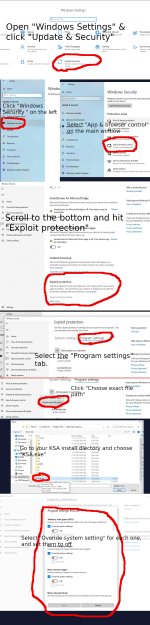
OK, I got it working, I needed to turn off "Exploit Protection" in the "App and Browser Control" settings. I am not sure which setting it is, so I disabled all of them for this app as I don't have time today to figure it out. I am attaching an image walk-through. KSA KERNALBASE.DLL FIX.jpg
 
  • Like
Reactions: Allie_Gat0r :3