Solved Volumetric Exhausts Help

This question has been answered or resolved.

KittenMan2007

New Member
Nov 18, 2025
3
1
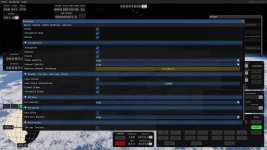
Help!, I accidently set the Volumetric Exhaust Quality to the Max and now my game crashes all the time when i load back in and i get stuck on this when loading in now this is what it says right before it crashes...

does anyone have a solution on how to fix it in the file explore or stm

p.s loading a new version of the game does nothing

 

Attachments

  • Screenshot 2026-05-05 210204.jpg
    Screenshot 2026-05-05 210204.jpg
    17.1 KB · Views: 0
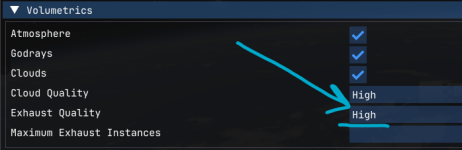
If you're referring to this setting:

1777983053508.png

The go to C:\Users\USERNAME\Documents\My Games\Kitten Space Agency\settings.toml and set:
"exhaustUpscale" = "Low"


Edit: Also, this thread belongs over in Technical Support. @Terra Incognita Thread move please?
 
Last edited:
If you're referring to this setting:

View attachment 1546

The go to C:\Users\USERNAME\Documents\My Games\Kitten Space Agency\settings.toml and set:
"exhaustUpscale" = "Low"


Edit: Also, this thread belongs over in Technical Support. @Terra Incognita Thread move please?
nope its the one below it (Maximum Exhaust Instances) witch was set at a very high number like (2147483647) lol but then changed to 0 but it still crashes my game but set it to (2048) it WORKS! Thanks :)

p.s is this a bug or no?
 

Attachments

  • Screenshot 2026-05-06 163003.jpg
    Screenshot 2026-05-06 163003.jpg
    284.2 KB · Views: 0
  • Like
Reactions: Kiwi Shark
Ahh I was close! Glad to have been able to point you in the right direction at least.

As for bugs, it sounds like this one:

May as well thrown your specs and experience in the mix.

Edit: I've marked this thread as Solved!
 
Last edited: