• ⚠️ Mod Release Rules now apply to this board.

    All mods must include a license, source code (for executable mods), and proper attribution.

    Read the full rules here before posting.

Gameplay Advanced Flight Computer

Maxi

Member
Oct 17, 2025
119
69
AdvancedFlightComputer adds maneuver planning tools to KSA's Transfer Planner: quick-tools for common orbital maneuvers, multi-pass burn splitting for Oberth-efficient departures, and support for targeting interstellar comets on hyperbolic orbits.

Features

Maneuver Quick-Tools


New plan types in the stock Transfer Planner dropdown:
  • Set Periapsis / Set Apoapsis - single burn at the opposite apse to raise or lower one apse to a target altitude.
  • Match Inclination - plane-change burn at AN or DN to align with a target orbit's plane.
  • Set Inclination - plane-change burn at AN or DN to set an absolute inclination angle. Reference plane selectable: Ecliptic or Equatorial.

Multi-Pass Burns

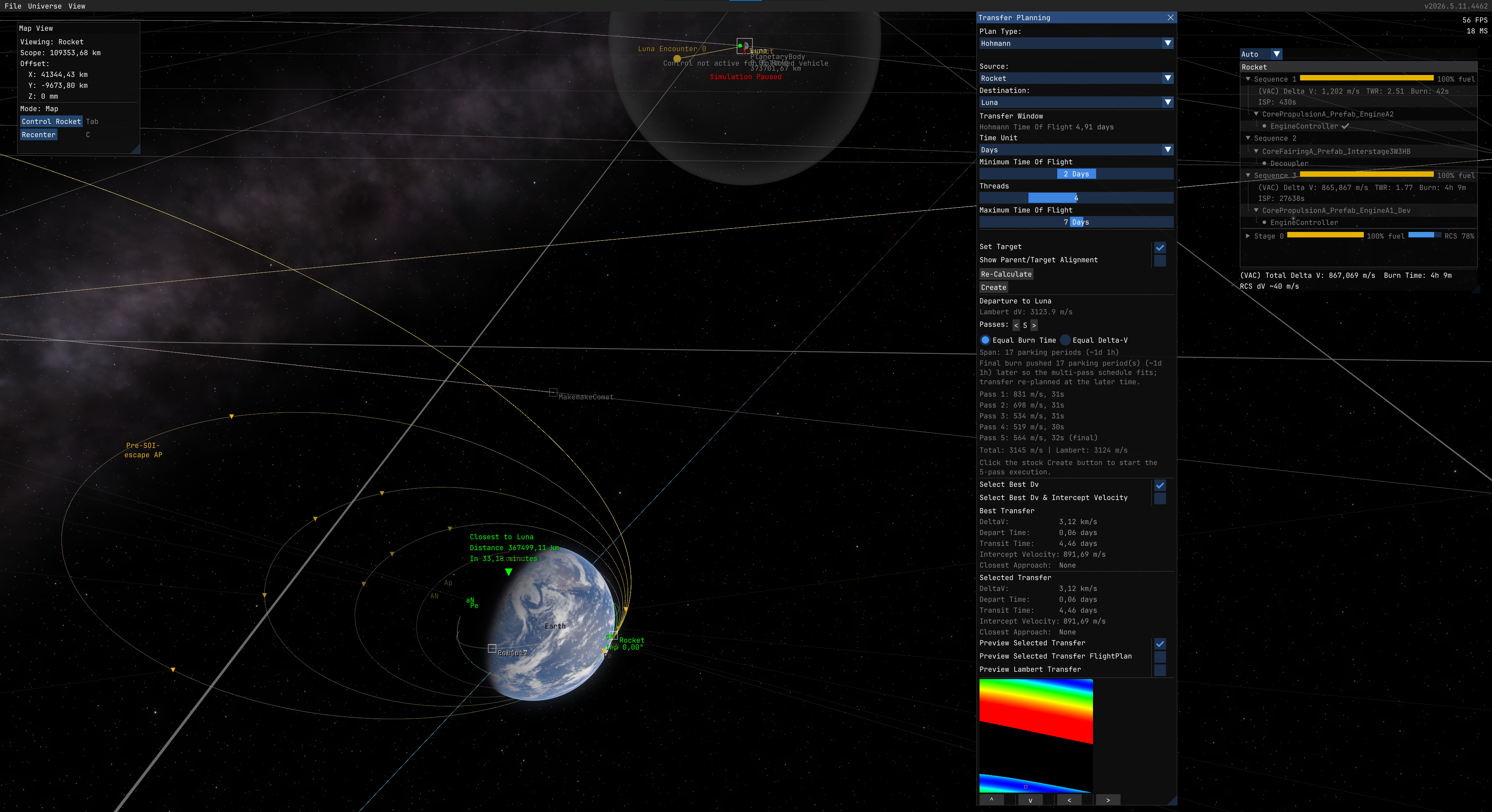
LEO_to_Luna_5_passes.png


Split any planned burn into multiple passes across successive orbits to reduce finite-burn loss. Instead of one long burn that sweeps a large arc away from periapsis, the engine fires in shorter bursts near periapsis on each orbit. This is the same technique used by real missions for e.g. lunar kick stages that perform multiple perigee burns over several days to gradually raise their orbit before the final trans-lunar injection.

Supports Hohmann departures, apse burns (Set Pe/Ap), inclination changes, and circularize. Includes a 3D orbit preview with per-pass markers, automatic execution via Auto burn mode, and an inline pass list showing remaining dV and burn time.

Particularly useful for low-TWR spacecraft (ion engines, small kick stages, nuclear tugs) where a single departure burn would spend too long thrusting away from periapsis.

Works best together with AutoStage and AutoRemoveFinishedBurns for hands-free multi-pass execution.
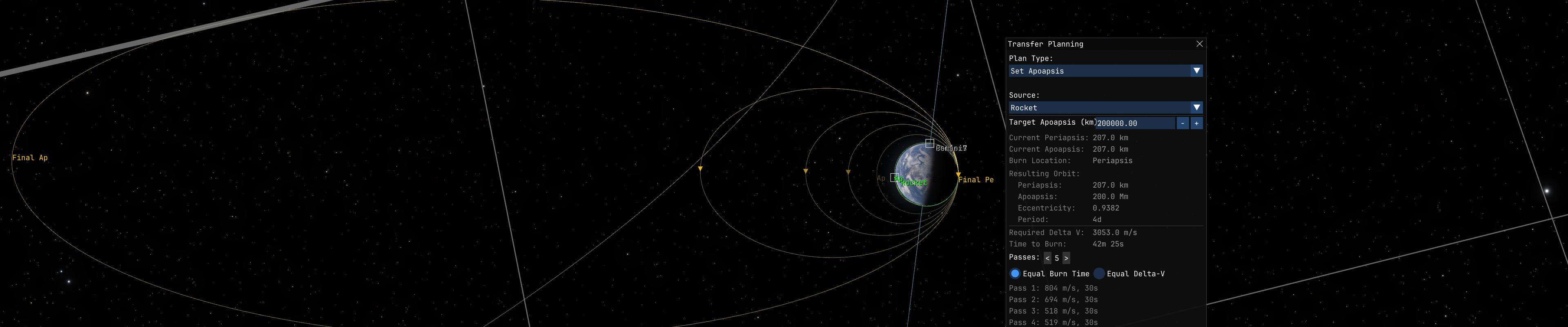
SetApoapsis.png


Hyperbolic Targets

The stock Transfer Planner filters out bodies with eccentricity >= 1. This mod lets it target interstellar comets (Oumuamua, 2I/Borisov, 3I/ATLAS) by patching the planner's time-of-flight and alignment math to handle unbound orbits.

Installation

  1. Install StarMap (required) and KittenExtensions (only for Hyperbolic Targets feature).
  2. Download from GitHub Releases or SpaceDock.
  3. Extract into Documents\My Games\Kitten Space Agency\mods\AdvancedFlightComputer\.
  4. The game auto-discovers new mods on next launch.

License: MIT
Source: GitHub
Download: Releases | SpaceDock
Dependencies: StarMap (required), KittenExtensions (only for Hyperbolic Targets feature)
 
Last edited:
I've been experimenting with auto-staging in a pre-release https://github.com/Maximilian-Nesslauer/KSA-AdvancedFlightComputer/releases/tag/v0.2.0-pre.1

The mod now:
  • Adds an AUTOSTAGE toggle button to the BurnControl gauge
  • Automatically stages when engines run out of propellant during an auto-burn (instead of aborting the autoburn)
  • Handles cascading stages (decoupler + engine in separate stages)

It only works with auto-burns for now, manual throttle support planned.

I did it to solve that when a multi-stage burn runs out of fuel mid-burn, the auto-burn aborts and you have to manually stage and restart. That gap without thrust throws off your planned trajectory since the burn timing was calculated assuming continuous thrust / an impulse.
(Demo video in https://discord.com/channels/1260011486735241329/1260011487905189897/1474767224156852379)
 
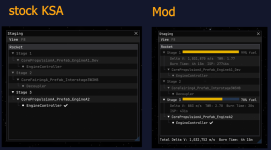
I've been working on per-stage info display in a pre-release of my mod (https://github.com/Maximilian-Nesslauer/KSA-AdvancedFlightComputer/releases/tag/v0.2.0-pre.2)

The mod now also:
- Shows a fuel progress bar on each stage in the Staging window
- Displays real-time Delta V, TWR, Burn Time, and ISP when you expand a stage
- Shows total Delta V and Burn Time at the bottom

I did it because the game currently has no per-stage delta v breakdown overview. You can only see the total delta v for all engines or click around part by part to take a look at the fuel levels using the part selector. This overview makes it easier to plan multi-stage burns or tell at a glance how much fuel each stage has left.

1771700260489.png
 
I updated the mod to https://github.com/Maximilian-Nesslauer/KSA-AdvancedFlightComputer/releases/tag/v0.2.0 and it now also:
- Shows how much Delta V each stage contributes to a planned burn ("needs X m/s") with a green/yellow/red gradient
- Warns when a planned burn exceeds available Delta V
- Corrects the BURN TIME and START BURN IN gauges to show the actual multi-stage burn time instead of the single-stage estimate

A video showcasing this is available here: https://discord.com/channels/1260011486735241329/1260011487905189897/1474861353754693683
 
Last edited:
For context on why the burn time correction matters:
the game currently calculates burn duration assuming only your currently active engines will provide all the Delta V.
For a single-stage vehicle that's correct, but for multi-stage vehicles it's wrong. It tries to solve the entire burn with just the first stage's engines, even if that stage doesn't have nearly enough fuel.
This means the displayed burn time can be way off, and since the game computes ignition timing as "burn midpoint minus half the burn duration", the auto-burn also starts at the wrong time.
 
  • Like
Reactions: AndyMt (UTC+1)
This evening I played around with adding atmospheric thrust calculation info to my mod (release: https://github.com/Maximilian-Nesslauer/KSA-AdvancedFlightComputer/releases/tag/v0.2.3), because I saw gravhoek's message about the game's TWR indicator (at least in this version) only using vacuum thrust values a few days ago (https://discord.com/channels/1260011486735241329/1265141847676682240/1474907048637632543).
The biggest impact is that especially vacuum-optimized engines show overly optimistic numbers for TWR, ISP and Delta-V when you're flying through atmosphere.

So I added atmospheric awareness to the Stage Info panel. As you can see in the video (https://discord.com/channels/1260011486735241329/1260011487905189897/1476718838556000409), there's now a display mode selector at the top of the staging window:

- Auto - shows the sea level performance while in any atmosphere and automatically switches to vacuum values once you leave the atmosphere. (end of the video)
- ASL - always shows sea-level performance of whatever body you're orbiting, even from orbit. It could useful for planning descent/landing burns
- VAC + ASL - shows both vacuum and atmospheric values side by side, with the one matching your current situation highlighted and the other one dimmed
- Planning - lets you select any celestial body (or just "vacuum") from a dropdown to see what your stage performance would look like there, including TWR adjusted for that body's surface gravity
 
  • Like
Reactions: Kiwi Shark
Today i did add more Maneuver Quick-Tools to the Transfer Planning window.

The stock planner only has Hohmann transfers and Circularize. If you want to adjust your periapsis or apoapsis to a specific altitude, or match another object's orbital plane, you have to drag the maneuver gizmo by hand which can be a bit imprecise and tedious for missions that require high precision such as satelite constellations.

This update adds 4 new plan types to the existing Transfer Planning dropdown:

- Set Periapsis / Set Apoapsis - enter a target altitude, get a precise maneuver node at the optimal burn point. Shows resulting orbit parameters (new Pe/Ap, eccentricity, period).
- Match Inclination - select any object in your SOI (moons, planets, other vehicles) and get a plane-change burn at the ascending or descending node. Shows dV cost and orbital speed at each node so you can pick the cheaper option.
- Set Inclination - change your orbital inclination to a specific angle (e.g. 0 for equatorial). Burns at the equatorial plane nodes.

All tools include a visual orbit preview (toggle to see your post-burn orbit before committing) and work with the existing auto-burn system.

I'm of course also planning improvements like giving the user more control over where the burn happens (not just the mathematically optimal point), combined maneuvers that save dV by doing plane changes and orbit adjustments in a single burn, and constrained node editing where you can drag the maneuver gizmo freely while the mod keeps your target parameter (e.g. apoapsis = 20,000 km) locked.

See here for the video: https://discord.com/channels/1260011486735241329/1260011487905189897/1477072305422340126
 
AFC v0.3.1 is out: https://github.com/Maximilian-Nesslauer/KSA-AdvancedFlightComputer/releases/tag/v0.3.1

  • Split into separate mods: AutoStage and StageInfo now live in their own repos and are individually maintained there:AFC is now focused on Transfer Planner / maneuver planning tooling.
  • Set Inclination fix: Set Inclination now has a reference-plane dropdown (Ecliptic / Equatorial). Previously "set inclination to 0" would put you into the ecliptic plane, which is ~23.4 degrees off Earth's equator. The Equatorial option now does what you would intuitively expect.
  • Compatibility fixes for KSA v2026.4.16.4170
 
  • Like
Reactions: Kiwi Shark
This thread has been moved to Mod Releases at the author's request.
 
  • Like
Reactions: Maxi
v0.4.0 released - Multi-pass burn splitting

Split any planned burn into multiple passes across successive orbits for Oberth-efficient departures. Supports Hohmann transfers, apse burns, inclination changes, and circularize. Includes 3D orbit preview with per-pass markers, automatic execution via Auto burn mode, and save/load persistence.

Particularly useful for low-TWR spacecraft where a single departure burn would spend too long thrusting away from periapsis.

LEO_to_Luna_5_passes.png


SetApoapsis.png


I updated the post with more details.

Download: GitHub | SpaceDock
 
v0.4.3 - Required for KSA 2026.6.2.4531

KSA 2026.6.2.4531 changed the signature of the vehicle-update method this mod hooks to drive multi-pass burns.

Update is mandatory if you are on KSA 2026.6.2.4531 and above; without it the hook no longer resolves and multi-pass burn splitting silently stops working (the pass selector and auto-advance disappear), while the single-burn quick-tools and hyperbolic targets keep functioning.

Changes
  • Re-bind the vehicle-update hook to KSA 2026.6.2.4531's new method signature, restoring multi-pass auto-advance.

Compatibility
Tested against KSA build version 2026.6.2.4531.

Installation
Extract into Documents\My Games\Kitten Space Agency\mods\AdvancedFlightComputer.
Requires StarMap.

Download