• ⚠️ Mod Release Rules now apply to this board.

    All mods must include a license, source code (for executable mods), and proper attribution.

    Read the full rules here before posting.

Blender Exporter

GhentZ

Member
Nov 14, 2025
33
8
Hi,

I'm working on a blender plugin that creates the required XML files for parts.

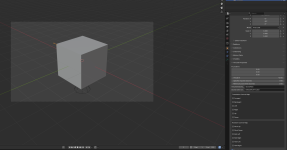
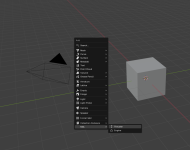
You can add thrusters and engines and specify the required parameters in the Parameter editor.
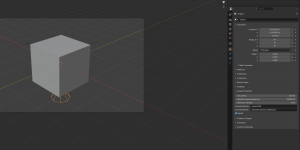
02.PNG03.PNG
01.png

Under Export you then find KSA xml which creates an xml file.

The source code you can find here:
https://github.com/MarcusZuber/kittenExport .
Since it is a blender plugin it is under GPL3 license.

I have zero experience in creating parts, and did not test if it really works. I would appreciate a lot if the part-modders could give me feedback, if it helps them.
If we get it together to a working tool, I will also put it directly in the blender addon-repo.
 

Attachments

  • Like
Reactions: Infinite_Spaces.
SO finally go around to testing it. the rcs and main engines get expoted as advertiesed. I would be great to have a basic "part-sub part-structure" with placeholder for mesh and texture file paths currently the generated xml file only has the thrusters and engine definitions.
 
As a blender noob and someone new to modding in general, this is exactly what ive been hoping for, thanks!
 
SO finally go around to testing it. the rcs and main engines get expoted as advertiesed. I would be great to have a basic "part-sub part-structure" with placeholder for mesh and texture file paths currently the generated xml file only has the thrusters and engine definitions.
Were the thrusters pointing in the right directions?

If you could attach me a tiny example (blender + expected XML) for the subparts etc. I can implement this as well.
 
Last edited:
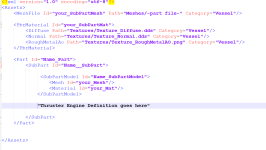
Also here is a screenshot of a Part config file template. the coode for the trusters shuld go inro the subpart portion. Mesh and Texture names are placeholders
 

Attachments

  • Screenshot 2025-11-22 131600.png
    Screenshot 2025-11-22 131600.png
    129.7 KB · Views: 0
  • Should the Material ID of the subpart be the PBR Material ID from the top? (same for mesh file id)
  • Should I make one subpart for each mesh in the scene?
  • Should I try to also export the mesh and material at the same time? (How do you export it right now?)
 
Yes
Yes, only one mesh is supported per sub part right now i think
currently i export the mesh using the glb export option in blender. would be great if it exports the selected mesh as well as the engines/thursters
 
Last edited:
Would aso be great to have a window were you could set mod name and export path. when you forst export the followimg file structure is created:

ModName
----Meshes (Folder for all the meshes of the mod)
----Textures (Folder for all the textures of the mod)
----part.xml (config file of the first part you exported)
 
Would aso be great to have a window were you could set mod name and export path. when you forst export the followimg file structure is created:

ModName
----Meshes (Folder for all the meshes of the mod)
----Textures (Folder for all the textures of the mod)
----part.xml (config file of the first part you exported)
Can you give this here a new try? Now you select only a folder in the export. If I didn't screw it the structure should be as you proposed.
 

Attachments

I just submitted it in the blender addon repository. After it is reviewed it can be installed directly in the blender addon-window.
 
FINALLY got a basic part in.

the reason why i kept chrashing was that they updated the texture from ROM to ORM

Updated part template

XML:
<Assets>
    <MeshFile Id="YourModel_Mesh" Path="Meshes/gemini_capsule.glb" Category="Vessel"/>
    
    <PbrMaterial Id="YourModel_Mat">
        <Diffuse Path="Textures/your_model_diffuse.png" Category="Vessel"/>
        <Normal Path="Textures/your_model_normal.png" Category="Vessel"/>
        <AoRoughMetal Path="Textures/your_model_roughmetalao.png" Category="Vessel"/>
    </PbrMaterial>

    <SubPart Id="YourModel_SubPart">
        <SubPartModel Id="YourModel_SubPartModel">
            <Mesh Id="YourModel_Mesh"/>
            <Material Id="YourModel_Mat"/>
        </SubPartModel>
    </SubPart>

    <Part Id="YourModel_Part">
        <SubPart InstanceOf="YourModel_SubPart"/>
        <Connector>
            <Transform>
                <Position X="0.0"/>
            </Transform>
        </Connector>
    </Part>
</Assets>

YourModel shuld be replaced with the part name you define in blender
 
  • Like
Reactions: Infinite_Spaces.
FINALLY got a basic part in.

the reason why i kept chrashing was that they updated the texture from ROM to ORM

Updated part template

XML:
<Assets>
    <MeshFile Id="YourModel_Mesh" Path="Meshes/gemini_capsule.glb" Category="Vessel"/>
   
    <PbrMaterial Id="YourModel_Mat">
        <Diffuse Path="Textures/your_model_diffuse.png" Category="Vessel"/>
        <Normal Path="Textures/your_model_normal.png" Category="Vessel"/>
        <AoRoughMetal Path="Textures/your_model_roughmetalao.png" Category="Vessel"/>
    </PbrMaterial>

    <SubPart Id="YourModel_SubPart">
        <SubPartModel Id="YourModel_SubPartModel">
            <Mesh Id="YourModel_Mesh"/>
            <Material Id="YourModel_Mat"/>
        </SubPartModel>
    </SubPart>

    <Part Id="YourModel_Part">
        <SubPart InstanceOf="YourModel_SubPart"/>
        <Connector>
            <Transform>
                <Position X="0.0"/>
            </Transform>
        </Connector>
    </Part>
</Assets>

YourModel shuld be replaced with the part name you define in blender
THX. I will implement it soon.