Game automatically crashes upon loading with integrated graphics even on lowest settings

gutza1

New Member
Nov 14, 2025
10
5
I am currently attempting to run the game on a laptop with no discrete graphics card and an Intel Core Ultra 7 155H processor with Arc graphics. Even when I turn the graphics to their lowest possible settings and load the "Earth Only" system, the game crashes a few moments after the "Loading Complete" message is displayed. I am unable to bypass this issue and this is preventing me from playing the game entirely.
 
  • Like
Reactions: Sean Frett
Upvote 2
I also have this issue. I'm not sure if this is true for everyone with this issue, but there are no error messages and I'm not sure how to access logs.
 
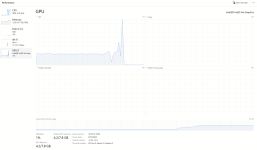
looking at my task manager it seems theres a huge cpu and gpu usage spike a few seconds before the loading completes
 
I am also having this issue! Intel Iris Xe Integrated graphics inside Intel i7-1260P in a Framework Laptop.
 
Last edited:
Same here! I'm on an i7-1355U laptop with the integrated Iris Xe. I get a huge GPU/CPU spike right after it says loading complete.
 
It says right in the Release post:

"This is an early pre-alpha on new technology (...) GPUs that do not have a lot of VRAM may struggle and experience crashes. This will improve over time, and we will also get a better idea of what minimum requirements will be once we have more content in the game. "

It is likely a VRAM issue for all of you. It may be helpful for the devs if you all post your PC specs and experience: HERE

FYI: on my system minimum settings seems to use about 6-8 GB of VRAM
 
According to my system I have 18 GB of vRAM (total system RAM is 32 GB) despite having an iGPU. vRAM isn't the problem in my case, I think it's an API problem.
 
Okay so with the new update making logs available here's the log with the crash. It appears to originate from a Vulkan error. It's worth noting that this is the "loading complete" crash with Earth only. With the full solar system, I'm noticing instead a crash when it loads the Mars spherical billboards. The log for that does not have a helpful error message.
 

Attachments

I've been encountering this same problem, with the CPU/GPU spike included, both before and after today's update. The start of my log looks a little different from gutza's, but the VK_ERROR_DEVICE_LOST error it ends in is identical.

This error window also appears after the game freezes on "Loading Complete":
1763421514859.png

My processor is a 13th Gen Intel Core i5-1335U and I have Intel Iris Xe integrated graphics
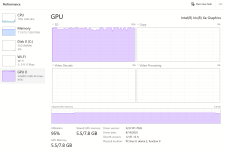
Task manager performance after the game stopped responding (in case it ends up mattering)
1763421332923.png
 

Attachments

Low Quality config looks very promising if you have an integrated graphics cards. KSA crashed on Loading complete for me before this. I've changed the config to the low quality and I have now got to the welcome screen.
 
The config that Glasseyes linked to allows the game to run for me...barely. In the Earth only scene, I get about 8 FPS whenever the camera is within low-orbit distance of a planet (which increases to 11-12 when not looking at the planet) and 50-60 FPS in deep space. I can enable atmosphere, increase the texture resolutions a few steps, and even load the full solar system scene without losing more frames, but enabling clouds or the ocean crashes the game. GPU usage seems to be the main bottleneck; this picture was taken while focusing on the vessel in the default 207 km orbit with atmosphere enabled and terrain textures set to 512 1763606239521.png
 
I tested by manually disabling ocean and terrain and can confirm this. The game runs decently with those disabled and I can use higher quality textures but if either of those are enabled the game crashes upon start. I suspect both of those features are overloading the GPU.
 
I tried to rerun the game with the latest build on my laptop. Now it doesn't just shut down, I instead get this exception:
The exception unknown software exception (0xe043452) occurred in the application at location 0x00007FFF10B180DA