
Moved this to its own thread on the recommendation of Kiwi, and hopefully fixed the embedded image.
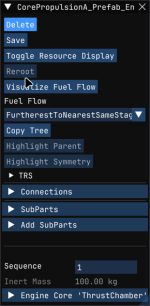
In addition, when the context window is open, the mouse appears to be offset, see screenshot for example.
Additional Information
Game Version
2026.8.3.5117Operating System
Linux (Mint)What Happened
In the vehicle editor, when an engine part context window is open, attempting to rotate or zoom the camera using middle or right click causes the the mode to be locked to that action (can’t stop rotating/scaling). The mouse itself is unavailable at this point, so the program cannot be closed, and the only way to exit KSA (or do anything else) is to hard restart the computer.In addition, when the context window is open, the mouse appears to be offset, see screenshot for example.
What Was Expected
Upon releasing the left or middle mouse button the mouse should be released and the camera should stop rotating/zooming.Reproduction Steps
- Open vehicle construction window.
- Place an engine.
- Left click on the engine to open the context menu.
- Attempt to zoom or rotate the camera using middle or left click.
Reproduction Rate
AlwaysAdditional Information
Last edited:

Upvote
1


