One True Linux Thread™

Hi, I've just installed the most recent version on CachyOS and the game loads to the point where it displays a rendered frame then immediately locks up and crashes. I've tried using a few different versions of Proton and ProtonGE but the result was the same. Anyone else having this problem? Is there a component I'm missing?

So far I've only tried this in COSMIC, I'll test it in Plasma and GNOME to see if anything changes.

Edit: My system configuration-
-Ryzen 3700X running at full default settings
-32GB DDR4 3600, XMP/DOCP is on
-RX9070
-CachyOS, kernel 6.18.3-2-cachyos

My RAM and SSD are both fairly new and have not thrown any errors in testing
 
Last edited:

Specs:
Proton: experimental
CPU - Ryzen 5 5600
RAM - 32 GB
GPU - RX 9060 XT 16gb VRAM
OS - Bazzite
Launcher - Steam

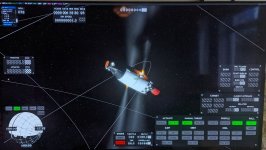
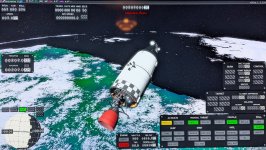
Hi all, I have the game running (v2026.1.3.3194) via Steam on high settings. I think a number of the steps on the wiki were unnecessary for me. The game does seem to crash rather randomly particularly withe interactions between time warp and the map mode. The solar system sim runs but the earth moon ones crashes on opening for some reason. The biggest issue I have is some of the planet textures are not loading so some of earth is invisible (see image) while the moon is completely invisible. Any ideas what might be happening here? I decided to fly into it and it just made the spacecraft behave erratically (see 2nd picture below). Fantastic work by the devs to get this far.
 

Attachments

  • PXL_20260110_102848451.jpg
    PXL_20260110_102848451.jpg
    1.1 MB · Views: 0
  • PXL_20260110_205112348.jpg
    PXL_20260110_205112348.jpg
    1.5 MB · Views: 0
Last edited:
  • Like
Reactions: Dalk and kolAflash
Worked for me on Bazzite with Lutris. Just installed the game and then manually selected the executable location. Then I had to "Winetricks>Install a windows DLL or component>dotnet3". After that the game works very smoothly even with everything maxed out. I had a flickering issue with the clouds, just had to deactivate them, made the game crash, then relaunched and reactivated them and now looks good.

CPU: 7950X3D
GPU: RX 7900XT

EDIT: after some test, I see there are still a lot of visual glitch (seing stars trought the earth, etc...)
I have the same visual glitches (I'm seeing through earth's landmasses, and the whole moon). I've updated my system but no luck. I'm guessing it is an AMD driver issue.
 
I installed it using Lutris's install wine game wizard and then changed the wine version to proton 10.0 and the game ran fine. I first tried the default wine-ge8 runner and it failed to launch, even after running `winetricks dotnet9`, but proton 10.0 worked without tweaks.

KSA Version: v2026.1.3.3194
Distro: Fedora 43
GPU: AMD Radeon RX 9070 XT
DE: KDE / Wayland
Runner: Lutris / Wine
Config: Change "wine version" to proton 10.0
Report: 😺
 
I have the same visual glitches (I'm seeing through earth's landmasses, and the whole moon). I've updated my system but no luck. I'm guessing it is an AMD driver issue.
Yeah, I recently switched to a 9070XT and also am seeing this issue, it seems to just be an issue with some AMD cards.
 
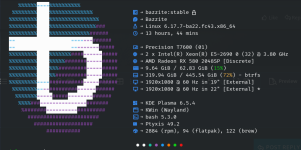
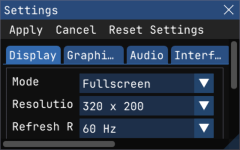
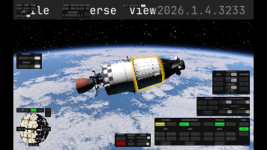
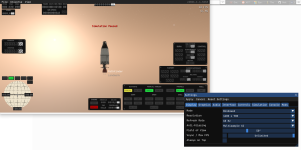
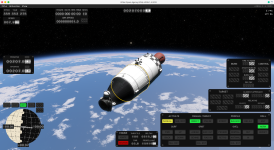
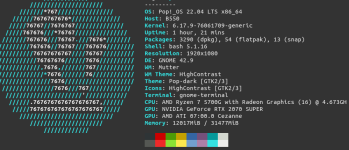
KSA v2026.1.4.3233 in Bazzite Lutrix, changed the version of wine to Proton-GE Latest. It started the game as 2 separate screens in one the settings with the original resolution and a black screen that disappear once the settings are accepted, changing the resolution worked but it doesn't apply in the first change, well I left the screen captures so you all find out... as you can see not all the textures are shown, but the quality is interesting... the FPS change once you change the resolution, sometimes slowing down a lot...


infopc.pngsettings.pngresolucionoriginal.pngwindowednotextures.pngwindow1920x1080.png
 
Game Crashes While Loading
Ubuntu (Kubuntu) with Wayland
CPU: 13th Gen Intel® Core™ i5-1334U
GPU: Intel® Iris® Xe Graphics
32 GB RAM
Using Wine on its own

With dotnetdesktop9 from winetricks, no change,e but I may be doing it wrong
No change with potato settings
tried Lutris, and the game didn't get to the settings menu
 
Game Crashes While Loading
Ubuntu (Kubuntu) with Wayland
CPU: 13th Gen Intel® Core™ i5-1334U
GPU: Intel® Iris® Xe Graphics
32 GB RAM
Using Wine on its own

With dotnetdesktop9 from winetricks, no change,e but I may be doing it wrong
No change with potato settings
tried Lutris, and the game didn't get to the settings menu
Same happened to me.
Previous version was running, this one crashes when loading Universe, regardless of settings.

Using Ubuntu and Wine
 
Framework 13 AMD 7040
CachyOS
Bottles with GE-proton-10.28

Game wouldn't start at first. Starting it from Bottles command line revealed an ICU library error.
Renamed icu.dll in windows/system32 folder --> game starts!

Set textures to worst quality all around and "Earth only" --> game launches to Rocket in orbit, weird graphics glitches on planet.
Will continue to experiment and report here.
 
Finally got TH3P4G3 Thunderbolt 4 dock and a Radeon RX 9060 XT 16Gb GPU. It seems to work out of the box, hotplugged (Debian sid, Hyprland). Anything launched with `DRI_PRIME=1` renders on it!

But KSA... It started once, showing VRAM usage this time (it didn't on Intel iGPU), showed initial scene with decent framerate and without any noticeable glitches, I even managed to look around a bit. But then the GPU just shut down (powered down, "amdgpu: device lost from bus!"). After re-plugging, it gives me the same "Attempted to read or write protected memory" story...
 
The sudden shutdown seems to be due to PSU not having a margin for GPU's power spikes. KSA seems to be the only thing on my system straining it this hard. Well, while I wait a new PSU, and since the same memory error also happens on eGPU, I tried fixing it back on iGPU with installing Vulkan SDK and trying:

DOTNET_JitEnableInductionVariableOpts=0
DOTNET_EnableWriteXorExecute=0
WINE_VULKAN_ICD_CHECK=1
VK_EXT_map_memory_placed=1
DOTNET_TieredCompilation=0
DOTNET_TieredPGO=0
DOTNET_GCHeapHardLimit=0x100000000
DOTNET_EnableHWIntrinsic=0
WINEVULKAN_DEVICE_LOCAL_MEMORY_POOL_SIZE=256

To no avail.

Also tried Wine 11.0. No change for KSA, but finally purging a Gigabyte of i386 packages from my system and disabling multiarch is so satisfying!
 
Framework 13 AMD 7040
CachyOS
Bottles with GE-proton-10.28

Game wouldn't start at first. Starting it from Bottles command line revealed an ICU library error.
Renamed icu.dll in windows/system32 folder --> game starts!

Set textures to worst quality all around and "Earth only" --> game launches to Rocket in orbit, weird graphics glitches on planet.
Will continue to experiment and report here.
Update:

I am happy to report KSA runs fine on my main PC with RTX 50 series card using CachyOS and Bottles. No graphics glitches, nothing.

Runner for bottles: proton GE 10.28, settings set to Windows 11 and dedicated GPU. As mentioned above, I had to rename the icu.dll in windows/system32 inside the bottle directory.

Otherwise: success!