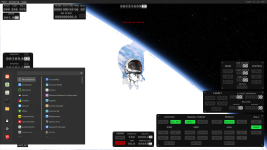
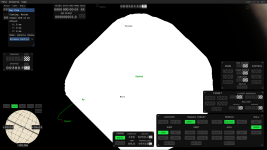
Found this strange graphical bug, where a white mass is propagating over Earth.
- In free camera following Earth.
- Triggered when moving the camera away slowly from earth, at a certain distance.
- When moving the camera, white parts outside of the screen are cleared.
- When moving away from Earth, the bug stops (showed at 00:23).
- Sometimes it doesn't reproduce. At the end of the video, I'm unable to trigger it again. But trying for more time always succeed to reproduce.
Running on an NVidia RTX 3060Ti, drivers 566.36 or 591.44 (I updated drivers and reproduced), Windows 11 23H2, KSA 2025.12.10.3057.
Maybe simialar to https://forums.ahwoo.com/threads/white-planet-blocking-craft.171/
- In free camera following Earth.
- Triggered when moving the camera away slowly from earth, at a certain distance.
- When moving the camera, white parts outside of the screen are cleared.
- When moving away from Earth, the bug stops (showed at 00:23).
- Sometimes it doesn't reproduce. At the end of the video, I'm unable to trigger it again. But trying for more time always succeed to reproduce.
Running on an NVidia RTX 3060Ti, drivers 566.36 or 591.44 (I updated drivers and reproduced), Windows 11 23H2, KSA 2025.12.10.3057.
Maybe simialar to https://forums.ahwoo.com/threads/white-planet-blocking-craft.171/
Last edited:

Upvote
0