
Install the app
How to install the app on iOS
Follow along with the video below to see how to install our site as a web app on your home screen.
Note: This feature may not be available in some browsers.
You are using an out of date browser. It may not display this or other websites correctly.
You should upgrade or use an alternative browser.
You should upgrade or use an alternative browser.
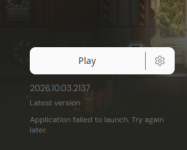
Launcher Repeatedly States application failed to launch. Try again later.
- Thread starter Fellow
- Start date

- Messages
- 734
- Reaction score
- 611
Could you provide any additional information, such as your system specs / OS / etc?
Might help with looking for a solution.
Might help with looking for a solution.


- Messages
- 220
- Reaction score
- 279
Hey there, welcome to the forums!
Are there any Gruntz logs? I think they are in My Documents / My Games / Gruntz on Linux too
Are there any Gruntz logs? I think they are in My Documents / My Games / Gruntz on Linux too
Hi, similar situation here,using windows 10, there does not seem to be any logs in C:\Program Files\Ahwoo or in C:\Program Files\Ahwoo\Games\Gruntz. For context I only got the game today. The only place I think it might be is in C:\Program Files\Ahwoo\Ahwoo Client ,but all the files there only reads gibberish to me.
- Messages
- 734
- Reaction score
- 611
You'll want to checkHi, similar situation here,using windows 10, there does not seem to be any logs in C:\Program Files\Ahwoo or in C:\Program Files\Ahwoo\Games\Gruntz. For context I only got the game today.
Documents\My Games\Gruntz\Logs for logs, they're kept separate from the game install directory.
- Messages
- 220
- Reaction score
- 279
Usual suspects are missing the .NET 10 desktop runtime (shouldn't be the case if the Ahwoo client runs) or outdated GPU drivers
Try updating your GPU drivers.
Try updating your GPU drivers.
[Brutal.Monitor] the most recent 5 log lines - full history in Gruntz.261010-031150.8100.log
gruntz v0.1.4970 14089831d
loaded settings from C:\Users\user\Documents\My Games\Gruntz\settings.toml
language en-US: 'EmitterWindow.BriefBody' is 595 chars, over the 256 cap, english shown
Unhandled exception System.TypeInitializationException: The type initializer for 'Brutal.VulkanApi.Vulkan' threw an exception.
---> System.DllNotFoundException: Unable to load DLL 'vulkan-1' or one of its dependencies: The specified module could not be found. (0x8007007E)
at System.Runtime.InteropServices.NativeLibrary.LoadLibraryByName(String libraryName, Assembly assembly, Nullable`1 searchPath, Boolean throwOnError)
at Brutal.VulkanApi.Vulkan..cctor()
--- End of inner exception stack trace ---
at Brutal.VulkanApi.Vulkan.get_GetInstanceProcAddr()
at Game.GruntzGame..ctor(String[] args)
at Game.Program.Main(String[] args).
Last chance dump: OK C:\Users\user\Documents\My Games\Gruntz\CrashDumps\LastChance\Gruntz.261010-031150.8100.20261010_031151_958.dmp.
The log I found, not sure if it will be of any help
gruntz v0.1.4970 14089831d
loaded settings from C:\Users\user\Documents\My Games\Gruntz\settings.toml
language en-US: 'EmitterWindow.BriefBody' is 595 chars, over the 256 cap, english shown
Unhandled exception System.TypeInitializationException: The type initializer for 'Brutal.VulkanApi.Vulkan' threw an exception.
---> System.DllNotFoundException: Unable to load DLL 'vulkan-1' or one of its dependencies: The specified module could not be found. (0x8007007E)
at System.Runtime.InteropServices.NativeLibrary.LoadLibraryByName(String libraryName, Assembly assembly, Nullable`1 searchPath, Boolean throwOnError)
at Brutal.VulkanApi.Vulkan..cctor()
--- End of inner exception stack trace ---
at Brutal.VulkanApi.Vulkan.get_GetInstanceProcAddr()
at Game.GruntzGame..ctor(String[] args)
at Game.Program.Main(String[] args).
Last chance dump: OK C:\Users\user\Documents\My Games\Gruntz\CrashDumps\LastChance\Gruntz.261010-031150.8100.20261010_031151_958.dmp.
The log I found, not sure if it will be of any help
KingDoogan
New Member
- Messages
- 1
- Reaction score
- 0
same issues here! no log either.
- Messages
- 1
- Reaction score
- 0
I found that I can't launch Gruntz on Linux without also installing the Vulkan dev loader package. I'm on Fedora so I had to look up the other distro commands, they may not be correct, but this resolved it on my side.
# On Fedora
sudo dnf install vulkan-loader-devel
# On Ubuntu or Debian
sudo apt updatesudo apt install libvulkan-dev
# On Arch Linux
sudo pacman -S vulkan-icd-loader
# On Fedora
sudo dnf install vulkan-loader-devel
# On Ubuntu or Debian
sudo apt updatesudo apt install libvulkan-dev
# On Arch Linux
sudo pacman -S vulkan-icd-loader

- Messages
- 1
- Reaction score
- 0
Hi Samsite,[Brutal.Monitor] the most recent 5 log lines - full history in Gruntz.261010-031150.8100.log
gruntz v0.1.4970 14089831d
loaded settings from C:\Users\user\Documents\My Games\Gruntz\settings.toml
language en-US: 'EmitterWindow.BriefBody' is 595 chars, over the 256 cap, english shown
Unhandled exception System.TypeInitializationException: The type initializer for 'Brutal.VulkanApi.Vulkan' threw an exception.
---> System.DllNotFoundException: Unable to load DLL 'vulkan-1' or one of its dependencies: The specified module could not be found. (0x8007007E)
at System.Runtime.InteropServices.NativeLibrary.LoadLibraryByName(String libraryName, Assembly assembly, Nullable`1 searchPath, Boolean throwOnError)
at Brutal.VulkanApi.Vulkan..cctor()
--- End of inner exception stack trace ---
at Brutal.VulkanApi.Vulkan.get_GetInstanceProcAddr()
at Game.GruntzGame..ctor(String[] args)
at Game.Program.Main(String[] args).
Last chance dump: OK C:\Users\user\Documents\My Games\Gruntz\CrashDumps\LastChance\Gruntz.261010-031150.8100.20261010_031151_958.dmp.
The log I found, not sure if it will be of any help
Looks like you need to update your graphics card drivers, to get the latest vulkan drivers.
SirMcSlushy
New Member
- Messages
- 3
- Reaction score
- 1
[2026-10-20 13:08:59.834] [INF] ExecuteActionAsync triggered. State="Installed"
[2026-10-20 13:08:59.835] [INF] Play requested. Exe=$HOME/Games/Ahwoo/Gruntz/Gruntz
[2026-10-20 13:08:59.838] [INF] Application launched.
[2026-10-20 13:08:59.848] [WRN] Application exited with code 150 within "00:00:05" of starting.
I'm on Linux Mint. Ubuntu.
This is about all I can find in my ahwoo logs, I got the same issue.
Updated Vulkan and all that, not sure where to really go from here.
And for those searching for their own logs, on linux mint anyway..
/home/slushy/.local/state/Ahwoo/Client/Logs
[2026-10-20 13:08:59.835] [INF] Play requested. Exe=$HOME/Games/Ahwoo/Gruntz/Gruntz
[2026-10-20 13:08:59.838] [INF] Application launched.
[2026-10-20 13:08:59.848] [WRN] Application exited with code 150 within "00:00:05" of starting.
I'm on Linux Mint. Ubuntu.
This is about all I can find in my ahwoo logs, I got the same issue.
Updated Vulkan and all that, not sure where to really go from here.
And for those searching for their own logs, on linux mint anyway..
/home/slushy/.local/state/Ahwoo/Client/Logs
Attachments
Last edited:
SirMcSlushy
New Member
- Messages
- 3
- Reaction score
- 1
==========[2026-10-20 13:08:59.834] [INF] ExecuteActionAsync triggered. State="Installed"
[2026-10-20 13:08:59.835] [INF] Play requested. Exe=$HOME/Games/Ahwoo/Gruntz/Gruntz
[2026-10-20 13:08:59.838] [INF] Application launched.
[2026-10-20 13:08:59.848] [WRN] Application exited with code 150 within "00:00:05" of starting.
I'm on Linux Mint. Ubuntu.
This is about all I can find in my ahwoo logs, I got the same issue.
Updated Vulkan and all that, not sure where to really go from here.
And for those searching for their own logs, on linux mint anyway..
/home/slushy/.local/state/Ahwoo/Client/Logs
VULKANINFO
==========
Vulkan Instance Version: 1.3.275
Instance Extensions: count = 24
-------------------------------
VK_EXT_acquire_drm_display : extension revision 1
VK_EXT_acquire_xlib_display : extension revision 1
VK_EXT_debug_report : extension revision 10
VK_EXT_debug_utils : extension revision 2
VK_EXT_direct_mode_display : extension revision 1
VK_EXT_display_surface_counter : extension revision 1
VK_EXT_headless_surface : extension revision 1
VK_EXT_surface_maintenance1 : extension revision 1
VK_EXT_swapchain_colorspace : extension revision 5
VK_KHR_device_group_creation : extension revision 1
VK_KHR_display : extension revision 23
VK_KHR_external_fence_capabilities : extension revision 1
VK_KHR_external_memory_capabilities : extension revision 1
VK_KHR_external_semaphore_capabilities : extension revision 1
VK_KHR_get_display_properties2 : extension revision 1
VK_KHR_get_physical_device_properties2 : extension revision 2
VK_KHR_get_surface_capabilities2 : extension revision 1
VK_KHR_portability_enumeration : extension revision 1
VK_KHR_surface : extension revision 25
VK_KHR_surface_protected_capabilities : extension revision 1
VK_KHR_wayland_surface : extension revision 6
VK_KHR_xcb_surface : extension revision 6
VK_KHR_xlib_surface : extension revision 6
VK_LUNARG_direct_driver_loading : extension revision 1
Instance Layers: count = 9
--------------------------
VK_LAYER_INTEL_nullhw INTEL NULL HW 1.1.73 version 1
VK_LAYER_MESA_device_select Linux device selection layer 1.4.303 version 1
VK_LAYER_MESA_overlay Mesa Overlay layer 1.4.303 version 1
VK_LAYER_NV_optimus NVIDIA Optimus layer 1.4.329 version 1
VK_LAYER_NV_present NVIDIA Presentation Layer 1.4.329 version 1
VK_LAYER_VALVE_steam_fossilize_32 Steam Pipeline Caching Layer 1.3.207 version 1
VK_LAYER_VALVE_steam_fossilize_64 Steam Pipeline Caching Layer 1.3.207 version 1
VK_LAYER_VALVE_steam_overlay_32 Steam Overlay Layer 1.3.207 version 1
VK_LAYER_VALVE_steam_overlay_64 Steam Overlay Layer 1.3.207 version 1
Devices:
========
GPU0:
apiVersion = 1.4.329
driverVersion = 595.84.0.0
vendorID = 0x10de
deviceID = 0x2206
deviceType = PHYSICAL_DEVICE_TYPE_DISCRETE_GPU
deviceName = NVIDIA GeForce RTX 3080
driverID = DRIVER_ID_NVIDIA_PROPRIETARY
driverName = NVIDIA
driverInfo = 595.84
conformanceVersion = 1.4.3.3
deviceUUID = 21fa821a-2d60-7fa7-9b08-52dbf1492f08
driverUUID = 027cbdd1-c478-513e-af69-ebc9eaa7de87
GPU1:
apiVersion = 1.4.318
driverVersion = 25.2.8
vendorID = 0x10005
deviceID = 0x0000
deviceType = PHYSICAL_DEVICE_TYPE_CPU
deviceName = llvmpipe (LLVM 20.1.2, 256 bits)
driverID = DRIVER_ID_MESA_LLVMPIPE
driverName = llvmpipe
driverInfo = Mesa 25.2.8-0ubuntu0.24.04.4 (LLVM 20.1.2)
conformanceVersion = 1.3.1.1
deviceUUID = 6d657361-3235-2e32-2e38-2d3075627500
driverUUID = 6c6c766d-7069-7065-5555-494400000000
SirMcSlushy
New Member
- Messages
- 3
- Reaction score
- 1
slushy@slushy-MS-7C75:~$ /home/slushy/Games/Ahwoo/Gruntz/Gruntz
You must install or update .NET to run this application.
App: /home/slushy/Games/Ahwoo/Gruntz/Gruntz
Architecture: x64
Framework: 'Microsoft.NETCore.App', version '10.0.0' (x64)
.NET location: /usr/lib/dotnet
The following frameworks were found:
8.0.31 at [/usr/lib/dotnet/shared/Microsoft.NETCore.App]
Learn more:
To install missing framework, download:
Troubleshoot app launch failures - .NET
Learn about common reasons for app launch failures and possible solutions.aka.ms


Install .NET on Ubuntu - .NET
Demonstrates the various ways to install .NET SDK and .NET Runtime on Ubuntu. .NET is usually installed through APT.
learn.microsoft.com
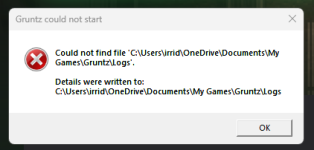
I was having this issue recently, once the launcher updated it went away, it has been replaced by an error log detailing how it cannot find the game logs. I have updated net and my drivers as soon as i read this post, but they did not help. (windows 11)Im not sure if I am missing something or just dumb. I was not informed much about any install instructions.
Attachments
Similar threads

- Replies
- 4
- Views
- 272
- Replies
- 0
- Views
- 154


- Replies
- 0
- Views
- 227