Follow along with the video below to see how to install our site as a web app on your home screen.
Note: This feature may not be available in some browsers.
it is configurable in the settings.toml. It did not render for me in game either.I do not see this setting![]()
Is anyone running on cosmic? I ran into some issues (popos 24.04) and the only solution I came up with was to run in x11 via gamescope for now. I am curious if i am the only one trying this setup and if I am doing something wrong.
It seems cosmic-comp + wgpu + NVIDIA is bugged and wgpu window surface never displays on the cosmic compositor
*EDIT* this issue has been worked around in 4057
From within the extracted linux-x64 folder make the binaries executable:tar xzf setup_ksa_v2026.4.18.4206.tar.gz
Link the local install of libvulcan.so.1 to libvulkan.so (I am using AMDGPU and mesa, so already had these apt-installed: libvulkan1 mesa-vulkan-drivers vulkan-tools)sudo chmod +x KSA
sudo chmod +x Brutal.Monitor.Subprocess
And (Because...Wayland), run it in an x11 session from the console like this:ln -sf /usr/lib/x86_64-linux-gnu/libvulkan.so.1 ./libvulkan.so
env XDG_SESSION_TYPE=x11 ./KSA
13:17:01 INFO Swapchain created with 3 images
Thank you for this. I had done the first parts but didn't know that I needed to link the libraries. I am on Zorin OS 18 Ubuntu 24.04 lts and that was what did the trick. Now to work out how you build without nodes, or find out if there is some way to toggle nodes.<Long time lurker, first time poster!>
@sleepy_eb : I just downloaded linux native v2026.4.18.4206 in POP_OS 24.04 COSMIC, with a Radeon 55700XT; (No NVIDIA, sorry)
I need the following tweaks:
Extract the Archive:
From within the extracted linux-x64 folder make the binaries executable:
Link the local install of libvulcan.so.1 to libvulkan.so (I am using AMDGPU and mesa, so already had these apt-installed: libvulkan1 mesa-vulkan-drivers vulkan-tools)
And (Because...Wayland), run it in an x11 session from the console like this:
Fastfetch:
OS: Pop!_OS 24.04 LTS x86_64
Kernel: Linux 6.18.7-76061807-generic
DE: COSMIC 1.0.0
WM: cosmic-comp (Wayland)
CPU: AMD Ryzen 7 5700G (16) @ 4.67 GHz
GPU: AMD Radeon RX 5700 XT [Discrete]
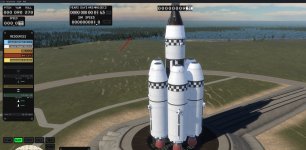
Fullscreen 4k@60 looks beautiful, windowed also ok, message boxes can get buried when in windowed mode.
Tested with Earth and Earth&Moon so far.
Overall runs well, seeing some pauses and flickering that is happening at the same time as this appears in the console:
<Long time lurker, first time poster!>
@sleepy_eb : I just downloaded linux native v2026.4.18.4206 in POP_OS 24.04 COSMIC, with a Radeon 55700XT; (No NVIDIA, sorry)
I need the following tweaks:
Extract the Archive:
From within the extracted linux-x64 folder make the binaries executable:
Link the local install of libvulcan.so.1 to libvulkan.so (I am using AMDGPU and mesa, so already had these apt-installed: libvulkan1 mesa-vulkan-drivers vulkan-tools)
And (Because...Wayland), run it in an x11 session from the console like this:
Fastfetch:
OS: Pop!_OS 24.04 LTS x86_64
Kernel: Linux 6.18.7-76061807-generic
DE: COSMIC 1.0.0
WM: cosmic-comp (Wayland)
CPU: AMD Ryzen 7 5700G (16) @ 4.67 GHz
GPU: AMD Radeon RX 5700 XT [Discrete]
Fullscreen 4k@60 looks beautiful, windowed also ok, message boxes can get buried when in windowed mode.
Tested with Earth and Earth&Moon so far.
Overall runs well, seeing some pauses and flickering that is happening at the same time as this appears in the console:
ln -sf /usr/lib64/libvulkan.so.1 ./libvulkan.so
./KSA