
Install the app
How to install the app on iOS
Follow along with the video below to see how to install our site as a web app on your home screen.
Note: This feature may not be available in some browsers.
You are using an out of date browser. It may not display this or other websites correctly.
You should upgrade or use an alternative browser.
You should upgrade or use an alternative browser.
One True Linux Thread™
- Thread starter SIGSTKFLT
- Start date
In the final release of 4057, that setting was replaced with a command-line flag called `-fixed-viewport`.
(So if you're running stock KSA, just run the game with `./KSA -fixed-viewport`. If you're running modded with StarMap, update to StarMap 0.4.5 and add `"GameArguments": ["-fixed-viewport"]` to your StarMapConfig.json.)
(So if you're running stock KSA, just run the game with `./KSA -fixed-viewport`. If you're running modded with StarMap, update to StarMap 0.4.5 and add `"GameArguments": ["-fixed-viewport"]` to your StarMapConfig.json.)

sleepy_eb
Member
- Messages
- 17
- Reaction score
- 10
it is configurable in the settings.toml. It did not render for me in game either.I do not see this setting
AllowMultipleWindows = false
i had to run the game, then exit then run again for it to work after making this change.
although upon review my bash i see that I also set the flag mentioned by arthomnix... so hmm maybe this was not the fix for me and the flag was the thing
sleepy_eb
Member
- Messages
- 17
- Reaction score
- 10
Is anyone running on cosmic? I ran into some issues (popos 24.04) and the only solution I came up with was to run in x11 via gamescope for now. I am curious if i am the only one trying this setup and if I am doing something wrong.
It seems cosmic-comp + wgpu + NVIDIA is bugged and wgpu window surface never displays on the cosmic compositor
*EDIT* this issue has been worked around in 4057

NForcer
New Member
- Messages
- 1
- Reaction score
- 3
<Long time lurker, first time poster!>
@sleepy_eb : I just downloaded linux native v2026.4.18.4206 in POP_OS 24.04 COSMIC, with a Radeon 55700XT; (No NVIDIA, sorry)
I need the following tweaks:
Extract the Archive:
OS: Pop!_OS 24.04 LTS x86_64
Kernel: Linux 6.18.7-76061807-generic
DE: COSMIC 1.0.0
WM: cosmic-comp (Wayland)
CPU: AMD Ryzen 7 5700G (16) @ 4.67 GHz
GPU: AMD Radeon RX 5700 XT [Discrete]
Fullscreen 4k@60 looks beautiful, windowed also ok, message boxes can get buried when in windowed mode.
Tested with Earth and Earth&Moon so far.
Overall runs well, seeing some pauses and flickering that is happening at the same time as this appears in the console:
@sleepy_eb : I just downloaded linux native v2026.4.18.4206 in POP_OS 24.04 COSMIC, with a Radeon 55700XT; (No NVIDIA, sorry)
I need the following tweaks:
Extract the Archive:
From within the extracted linux-x64 folder make the binaries executable:tar xzf setup_ksa_v2026.4.18.4206.tar.gz
Link the local install of libvulcan.so.1 to libvulkan.so (I am using AMDGPU and mesa, so already had these apt-installed: libvulkan1 mesa-vulkan-drivers vulkan-tools)sudo chmod +x KSA
sudo chmod +x Brutal.Monitor.Subprocess
And (Because...Wayland), run it in an x11 session from the console like this:ln -sf /usr/lib/x86_64-linux-gnu/libvulkan.so.1 ./libvulkan.so
Fastfetch:env XDG_SESSION_TYPE=x11 ./KSA
OS: Pop!_OS 24.04 LTS x86_64
Kernel: Linux 6.18.7-76061807-generic
DE: COSMIC 1.0.0
WM: cosmic-comp (Wayland)
CPU: AMD Ryzen 7 5700G (16) @ 4.67 GHz
GPU: AMD Radeon RX 5700 XT [Discrete]
Fullscreen 4k@60 looks beautiful, windowed also ok, message boxes can get buried when in windowed mode.
Tested with Earth and Earth&Moon so far.
Overall runs well, seeing some pauses and flickering that is happening at the same time as this appears in the console:
13:17:01 INFO Swapchain created with 3 images
13:17:01 INFO Swapchain created with 3 images
13:17:01 INFO Swapchain created with 3 images
13:17:01 INFO Swapchain created with 3 images

ColdJ
Member
- Messages
- 63
- Reaction score
- 40
Thank you for this. I had done the first parts but didn't know that I needed to link the libraries. I am on Zorin OS 18 Ubuntu 24.04 lts and that was what did the trick. Now to work out how you build without nodes, or find out if there is some way to toggle nodes.<Long time lurker, first time poster!>
@sleepy_eb : I just downloaded linux native v2026.4.18.4206 in POP_OS 24.04 COSMIC, with a Radeon 55700XT; (No NVIDIA, sorry)
I need the following tweaks:
Extract the Archive:
From within the extracted linux-x64 folder make the binaries executable:
Link the local install of libvulcan.so.1 to libvulkan.so (I am using AMDGPU and mesa, so already had these apt-installed: libvulkan1 mesa-vulkan-drivers vulkan-tools)
And (Because...Wayland), run it in an x11 session from the console like this:
Fastfetch:
OS: Pop!_OS 24.04 LTS x86_64
Kernel: Linux 6.18.7-76061807-generic
DE: COSMIC 1.0.0
WM: cosmic-comp (Wayland)
CPU: AMD Ryzen 7 5700G (16) @ 4.67 GHz
GPU: AMD Radeon RX 5700 XT [Discrete]
Fullscreen 4k@60 looks beautiful, windowed also ok, message boxes can get buried when in windowed mode.
Tested with Earth and Earth&Moon so far.
Overall runs well, seeing some pauses and flickering that is happening at the same time as this appears in the console:


DerTroglodyt
New Member
- Messages
- 4
- Reaction score
- 0
Runs out of the box on my fedora 44, Nvidia RTX 5080, dual display with no errors in log.
Sadly everything is rendered in the upper left quarter of the screen and the mouse is registered at it's real position, so i can't click anything. Moving and resizing the window works but does not help, as the rendered quarter also changes size.
Edit: Did some more testing and the rendered part of the window is getting smaller with every start of KSA.
Sadly everything is rendered in the upper left quarter of the screen and the mouse is registered at it's real position, so i can't click anything. Moving and resizing the window works but does not help, as the rendered quarter also changes size.
Edit: Did some more testing and the rendered part of the window is getting smaller with every start of KSA.
Last edited:
ScottChegg
New Member
- Messages
- 1
- Reaction score
- 1
I'm on Fedora 44, got it working with these steps, but had to use a different path for the link for libvulcan<Long time lurker, first time poster!>
@sleepy_eb : I just downloaded linux native v2026.4.18.4206 in POP_OS 24.04 COSMIC, with a Radeon 55700XT; (No NVIDIA, sorry)
I need the following tweaks:
Extract the Archive:
From within the extracted linux-x64 folder make the binaries executable:
Link the local install of libvulcan.so.1 to libvulkan.so (I am using AMDGPU and mesa, so already had these apt-installed: libvulkan1 mesa-vulkan-drivers vulkan-tools)
And (Because...Wayland), run it in an x11 session from the console like this:
Fastfetch:
OS: Pop!_OS 24.04 LTS x86_64
Kernel: Linux 6.18.7-76061807-generic
DE: COSMIC 1.0.0
WM: cosmic-comp (Wayland)
CPU: AMD Ryzen 7 5700G (16) @ 4.67 GHz
GPU: AMD Radeon RX 5700 XT [Discrete]
Fullscreen 4k@60 looks beautiful, windowed also ok, message boxes can get buried when in windowed mode.
Tested with Earth and Earth&Moon so far.
Overall runs well, seeing some pauses and flickering that is happening at the same time as this appears in the console:
Bash
ln -sf /usr/lib64/libvulkan.so.1 ./libvulkan.so
Bash
./KSASince ksa_linux_v2026.9.7.5402 i did not need to link any libs or do any chmod stuff.
./KSA was enough on wayland/ Arch
Ok there are some bugs do to wayland maybe AMD graphics Card i believe:
Trees in the water.
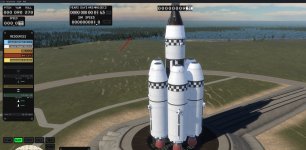
Sequence Editor not loading properly:
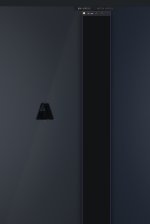
At the beginning of loading the editor:
Cant click anything...
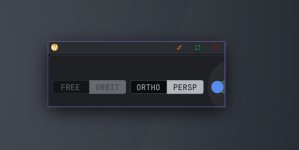
./KSA was enough on wayland/ Arch
Ok there are some bugs do to wayland maybe AMD graphics Card i believe:
Trees in the water.
Sequence Editor not loading properly:
At the beginning of loading the editor:
Cant click anything...
Last edited:

Zt5d5d
New Member
- Messages
- 3
- Reaction score
- 3
Does anyone know about the compatibility with Intel Iris Xe? On Zorin OS 18. I tried launching multiple times, with and without forced X11, installed libvulkan-dev, changed settings.toml, put everything on lowest settings, etc. It boots fine to the menu and loads a bit, but after a bit of compiling shaders, it crashes to a segfault. I'm on the latest build. I don't know where the logs are, so here's what the terminal says:
15:51:56 INFO loaded settings from /home/liamsmithnasa/Documents/My Games/Kitten Space Agency/settings.toml
15:51:56 WARN No dedicated compute queue family found on physical device, using graphics queue for compute operations.
15:51:56 DEBUG No dedicated transfer queue family found on physical device, using graphics queue for texture streaming uploads.
15:51:56 DEBUG Multi view supported: True
15:51:56 INFO Present wait supported: True
15:51:56 DEBUG Ray query acceleration structure support:False
15:51:56 INFO Swapchain created with 4 images at 1920x1200 (surface current -1x-1, min 1x1, max 16384x16384, window 1920x1200, framebuffer 1920x1200, present FifoKHR)
15:51:56 DEBUG Kitten Space Agency (KSA) v2026.9.22.5482 initialized
15:51:57 INFO found mod 'Core'
15:51:57 DEBUG found system 'Sol'
15:51:57 DEBUG found system 'SolDense'
15:51:57 DEBUG found system 'SolLite'
15:51:57 DEBUG found system 'Test'
15:51:57 INFO loaded Situation Template 'Gemini7StartingSituation'
15:51:57 INFO loaded Situation Template 'RocketStartingSituation'
15:51:57 INFO loaded Situation Template 'HunterStartingSituation'
15:51:57 INFO loaded Situation Template 'BanjoStartingSituation'
15:51:57 INFO loaded Situation Template 'PolarisStartingSituation'
15:51:57 INFO loaded Instance of Situation Template 'Gemini7StartingSituation'
15:51:57 INFO loaded Instance of Situation Template 'RocketStartingSituation'
15:51:57 INFO loaded Instance of Situation Template 'HunterStartingSituation'
15:51:57 INFO loaded Instance of Situation Template 'BanjoStartingSituation'
15:51:57 INFO loaded Instance of Situation Template 'PolarisStartingSituation'
15:51:57 DEBUG loaded system 'Sol'
15:51:57 INFO loaded Instance of Situation Template 'Gemini7StartingSituation'
15:51:57 INFO loaded Instance of Situation Template 'RocketStartingSituation'
15:51:57 INFO loaded Instance of Situation Template 'HunterStartingSituation'
15:51:57 INFO loaded Instance of Situation Template 'BanjoStartingSituation'
15:51:57 INFO loaded Instance of Situation Template 'PolarisStartingSituation'
15:51:57 DEBUG loaded system 'SolDense'
15:51:57 INFO loaded Instance of Situation Template 'Gemini7StartingSituation'
15:51:57 INFO loaded Instance of Situation Template 'RocketStartingSituation'
15:51:57 INFO loaded Instance of Situation Template 'HunterStartingSituation'
15:51:57 INFO loaded Instance of Situation Template 'BanjoStartingSituation'
15:51:57 INFO loaded Instance of Situation Template 'PolarisStartingSituation'
15:51:57 DEBUG loaded system 'SolLite'
15:51:57 INFO loaded Instance of Situation Template 'Gemini7StartingSituation'
15:51:57 INFO loaded Instance of Situation Template 'RocketStartingSituation'
15:51:57 INFO loaded Instance of Situation Template 'HunterStartingSituation'
15:51:57 INFO loaded Instance of Situation Template 'BanjoStartingSituation'
15:51:57 INFO loaded Instance of Situation Template 'PolarisStartingSituation'
15:51:57 DEBUG loaded system 'Test'
15:51:57 INFO registered language 'English (United States)'
15:51:58 INFO loaded Situation Template 'Gemini7StartingSituation'
15:51:58 INFO loaded Situation Template 'RocketStartingSituation'
15:51:58 INFO loaded Situation Template 'HunterStartingSituation'
15:51:58 INFO loaded Situation Template 'BanjoStartingSituation'
15:51:58 INFO loaded Situation Template 'PolarisStartingSituation'
15:51:59 INFO loaded Situation Template 'Gemini7StartingSituation'
15:51:59 INFO loaded Situation Template 'RocketStartingSituation'
15:51:59 INFO loaded Situation Template 'HunterStartingSituation'
15:51:59 INFO loaded Situation Template 'BanjoStartingSituation'
15:51:59 INFO loaded Situation Template 'PolarisStartingSituation'
15:51:59 INFO loaded Instance of Situation Template 'Gemini7StartingSituation'
15:51:59 INFO loaded Instance of Situation Template 'RocketStartingSituation'
15:51:59 INFO loaded Instance of Situation Template 'HunterStartingSituation'
15:51:59 INFO loaded Instance of Situation Template 'BanjoStartingSituation'
15:51:59 INFO loaded Instance of Situation Template 'PolarisStartingSituation'
15:51:59 DEBUG loaded system 'Test'
15:51:59 DEBUG loaded planet mesh collection 'Default'
15:51:59 DEBUG loaded planet mesh collection 'EarthScale'
15:51:59 DEBUG loaded planet mesh collection 'OceanEarth'
15:51:59 DEBUG loaded planet mesh collection 'Asteroid'
15:51:59 DEBUG loaded planet mesh collection 'MarsScale'
15:51:59 DEBUG loaded planet heightmap collection 'Default'
15:52:01 INFO loading star binary 'briars_binary_dimmer_better_99k_stars.bin'
15:52:01 INFO loading star binary 'briars_binary_dimmer_better_99k_stars.bin'
15:52:01 DEBUG loading 99038 star binaries from 'Content/Core/briars_binary_dimmer_better_99k_stars.bin'
15:52:01 INFO instantiated 'Test' system
15:52:01 INFO following celestial 'Rocket'
15:52:01 INFO set simulation speed to x1
15:52:01 INFO set map camera to azimuth 2.88, elevation 0.47, distancePower 3635076.00
15:52:01 INFO set camera mode to 'Map'
15:52:01 INFO set map camera to azimuth 2.88, elevation 0.47, distancePower 3635076.00
15:52:01 INFO set camera mode to 'Map'
15:52:01 INFO set orbit camera to azimuth -4.83, elevation -0.41, distancePower 2.85
15:52:01 INFO set camera mode to 'Orbit'
15:52:07 INFO Planet renderer procedural modifier pipelines build in: 606ms
Segmentation fault
15:51:56 WARN No dedicated compute queue family found on physical device, using graphics queue for compute operations.
15:51:56 DEBUG No dedicated transfer queue family found on physical device, using graphics queue for texture streaming uploads.
15:51:56 DEBUG Multi view supported: True
15:51:56 INFO Present wait supported: True
15:51:56 DEBUG Ray query acceleration structure support:False
15:51:56 INFO Swapchain created with 4 images at 1920x1200 (surface current -1x-1, min 1x1, max 16384x16384, window 1920x1200, framebuffer 1920x1200, present FifoKHR)
15:51:56 DEBUG Kitten Space Agency (KSA) v2026.9.22.5482 initialized
15:51:57 INFO found mod 'Core'
15:51:57 DEBUG found system 'Sol'
15:51:57 DEBUG found system 'SolDense'
15:51:57 DEBUG found system 'SolLite'
15:51:57 DEBUG found system 'Test'
15:51:57 INFO loaded Situation Template 'Gemini7StartingSituation'
15:51:57 INFO loaded Situation Template 'RocketStartingSituation'
15:51:57 INFO loaded Situation Template 'HunterStartingSituation'
15:51:57 INFO loaded Situation Template 'BanjoStartingSituation'
15:51:57 INFO loaded Situation Template 'PolarisStartingSituation'
15:51:57 INFO loaded Instance of Situation Template 'Gemini7StartingSituation'
15:51:57 INFO loaded Instance of Situation Template 'RocketStartingSituation'
15:51:57 INFO loaded Instance of Situation Template 'HunterStartingSituation'
15:51:57 INFO loaded Instance of Situation Template 'BanjoStartingSituation'
15:51:57 INFO loaded Instance of Situation Template 'PolarisStartingSituation'
15:51:57 DEBUG loaded system 'Sol'
15:51:57 INFO loaded Instance of Situation Template 'Gemini7StartingSituation'
15:51:57 INFO loaded Instance of Situation Template 'RocketStartingSituation'
15:51:57 INFO loaded Instance of Situation Template 'HunterStartingSituation'
15:51:57 INFO loaded Instance of Situation Template 'BanjoStartingSituation'
15:51:57 INFO loaded Instance of Situation Template 'PolarisStartingSituation'
15:51:57 DEBUG loaded system 'SolDense'
15:51:57 INFO loaded Instance of Situation Template 'Gemini7StartingSituation'
15:51:57 INFO loaded Instance of Situation Template 'RocketStartingSituation'
15:51:57 INFO loaded Instance of Situation Template 'HunterStartingSituation'
15:51:57 INFO loaded Instance of Situation Template 'BanjoStartingSituation'
15:51:57 INFO loaded Instance of Situation Template 'PolarisStartingSituation'
15:51:57 DEBUG loaded system 'SolLite'
15:51:57 INFO loaded Instance of Situation Template 'Gemini7StartingSituation'
15:51:57 INFO loaded Instance of Situation Template 'RocketStartingSituation'
15:51:57 INFO loaded Instance of Situation Template 'HunterStartingSituation'
15:51:57 INFO loaded Instance of Situation Template 'BanjoStartingSituation'
15:51:57 INFO loaded Instance of Situation Template 'PolarisStartingSituation'
15:51:57 DEBUG loaded system 'Test'
15:51:57 INFO registered language 'English (United States)'
15:51:58 INFO loaded Situation Template 'Gemini7StartingSituation'
15:51:58 INFO loaded Situation Template 'RocketStartingSituation'
15:51:58 INFO loaded Situation Template 'HunterStartingSituation'
15:51:58 INFO loaded Situation Template 'BanjoStartingSituation'
15:51:58 INFO loaded Situation Template 'PolarisStartingSituation'
15:51:59 INFO loaded Situation Template 'Gemini7StartingSituation'
15:51:59 INFO loaded Situation Template 'RocketStartingSituation'
15:51:59 INFO loaded Situation Template 'HunterStartingSituation'
15:51:59 INFO loaded Situation Template 'BanjoStartingSituation'
15:51:59 INFO loaded Situation Template 'PolarisStartingSituation'
15:51:59 INFO loaded Instance of Situation Template 'Gemini7StartingSituation'
15:51:59 INFO loaded Instance of Situation Template 'RocketStartingSituation'
15:51:59 INFO loaded Instance of Situation Template 'HunterStartingSituation'
15:51:59 INFO loaded Instance of Situation Template 'BanjoStartingSituation'
15:51:59 INFO loaded Instance of Situation Template 'PolarisStartingSituation'
15:51:59 DEBUG loaded system 'Test'
15:51:59 DEBUG loaded planet mesh collection 'Default'
15:51:59 DEBUG loaded planet mesh collection 'EarthScale'
15:51:59 DEBUG loaded planet mesh collection 'OceanEarth'
15:51:59 DEBUG loaded planet mesh collection 'Asteroid'
15:51:59 DEBUG loaded planet mesh collection 'MarsScale'
15:51:59 DEBUG loaded planet heightmap collection 'Default'
15:52:01 INFO loading star binary 'briars_binary_dimmer_better_99k_stars.bin'
15:52:01 INFO loading star binary 'briars_binary_dimmer_better_99k_stars.bin'
15:52:01 DEBUG loading 99038 star binaries from 'Content/Core/briars_binary_dimmer_better_99k_stars.bin'
15:52:01 INFO instantiated 'Test' system
15:52:01 INFO following celestial 'Rocket'
15:52:01 INFO set simulation speed to x1
15:52:01 INFO set map camera to azimuth 2.88, elevation 0.47, distancePower 3635076.00
15:52:01 INFO set camera mode to 'Map'
15:52:01 INFO set map camera to azimuth 2.88, elevation 0.47, distancePower 3635076.00
15:52:01 INFO set camera mode to 'Map'
15:52:01 INFO set orbit camera to azimuth -4.83, elevation -0.41, distancePower 2.85
15:52:01 INFO set camera mode to 'Orbit'
15:52:07 INFO Planet renderer procedural modifier pipelines build in: 606ms
Segmentation fault

- Messages
- 56
- Reaction score
- 186
Posting here for visibility:
https://www.kicad.org/blog/2025/06/KiCad-and-Wayland-Support/
Wayland Is not Supported by KSA
Posting this here so I can pin it, so people can easily find the information. Wayland does not support window positioning, which is somewhat important now but will become increasingly important as UI rework happens. Instead of outlining all the reasons why, you can see why many serious software applications take specific issues with Wayland making design decisions:The above is taken from KiCad's post about the subject is much more thorough than I can be:These problems exist because Wayland’s design omits basic functionality that desktop applications for X11, Windows and macOS have relied on for decades—things like being able to position windows or warp the mouse cursor. This functionality was omitted by design, not oversight.
https://www.kicad.org/blog/2025/06/KiCad-and-Wayland-Support/

Psycho_zs
Member
- Messages
- 106
- Reaction score
- 43
Most of the current problems of KSA on Wayland stem from lack of proper window attributes. Positioning issues (placing window near cursor for example) can be mitigated from compositor's end if windows are targetable (have proper attributes), but for nowPosting here for visibility:
Wayland Is not Supported by KSA
Posting this here so I can pin it, so people can easily find the information. Wayland does not support window positioning, which is somewhat important now but will become increasingly important as UI rework happens. Instead of outlining all the reasons why, you can see why many serious software applications take specific issues with Wayland making design decisions:
The above is taken from KiCad's post about the subject is much more thorough than I can be:
https://www.kicad.org/blog/2025/06/KiCad-and-Wayland-Support/
-fixed-viewport sidesteps the whole lack of positioning thing.Relying on X11 and compatibility layers (Xwayland) does not seem like a viable long-term strategy.
Plus there is zones protocol now.
Last edited:
- Messages
- 56
- Reaction score
- 186
You seem to have missed it, but I noted in my post that currently KSA is mostly workable.Most of the current problems of KSA on Wayland stem from lack of proper window attributes. Positioning issues (placing window near cursor for example) can be mitigated from compositor's end if windows are targetable (have proper attributes), but for now-fixed-viewportsidesteps the whole lack of positioning thing.
Relying on X11 and compatibility layers (Xwayland) does not seem like a viable long-term strategy.
Plus there is zones protocol now.
Is there anything incorrect I am missing from the KiCad post that has changed about Wayland?
Psycho_zs
Member
- Messages
- 106
- Reaction score
- 43
There's pointer warp protocol and zones protocol appeared since then.Is there anything incorrect I am missing from the KiCad post that has changed about Wayland?
"Wayland-specific freezes and glitches" might also be KiCad-specific. I can't back this up with anything solid, other than the only "true" Wayland-specific glitch I can remember ever encountering in daily practice in the last couple of years was a frozen cursor in Audacity's old GUI (which was created long time ago without any Wayland-specific effort ever being put into it).
The most common window management-related glitch I encounter is app's poor response to window resizes or "unexpected" initial window sizes, but that is more of a tiling WM-adjacent thing, rather than a Wayland thing.
Anyway, I understand that the lack of global positioning is a big issue with complex consequences, and the whole thing requires clear messaging. It's just "Wayland Is not Supported" phrase sounds rather scary and worrisome.
- Messages
- 56
- Reaction score
- 186
The KiCad post does a much bette job of explaining the issue. I looked into the issues in much more detail a few weeks ago including testing my initial UI refactor work on wayland and it was completely broken on it. I shelved the work for sometime, and then come back to it recently.
The problem is, much like the clear frustration present in the KiCad post, I have spent much more time trying to deal with issues with wayland than I do issues with windows. And I should be clear we have plenty of bones to pick with windows!
The design aim of wayland precludes how I want to make games, in regards to the application positioning and resizing windows. Again, the KiCad post explains it better than me.
Much like them I want to be transparent. I use a desktop as a desktop, so an OS than abandons decades of convention for the sake of portable consistency is not one I want to use.
I will keep an eye on the zones support although it seems nascent. However wayland will not be supported unless full multi-window positioning and sizing is supported.
This was a pillar of the project from the start and something I have been passionate about since the nineties, with games like the early flight sims leading the way. It also allows easy integration with custom peripherals - multi app windows in flightsim very commonly was used to be bound to custom LCD windows for example.
I am trying to be as clear as possible, Wayland is not supported. It does kind of work. But I’d need good confidence multi window support works with the zones update. The upstream open source project we use (Dear IMGUI) highlight this limitation for Wayland and it affects all uses of Dear IMGUI (of which there are many). So before wasting more time on the issue I’ll wait for the upstream library to confirm functionality.
I can make the game inform Wayland users with a notification if you think that would help?
The problem is, much like the clear frustration present in the KiCad post, I have spent much more time trying to deal with issues with wayland than I do issues with windows. And I should be clear we have plenty of bones to pick with windows!
The design aim of wayland precludes how I want to make games, in regards to the application positioning and resizing windows. Again, the KiCad post explains it better than me.
Much like them I want to be transparent. I use a desktop as a desktop, so an OS than abandons decades of convention for the sake of portable consistency is not one I want to use.
I will keep an eye on the zones support although it seems nascent. However wayland will not be supported unless full multi-window positioning and sizing is supported.
This was a pillar of the project from the start and something I have been passionate about since the nineties, with games like the early flight sims leading the way. It also allows easy integration with custom peripherals - multi app windows in flightsim very commonly was used to be bound to custom LCD windows for example.
I am trying to be as clear as possible, Wayland is not supported. It does kind of work. But I’d need good confidence multi window support works with the zones update. The upstream open source project we use (Dear IMGUI) highlight this limitation for Wayland and it affects all uses of Dear IMGUI (of which there are many). So before wasting more time on the issue I’ll wait for the upstream library to confirm functionality.
I can make the game inform Wayland users with a notification if you think that would help?
Psycho_zs
Member
- Messages
- 106
- Reaction score
- 43
Yes, that would help. My suggestion would be:I can make the game inform Wayland users with a notification if you think that would help?
- Replace
-fixed-workspacewith-single-window/-multi-windowtoggle. - On Wayland run in single window by default.
- If launched on Wayland without explicit option, show notification, something along the lines of "Hey, we've designed it to have a cool multi-window setup, but we support it only on X11/XWayland, so now running in single window mode..."
- Set app-id, sizes, xdg-tags, etc on windows, so people on Wayland could at least partially deal with multiple windows from their end if they choose to force multi-window mode (at their own risk).
Similar threads

- Replies
- 22
- Views
- 2K

- Replies
- 0
- Views
- 312

- Replies
- 1
- Views
- 223

- Suggestion
- Replies
- 2
- Views
- 757

- Replies
- 47
- Views
- 11K