
Kitten Main Menu 0.1.0
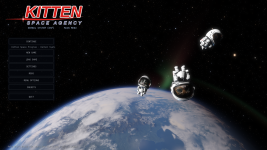
A main menu for Kitten Space Agency, riffing on KSP and KSP2's title screens: your home world seen from orbit, three kittens floating in front of it, and proper screens for new games, saves and settings. A StarMap mod.Stock KSA drops you straight into the game after a configuration popup. Kitten Main Menu asks which world you want before anything loads, then opens on a paused view of your home planet with Hunter, Banjo and Polaris drifting past in their suits and jetpacks, and Continue, New Game and Load Game right there.
No game files are modified.
Features
- Title screen over your home world. Once KSA has loaded, the game stays paused and the camera sits in orbit over your home planet, drifting slowly. The three kittens are drawn for the menu only, so they're never added to your game or your saves.
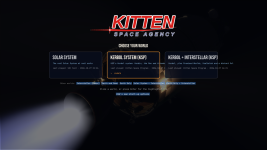
- World picker before loading. KSA loads one star system per launch, so the menu asks first: Sol, or any system mod you have installed, each with its last save. It starts your last world after a short countdown if you don't touch anything.
- Continue, New Game, Load Game. Continue picks up your newest save in this world. New Game starts a fresh game without restarting KSA. Load Game lists every save with its world and date.
- Delete that forgives you. Deleted saves go to the trash (Linux) or a
saves-deletedfolder, not straight to oblivion. - Safe across worlds. A save only loads into a world that has all of its planets. Loading it into the wrong one would make KSA quietly drop vessels around the missing bodies, so the menu switches worlds instead.
- Settings, Mods, Credits, Quit. Settings and Mods open KSA's own settings window. Menu Options covers the menu itself: skip it at launch, the world picker, the kittens and the camera view.
- Back to the menu any time. A MAIN MENU button in the pause menu, and a Game tab in the top menu bar (Main Menu, Save / Load, Settings, Quit).
- A new loading screen. A slideshow with a slow zoom, the logo, and a little rocket orbiting a kitten planet beside KSA's loading progress. Drop your own pictures into
mods/KSAMainMenu/LoadingImages/.
Status
Heads-up: this mod was built with Claude (Anthropic's AI), with me directing, testing and reviewing. The full source is on GitHub, so you can check what you're installing.Tested in game on KSA 2026.10.25.5707 on Linux: the world picker, the loading screen, the menu scene with the kittens (in Sol and in a modded Kerbol system), and Continue / Load Game. New Game without restarting, Delete and the Game tab are new and have had little play so far. Windows should work but hasn't been tried. Reports are very welcome, here or as a GitHub issue, ideally with the
[KSAMainMenu] lines from the game log.Known limits
- Switching to a different world needs a restart, because KSA can't unload a world. On Linux the menu restarts KSA for you and carries on; elsewhere it remembers your choice and asks you to start KSA again, which then opens that world straight away. Picking the world in the world picker avoids this.
- After the menu restarts KSA on Linux, Borea loses track of the game (its running indicator and playtime).
- KSA can't draw 3D before a world has loaded, so the first thing you see is the world picker and the loading screen, and the menu itself comes up once loading is done.
- KSA's own Configuration popup is skipped. Hold Shift while KSA starts, or use the link in the world picker, to get it back.
- While the menu is open, KSA's HUD and other mods' windows are hidden.
Installation
Requires StarMap 0.4.7 or newer.- Install StarMap and run the game once through it.
- Extract the release zip into
Documents/My Games/Kitten Space Agency/mods/, givingmods/KSAMainMenu/KSAMainMenu.dll. - Launch the game once and close it. KSA adds new mods to
manifest.tomldisabled: set this mod's entry toenabled = true. - Launch through StarMap.
mods/KSAMainMenu. KSA's own start-up popup comes back by itself.Network use: none. The mod never downloads or sends anything.
Credits
- Kitten Space Agency by RocketWerkz: the game, its kittens and everything this menu stands on.
- Kerbal Space Program and KSP2 by Squad and Intercept Games, whose title screens inspired this one.
- Bundled: Bebas Neue font by Dharma Type, SIL Open Font License 1.1 (its license text is in
Fonts/OFL.txtin the download).
License: MIT
Source: GitHub
Download: GitHub Releases Or Borea
Dependencies: StarMap 0.4.7+ (required)
Bug reports: GitHub issues
Last edited:


