Trial Deployment of Linux Builds

Apologies it has taken this long, but we are now trialing linux build deployments. These builds are deployed untested. I have changed ⁠version-history on discord to now split out preparing the builds and deploying them. The windows build will now refuse to deploy a build that fails digital signature. Both builds will now indicate if they have successfully be deployed or not. The master server MAY indicate an incorrect build for linux, if linux fails to deploy. This will be changed soon when I can update that side of the deployment process.

You can download the trial builds for linux directly at:https://ksa-linux.ahwoo.com/

Please consider contributing​

It will increase our costs significantly to host this separate linux deployment. We are already spending x10 as much as we get in contributions - so it would make a great deal of help if folks who find the linux deployment useful consider contributing. If you do contribute - please do note in the contribution message if you can that it is FOR the linux deployments. I will use this data to help push that we should continue to integrate this going forward.

Report Linux issues​

Please discuss linux issues here and we will do our best to resolve them. One member of the team is developing on linux, so we do have some capacity to try and resolve these issues where they occur.
 
Probably better to link /usr/lib64/libvulkan.so → /usr/lib64/libvulkan.so.1 instead, apparently some distros' vulkan-loader package doesn't provide this link even though it should.

Yeah, linking libVulkanEx.so was probably a mistake, it's better to link system's libvulkan.so.1 into ./libvulkan.so just to satisfy current build of KSA.

But KSA should search libvulkan by a versioned name. Unversioned .so names are for development and compilation, compiled applications are expected to access libraries by versioned names.

This is by design, and, for example, in Debian it is reflected in which package provides which path:
libvulkan-dev: /usr/lib/x86_64-linux-gnu/libvulkan.so
libvulkan1: /usr/lib/x86_64-linux-gnu/libvulkan.so.1
libvulkan1: /usr/lib/x86_64-linux-gnu/libvulkan.so.1.4.341
 
Last edited:
Yay, thanks for the above advice, I was able to get KSA to run for a few seconds on my first run, about a minute on the next.
Then KSA just spontaneously crashes and disappears... :confused:
Also buttons don't work on the escape menu, step by step I guess!
 
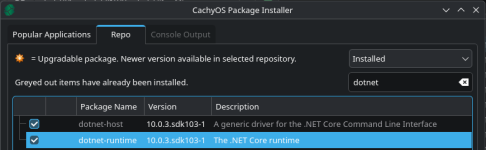
fyi: on (k)ubuntu 24.04 LTS i needed to install the following packages to get it working:
Bash:
sudo apt install -y dotnet-sdk-10.0 libvulkan1 libvulkan-dev
 
  • Like
Reactions: sleepy_eb
Intallation on debian 13 ...
wget https://packages.microsoft.com/config/debian/13/packages-microsoft-prod.deb
sudo dpkg -i packages-microsoft-prod.deb
#this installs a microsoft repository
sudo apt update
sudo apt install dotnet-runtime-10.0
#this installs dotnet-runtime-10.0 from the microsoft repository
#doesn't feel great tainting debian with microsoft stuff

KSA didn't find vulkan on debian 13:

-----------------------------------------------------------------
~/Games/ksa3640/linux-x64$ ./KSA
21:36:33 ERROR Unhandled exception System.TypeInitializationException: The type initializer for 'Brutal.VulkanApi.Vulkan' threw an exception.
---> System.DllNotFoundException: Unable to load shared library 'vulkan' or one of its dependencies. In order to help diagnose loading problems, consider using a tool like strace. If you're using glibc, con
sider setting the LD_DEBUG environment variable:
/home/bernhard/Games/ksa3640/linux-x64/vulkan.so: cannot open shared object file: No such file or directory
/usr/share/dotnet/shared/Microsoft.NETCore.App/10.0.3/vulkan.so: cannot open shared object file: No such file or directory
/home/bernhard/Games/ksa3640/linux-x64/libvulkan.so: cannot open shared object file: No such file or directory
/usr/share/dotnet/shared/Microsoft.NETCore.App/10.0.3/libvulkan.so: cannot open shared object file: No such file or directory
/home/bernhard/Games/ksa3640/linux-x64/vulkan: cannot open shared object file: No such file or directory
/usr/share/dotnet/shared/Microsoft.NETCore.App/10.0.3/vulkan: cannot open shared object file: No such file or directory
/home/bernhard/Games/ksa3640/linux-x64/libvulkan: cannot open shared object file: No such file or directory
/usr/share/dotnet/shared/Microsoft.NETCore.App/10.0.3/libvulkan: cannot open shared object file: No such file or directory

at System.Runtime.InteropServices.NativeLibrary.LoadLibraryByName(String libraryName, Assembly assembly, Nullable`1 searchPath, Boolean throwOnError)
at Brutal.VulkanApi.Vulkan..cctor()
--- End of inner exception stack trace ---
at Brutal.VulkanApi.Vulkan.get_GetInstanceProcAddr()
at KSA.Program..ctor(IReadOnlyList`1 inArgs)
at KSA.Program.Main(String[] inArgs).
Unhandled exception. System.TypeInitializationException: The type initializer for 'Brutal.VulkanApi.Vulkan' threw an exception.
---> System.DllNotFoundException: Unable to load shared library 'vulkan' or one of its dependencies. In order to help diagnose loading problems, consider using a tool like strace. If you're using glibc, con
sider setting the LD_DEBUG environment variable:
/home/bernhard/Games/ksa3640/linux-x64/vulkan.so: cannot open shared object file: No such file or directory
/usr/share/dotnet/shared/Microsoft.NETCore.App/10.0.3/vulkan.so: cannot open shared object file: No such file or directory
/home/bernhard/Games/ksa3640/linux-x64/libvulkan.so: cannot open shared object file: No such file or directory
/usr/share/dotnet/shared/Microsoft.NETCore.App/10.0.3/libvulkan.so: cannot open shared object file: No such file or directory
/home/bernhard/Games/ksa3640/linux-x64/vulkan: cannot open shared object file: No such file or directory
/usr/share/dotnet/shared/Microsoft.NETCore.App/10.0.3/vulkan: cannot open shared object file: No such file or directory
/home/bernhard/Games/ksa3640/linux-x64/libvulkan: cannot open shared object file: No such file or directory
/usr/share/dotnet/shared/Microsoft.NETCore.App/10.0.3/libvulkan: cannot open shared object file: No such file or directory

at System.Runtime.InteropServices.NativeLibrary.LoadLibraryByName(String libraryName, Assembly assembly, Nullable`1 searchPath, Boolean throwOnError)
at Brutal.VulkanApi.Vulkan..cctor()
--- End of inner exception stack trace ---
at Brutal.VulkanApi.Vulkan.get_GetInstanceProcAddr()
at KSA.Program..ctor(IReadOnlyList`1 inArgs)
at KSA.Program.Main(String[] inArgs)
Aborted
--------------------------------------------------------------------------------------

gpt-oss-20B suggested:
sudo ldconfig -p | grep vulkan
libvulkan.so.1 (libc6,x86-64) => /lib/x86_64-linux-gnu/libvulkan.so.1
libvulkan.so.1 (libc6) => /lib/i386-linux-gnu/libvulkan.so.1
libgstvulkan-1.0.so.0 (libc6,x86-64) => /lib/x86_64-linux-gnu/libgstvulkan-1.0.so.0

Then either
cd ~/Games/ksa3640/linux-x64
ln -s /lib/x86_64-linux-gnu/libvulkan.so.1 libvulkan.so

or
export LD_LIBRARY_PATH=/lib/x86_64-linux-gnu:$LD_LIBRARY_PATH
./KSA

I did the former and it works. :)
 
Last edited:
On Hyprland KSA has serious scaling/mouse position issues and tries to randomly spawn dialogs into separate non-child windows, making a mess.

Here, for example a configuration popped into separate window after attempting to interact with drop-down lists. This window is not a child of the main KSA window (so compositor does not float it), moreover it does has neither app-id, nor a title, nor xdg tag, so I can't float it via window rules...

Scratch that, it tries to spawn any drop-down as a separate window. This is a non-starter on Wayland.

View attachment 1258

Initial fullscreen window before any interaction looks like this, out of frame, with misaligned mouse. I use 1x scaling on the display.
View attachment 1259

...and
Code:
Fatal error.
System.AccessViolationException: Attempted to read or write protected memory. This is often an indication that other memory is corrupt.
   at KSA.PlanetRenderer.GenerateMeshData(Brutal.VulkanApi.CommandBuffer, KSA.Viewport, Int32)
   at KSA.Program.RenderGame(RenderCore.AcquiredFrame, Double)
   at KSA.Program.OnFrame(Double, Double)
   at KSA.App.Run()
   at KSA.Program.Main(System.String[])

Better interaction results via xwayland-run, but so far out of 5 attempts, none got past the protected memory error.
6th and 7th attempts briefly showed initial scene before crashing.

BTW, X11 version does not try to spawn any windows, why is that?
I have this exact issue, also on Hyprland 1x scaling@1080p intel iGPU. The resizing issue is annoying but can be worked around by tiling/floating the main window. The crash is unavoidable.
 
For Hyprland:
Code:
windowrule = float on, match:title ^Kitten Space Agency.*$
The trick is to make the main window big enough on creation. Either float or spawning on an empty workspace works.

Unfortunately, KSA windows do not have app-id or xdg tags set yet, so only a title-based rule is possible. And any additional windows do not even have a title. They also lack parent. At least if the main window is created big enough, unmanageable windows problem is sidestepped.
 
Last edited:
  • Like
Reactions: sleepy_eb
An observation: both native and windows build in wine sometimes pause at "Planet renderer" loading stage and hog CPU for a minute, not updating window frames (i.e. Hyprland notifies that window is not responding). And sometimes they do not and load almost instantly.

Output pauses after this:
Code:
15.46.24  INFO following celestial 'Rocket'
15.46.24  INFO Controlling 'Rocket'
15.46.24  INFO set simulation speed to x1
15.46.24  INFO set map camera to azimuth 2,88, elevation 0,47, distancePower 3635076,00
15.46.24  INFO set camera mode to 'Map'
15.46.24  INFO set map camera to azimuth 2,88, elevation 0,47, distancePower 3635076,00
15.46.24  INFO set camera mode to 'Map'
15.46.24  INFO set orbit camera to azimuth -4,83, elevation -0,41, distancePower 2,85
15.46.24  INFO set camera mode to 'Orbit'
and resumes with
Code:
15.47.35  INFO Ecotype: DefaultEcotype VRAM Usage: 10 MB.
15.47.35  INFO Ecotype: DefaultEcotype VRAM Usage: 5 MB.
15.47.35  INFO Ecotype: DefaultEcotype VRAM Usage: 10 MB.
15.47.35  INFO Ecotype: DefaultEcotype VRAM Usage: 5 MB.
15.47.36  INFO Current ring maximum meshes instances: 48206, impostor instances: 849754, VRAM usage: 17 MB.
...

Edit:
...the answer seems to be cache in $XDG_CACHE_HOME. Landed it persistently inside isolated environment, and the delay is gone.
 
Last edited:
I tried to run the new linux build (v2026.2.18.3622) last light and after a bit of reading posts and applying a few fixes (patching the executable and symlinking the provided libVulkanEx.so to libvulkan.so) it didnt seem to work and so I gave up trying for the night and put my computer to sleep with it hanging after the log "21:07:21 DEBUG Ray query acceleration structure support:True". Strangely, turning it back on this morning greeted me with the KSA config screen and it continuing to boot up until the initialization completed at which point it crashed.
Further testing showed I could repeat this behavior by starting the game until it paused the setup, then switch to another tty with ctrl+alt+f2 then when switching back to the one running the desktop KSA was at the config menu.

This was done on a framework desktop on pop_os so AMD strix halo combined cpu/gpu and wayland
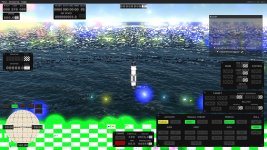
Definite progress with the new build, the game is now running without crashing (though still with the weird needing to switch desktops and back, likely a pop_os quirk). Though it still looks like this:

1771680590584.jpeg
So not quite there yet :LOL:

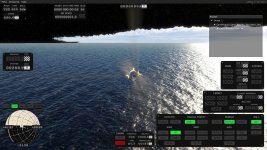
Edit: Looks like this is only an issue with fullscreen! Windowed looks like this
1771681918599.jpegThough it is still not playable with pop up windows not really working (as seen in the logs) and eventually crashing with a similar memory error

14:06:07 ERROR GLFW Error: 65548 Wayland: The platform does not provide the window position
14:06:07 ERROR GLFW Error: 65548 Wayland: The platform does not support setting the window position
14:06:07 ERROR GLFW Error: 65548 Wayland: The platform does not provide the window position
14:06:14 ERROR GLFW Error: 65548 Wayland: The platform does not provide the window position
14:06:14 ERROR GLFW Error: 65548 Wayland: The platform does not support setting the window position
14:06:14 ERROR GLFW Error: 65548 Wayland: The platform does not provide the window position
14:06:23 ERROR GLFW Error: 65548 Wayland: The platform does not provide the window position
14:06:23 ERROR GLFW Error: 65548 Wayland: The platform does not support setting the window position
14:06:23 ERROR GLFW Error: 65548 Wayland: The platform does not provide the window position
14:06:25 ERROR GLFW Error: 65548 Wayland: The platform does not provide the window position
14:06:25 ERROR GLFW Error: 65548 Wayland: The platform does not support setting the window position
14:06:25 ERROR GLFW Error: 65548 Wayland: The platform does not provide the window position
Fatal error.
System.AccessViolationException: Attempted to read or write protected memory. This is often an indication that other memory is corrupt.
at KSA.GroundClutterRenderer.GenerateGroundClutter(KSA.ClutterEcotypeRenderData, KSA.Viewport, Brutal.VulkanApi.CommandBuffer, Int32, KSA.Celestial)
at KSA.GroundClutterRenderer.UpdateEcotypeClutter(KSA.Viewport, Int32, Brutal.VulkanApi.CommandBuffer, KSA.ClutterEcotypeRenderData, KSA.Celestial, Brutal.Numerics.double3, Brutal.Numerics.float4x4, Boolean)
at KSA.GroundClutterRenderer.OnFrame(KSA.Viewport, Int32, Brutal.VulkanApi.CommandBuffer, Brutal.Numerics.float4x4, Boolean)
at KSA.PlanetRenderer.OnFrameGroundClutter(Brutal.VulkanApi.CommandBuffer, KSA.Viewport, KSA.Celestial, Int32)
at KSA.Program.RenderGame(RenderCore.AcquiredFrame, Double)
at KSA.Program.OnFrame(Double, Double)
at KSA.App.Run()
at KSA.Program.Main(System.String[])
Aborted (core dumped)
 
Last edited:
Hi! I've been really looking forward to the native Linux build, and I'm extremely glad the developers are committed to Linux support. Overall, I'm very excited about this game — thanks for everything you're doing!

Sharing my experience running the native Linux build on AMD Radeon RX 6900 XT, hope this helps the devs track down Mesa/AMDGPU compatibility issues.

System:
Code:
[vladtop46@homepc ~]$ fastfetch --logo none
vladtop46@homepc
----------------
OS: Arch Linux x86_64
Kernel: Linux 6.18.9-arch1-2
Uptime: 10 hours, 22 mins
Packages: 1956 (pacman)
Shell: bash 5.3.9
Display (PHL 242V8): 1920x1080 in 24", 75 Hz [External] *
Display (VZ249HEG1R): 1920x1080 in 24", 75 Hz [External]
DE: KDE Plasma 6.6.0
WM: KWin (Wayland)
WM Theme: Breeze
Theme: Breeze (Dark) [Qt], Breeze-Dark [GTK2], Breeze [GTK3]
Icons: breeze-dark [Qt], breeze-dark [GTK2/3/4]
Font: Noto Sans (10pt) [Qt], Noto Sans (10pt) [GTK2/3/4]
Cursor: breeze (24px)
Terminal: konsole 25.12.2
CPU: AMD Ryzen 9 5900X (24) @ 5.16 GHz
GPU: AMD Radeon RX 6900 XT [Discrete]
Memory: 10.47 GiB / 62.69 GiB (17%)
Swap: 26.04 MiB / 32.00 GiB (0%)
Disk (/): 255.75 GiB / 425.39 GiB (60%) - ext4
Disk (/mnt/storage): 758.98 GiB / 915.82 GiB (83%) - ext4
Local IP (enp7s0): 192.168.1.142/24
Locale: ru_RU.UTF-8

Without patch — crash after loading:Game crashes with System.AccessViolationException in KSA.PlanetRenderer.UpdateUvOffsets immediately after finishing loading.

Log of the attempt to launch the original binary is attached - "ksa_log_original.txt"

With arthomnix binary patch (post #6) - game launches, but with issues:
- 75 FPS stable
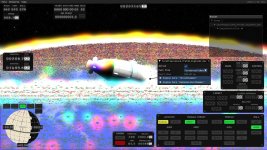
- Visual artifacts on terrain/planet surface
- Black screen when firing main engine or RCS thrusters
- UI flickering

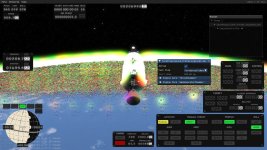
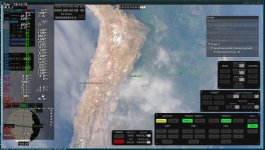
There are two screenshots of game:
photo_2026-02-22_00-37-11.jpg
photo_2026-02-22_00-37-16.jpg

Log of successful launch with patched binary is attached too - "ksa_log_patched.txt"
 

Attachments

Thank you, I read that KSA on AMD has issues, but I wasn't sure where to find particulars.

For reference, I tried the current windows build through wine and My 6700XT sure was not happy with it - hard crashed my GFX so it didn't come back up even after the driver tried resetting it which is a first :). First ever forced reboot since... I don't even know, years.

I will try the patched binary and report back.
The patched binary crashed my 6700XT also, requiring a forced reboot. I think I recall a similar issue when I tried running the first public version through proton.

I won't continue trying KSA until AMD cards work better under linux, forced reboots are not fun.
 
With arthomnix binary patch (post #6) - game launches, but with issues:

This patch only applied to one of the first builds which had a specific error immediately after launch. This error was fixed in subsequent builds. Applying the patch to any other build will likely cause problems.

"Protected memory" error occurs in semi-random fashion, as do some of graphical glitches.