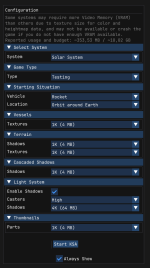
For context
@Samuel
There are 2 likely causes for your guessing based on your description
1. KSA currently needs to load
all Textures into the VRAM of the GPU. If there is not enough VRAM, KSA will crash. The Solution is to use lower graphics settings.
2. Some AMD GPUs currently have issues with the GroundClutter.
The devs are already in contact with AMD to fix this.
please try the following in the meantime:
It means that you wont have groundclutter (e.g. fancy rocks on the surface of planets) for now but at least the game will run.
Go to C:\Users\YOUR_USERNAME\Documents\My Games\Kitten Space Agency\settings.toml and change:
groundClutter = true
to
groundClutter = false
For Reference his is what an GPU with 8GB should be able to handle:
View attachment 1646