Why isn't KSA opening?

Samuel

New Member
Jun 12, 2026
4
0
I open the .exe, and it says it's loading all the textures, but after a while it finishes loading yet the game never opens. How do I fix this?
 
@Kiwi Shark could you please move this to the Technical Support forum? :)

@Samuel we are going to need to get more details in order to troubleshoot this.

1. What's your hardware? (GPU, CPU, RAM)? If you dont know it you can check using the windows search bar -> search "Settings" -> go to "System" -> go to "About"

3. Try lowering the graphics settings to the lowest values possible.

4. Check for logs in C:\Users\YourName\Documents\My Games\Kitten Space Agency\Logs\ Does the directory exist? If yes: what are the contents of the log file?

5. check Windows Event Viewer (Win+R > eventvwr > Windows Logs > Application > "Find" (on the right side panel of the window if you are using windows 10) -> KSA") for entries with source ".NET Runtime" or "Application Error" around the time you tried to launch
 
This thread has been moved to Technical Support.
 
  • Like
Reactions: Maxi
@Kiwi Shark could you please move this to the Technical Support forum? :)

@Samuel we are going to need to get more details in order to troubleshoot this.

1. What's your hardware? (GPU, CPU, RAM)? If you dont know it you can check using the windows search bar -> search "Settings" -> go to "System" -> go to "About"

3. Try lowering the graphics settings to the lowest values possible.

4. Check for logs in C:\Users\YourName\Documents\My Games\Kitten Space Agency\Logs\ Does the directory exist? If yes: what are the contents of the log file?

5. check Windows Event Viewer (Win+R > eventvwr > Windows Logs > Application > "Find" (on the right side panel of the window if you are using windows 10) -> KSA") for entries with source ".NET Runtime" or "Application Error" around the time you tried to launch
My processor is AMD Ryzen 5 7535HS with Radeon Graphics, my installed RAM is 8.00 GB (7.21 GB usable), I have a 64-bit operating system, x64 based processor, and no touch screen
 
@Kiwi Shark could you please move this to the Technical Support forum? :)

@Samuel we are going to need to get more details in order to troubleshoot this.

1. What's your hardware? (GPU, CPU, RAM)? If you dont know it you can check using the windows search bar -> search "Settings" -> go to "System" -> go to "About"

3. Try lowering the graphics settings to the lowest values possible.

4. Check for logs in C:\Users\YourName\Documents\My Games\Kitten Space Agency\Logs\ Does the directory exist? If yes: what are the contents of the log file?

5. check Windows Event Viewer (Win+R > eventvwr > Windows Logs > Application > "Find" (on the right side panel of the window if you are using windows 10) -> KSA") for entries with source ".NET Runtime" or "Application Error" around the time you tried to launch
For context @Samuel

There are 2 likely causes for your guessing based on your description

1. KSA currently needs to load all Textures into the VRAM of the GPU. If there is not enough VRAM, KSA will crash. The Solution is to use lower graphics settings.

2. Some AMD GPUs currently have issues with the GroundClutter.
The devs are already in contact with AMD to fix this.

please try the following in the meantime:
It means that you wont have groundclutter (e.g. fancy rocks on the surface of planets) for now but at least the game will run.

Go to C:\Users\YOUR_USERNAME\Documents\My Games\Kitten Space Agency\settings.toml and change:

groundClutter = true
to
groundClutter = false


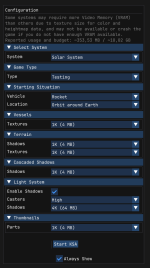
For Reference his is what an GPU with 8GB should be able to handle:

1781294151155.png
 
For context @Samuel

There are 2 likely causes for your guessing based on your description

1. KSA currently needs to load all Textures into the VRAM of the GPU. If there is not enough VRAM, KSA will crash. The Solution is to use lower graphics settings.

2. Some AMD GPUs currently have issues with the GroundClutter.
The devs are already in contact with AMD to fix this.

please try the following in the meantime:
It means that you wont have groundclutter (e.g. fancy rocks on the surface of planets) for now but at least the game will run.

Go to C:\Users\YOUR_USERNAME\Documents\My Games\Kitten Space Agency\settings.toml and change:

groundClutter = true
to
groundClutter = false


For Reference his is what an GPU with 8GB should be able to handle:

View attachment 1646
What if I unchecked always show so now I can’t change it? Should I delete and restart it?
 
My processor is AMD Ryzen 5 7535HS with Radeon Graphics, my installed RAM is 8.00 GB (7.21 GB usable), I have a 64-bit operating system, x64 based processor, and no touch screen
Thank you for providing the details :)

Your Laptop will sadly not be able to run KSA (yet) with the 8GB of RAM being the main bottleneck as KSA needs to load *everything* all at once right now.

I recommend checking out the game in a few months again as the devs might have implemented performance improvements by then.
 
Thank you for providing the details :)

Your Laptop will sadly not be able to run KSA (yet) with the 8GB of RAM being the main bottleneck as KSA needs to load *everything* all at once right now.

I recommend checking out the game in a few months again as the devs might have implemented performance improvements by then.
okay, i will
 
What if I unchecked always show so now I can’t change it? Should I delete and restart it?
For reference you can re-enable the config menu from the settings.toml file. Instructions are available here.